Digital Color Communication Between Conservation Labs
The Language Problem
"It is a warm grayish-blue with a slightly greenish cast."
How many different colors could that description refer to? Dozens. Hundreds. The English language — or any language — lacks the vocabulary to communicate color with the precision that conservation requires.
This becomes a practical problem whenever conservation labs need to collaborate:
- A traveling exhibition needs repair at a venue far from the originating museum
- Two institutions are co-conserving a collection that was divided between them
- A conservator is consulting remotely with a specialist about a color-matching challenge
- A private restorer needs to match a color documented by a museum lab
In all these cases, the core challenge is the same: how do you transmit color information from one location to another with enough accuracy that the receiving lab can reproduce a match without seeing the original object?
Why Photography Alone Is Not Enough
Photographs are the most common way to share visual information between labs. But for color-critical work, standard photography introduces unacceptable errors:
- Camera sensors interpret color differently from the human eye and from each other
- White balance settings shift the entire color palette
- Display calibration varies wildly — the same image file looks different on every uncalibrated screen
- Compression artifacts in JPEG and other formats alter color values
- Ambient viewing conditions at the receiving end affect how the image is perceived
A photograph is useful for showing location, texture, and general condition. It is not reliable for communicating specific color values.
Spectral Data: The Gold Standard
The most accurate way to communicate color between labs is to share spectral reflectance data — the full curve of light reflected at each wavelength across the visible spectrum.
Advantages:
- Independent of any light source, display, or viewing condition
- The receiving lab can calculate the color appearance under any illuminant they choose
- No ambiguity — the spectral curve is a physical measurement, not a perception
- Can be stored in standard file formats (.spc, .csv, .dx) and transmitted electronically
Practical requirements:
- Both labs need spectrophotometers (ideally the same model or calibrated to the same standard)
- Measurement conditions must be documented (geometry, aperture size, number of flashes)
- Inter-instrument agreement should be verified periodically using physical standards
Lab* Values: The Practical Compromise
When full spectral data is not available or not practical, CIELAB (Lab*) values provide a standardized numerical description of color:
- L* describes lightness (0 = black, 100 = white)
- a* describes the red-green axis (positive = red, negative = green)
- b* describes the yellow-blue axis (positive = yellow, negative = blue)
Lab* values can be communicated in a text message, email, or phone call. They are unambiguous and device-independent.
Limitations:
- Lab* values are calculated for a specific illuminant (usually D65). Under different lighting, the same object will have different Lab* values.
- Two colors with identical Lab* values under D65 may diverge under other illuminants (metamerism) — something that full spectral data would reveal but Lab* alone does not.
- Lab* values do not convey surface properties (gloss, texture, transparency).
Best practice: Communicate Lab* values along with the illuminant, the instrument model, and the measurement geometry. Include a note about any known metamerism concerns.
Calibrated Photography as a Supplement
While standard photography is unreliable for color, calibrated photography can be a useful supplement to numerical data:
How to create calibrated photographs:
- Include a color reference target (X-Rite ColorChecker Classic or equivalent) in every photograph
- Shoot under controlled, documented lighting (D65, specific lux level)
- Shoot in RAW format (not JPEG)
- Process using color profiling software that uses the reference target to create an ICC profile
- Export with the embedded ICC profile
The receiving lab can then:
- Open the image on a calibrated display
- Apply the embedded ICC profile
- View colors that are significantly closer to the original than an uncalibrated photo
This is not as accurate as spectral data, but it communicates spatial information (where on the textile is this color?) that spectral point measurements cannot.
A Communication Protocol for Cross-Institutional Matching
When you need to share color data with another lab, follow this protocol:
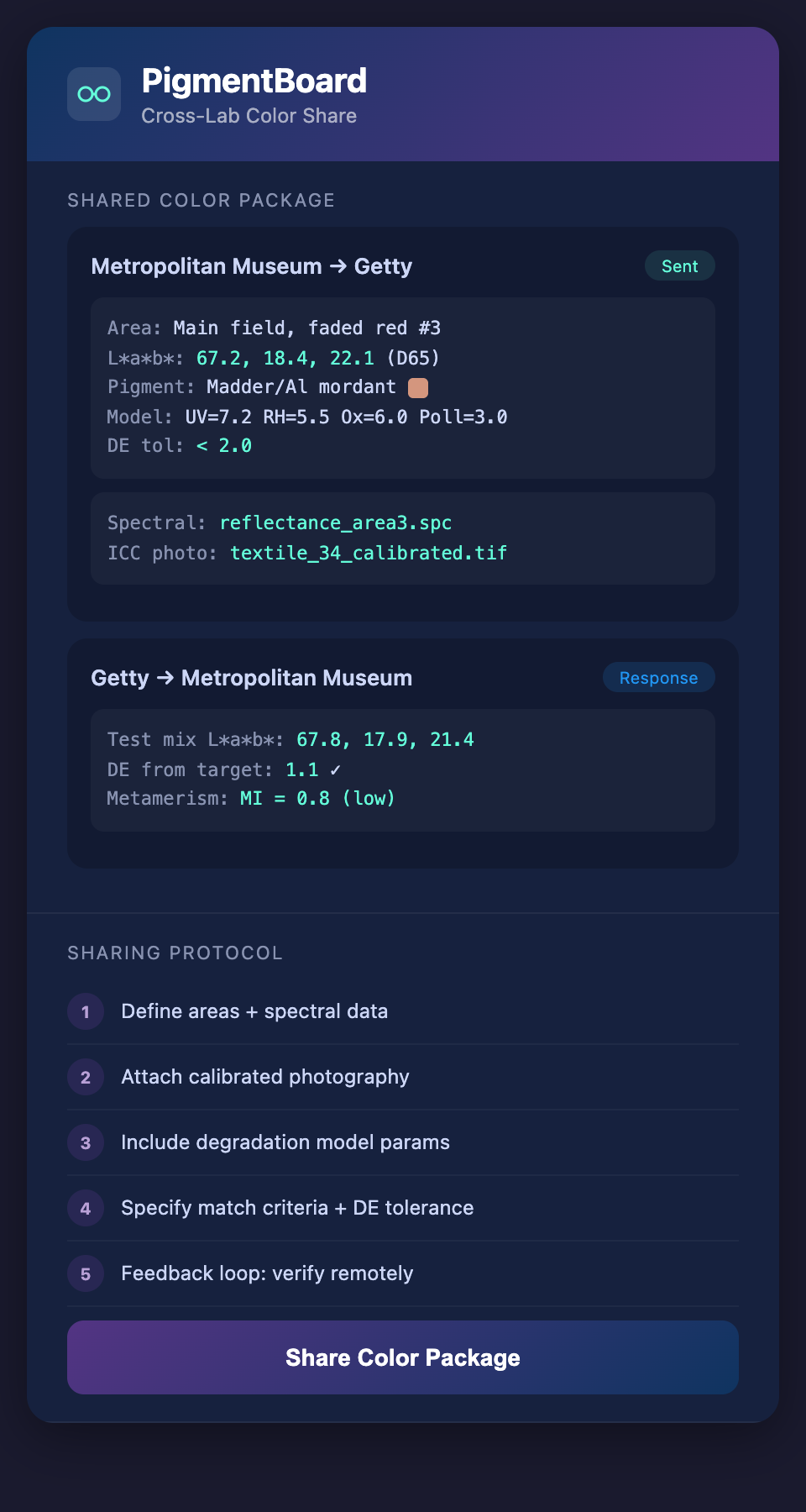
1. Define the areas of interest. Provide a clearly labeled diagram or annotated photograph showing exactly which areas on the textile need color matching. Use reference numbers.
2. Provide spectral data or Lab values for each area.* Include measurement conditions (instrument, illuminant, geometry, number of measurements averaged).
3. Provide calibrated photographs. Including color reference target, lighting documentation, and ICC profile.
4. Provide contextual information.
- Original pigment identification (if known)
- Estimated degradation history
- Substrate type and preparation
- Any previous treatments in the area
5. Specify the match criteria. What ΔE tolerance is acceptable? Under which illuminant should the match be optimized? What surface properties (matte, semi-gloss) are required?
6. Establish a feedback loop. The receiving lab should send back spectral data or Lab* values of their test mixtures for remote evaluation before applying to the textile.
Emerging Standards
The conservation field is slowly moving toward standardized color communication:
- The AIC (American Institute for Conservation) has published guidelines for digital imaging that include color management recommendations
- ICOM-CC working groups on preventive conservation have addressed environmental color monitoring
- ISO 3664 specifies viewing conditions for color evaluation, providing a common reference
However, there is no widely adopted standard specifically for inter-institutional color data exchange in conservation. This is an area ripe for development.
The Role of Shared Degradation Models
When two labs share not just color measurements but degradation model parameters, they gain an additional layer of communication:
"The target color matches our model output with UV set to 7, humidity to 5, oxidation to 6, and pollutants to 3, using the madder/aluminum mordant degradation pathway."
This tells the receiving lab not just what the color is, but why it is that color — enabling them to adjust for local differences in conservation pigment suppliers, application methods, and evaluation conditions.
Want to share degradation models across labs as easily as sharing a file? Join the PigmentBoard waitlist.