How to Document Pigment Formulas for Conservation Teams
The Documentation Problem in Conservation Labs
Every experienced conservator has a notebook. It contains years of accumulated color-matching wisdom — pigment ratios, supplier notes, observations about how certain mixtures behave on different substrates. It is invaluable.
It is also a single point of failure.
When that conservator is out sick, their notebook sits in a locked drawer. When they retire, the notebook goes with them — or, worse, gets filed somewhere and never consulted again. When a new conservator joins the team and needs to match a color that was already matched two years ago, they start from scratch.
This is not a personal failing. It is a systemic problem with how conservation labs handle what is arguably their most hard-won practical knowledge: color-matching formulas.
What Good Documentation Looks Like
Effective pigment formula documentation needs five qualities:
1. Precise and quantified. "A bit of raw umber" is not documentation. "0.8g raw umber (Kremer 40610, batch 2023-07)" is documentation. Every ingredient should be recorded by weight, product code, and batch number if possible.
2. Contextual. The formula alone is not enough. You need to record:
- What it was matching (textile ID, specific area, accession number)
- The condition of the target (degree of fading, type of degradation)
- The lighting conditions under which the match was evaluated
- The substrate it was applied to
- The application method (brush, airbrush, stipple)
3. Reproducible. Another conservator should be able to read your documentation and produce the same color without needing to ask you questions. If they cannot, the documentation has gaps.
4. Searchable. When a new project requires matching a similar textile, you need to find the relevant formula quickly. This means tagging formulas by dye type, era, fiber type, degradation type, and any other relevant category.
5. Centralized and accessible. Everyone on the team should be able to access every formula. This can be a shared digital database, a well-organized shared drive folder, or a dedicated section of your collections management system.
A Practical Documentation Template
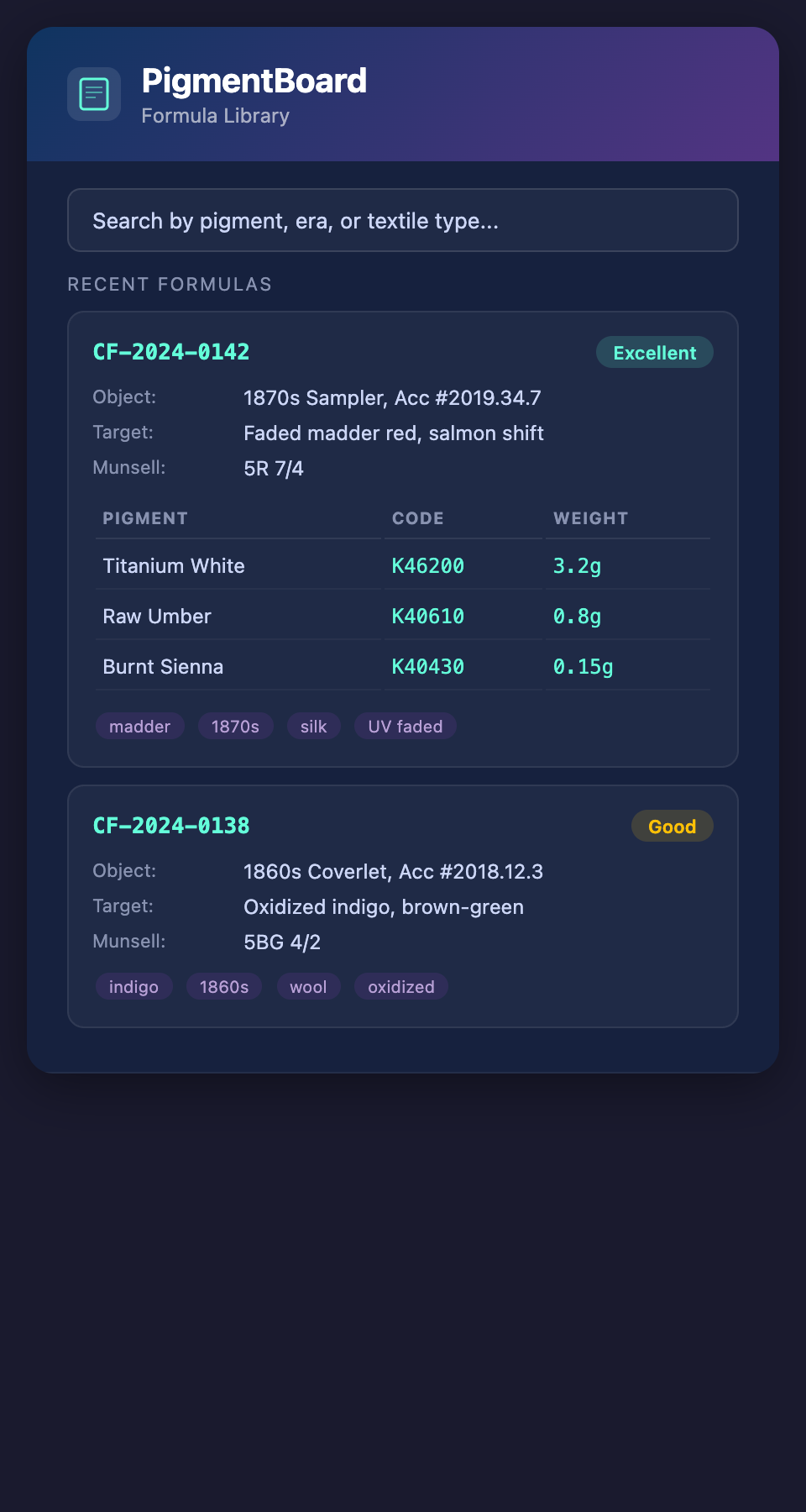
Here is a template that covers the essential fields:
Formula ID: [Unique identifier, e.g., CF-2024-0142]
Date created: [Date] Created by: [Conservator name]
Target object:
- Accession number: [Number]
- Object description: [Brief description]
- Area being matched: [Specific location on the object]
- Photograph reference: [File name or link to controlled photograph]
Target color analysis:
- Visual description: [e.g., "faded madder red, shifted toward salmon"]
- Munsell notation: [If measured, e.g., 5R 7/4]
- Spectrophotometer reading: [Lab* values if available]
- Estimated original pigment: [e.g., "madder lake on aluminum mordant"]
- Estimated degradation factors: [e.g., "UV: moderate, oxidation: significant, humidity: high"]
Formula:
| Pigment | Product code | Batch | Weight (g) | % of total |
|---|---|---|---|---|
| [Name] | [Code] | [Batch] | [Weight] | [Percentage] |
Binder: [Type, ratio, preparation notes]
Application:
- Method: [Brush/airbrush/stipple]
- Number of layers: [Count]
- Drying time between layers: [Duration]
- Substrate preparation: [Any pre-treatment]
Evaluation:
- Lighting used for comparison: [Light source, color temperature, lux level]
- Match quality: [Excellent/Good/Acceptable/Needs revision]
- Notes: [Any observations about the match, areas that could be improved]
Moving From Paper to Digital
Paper notebooks are familiar and comfortable. But for team-level documentation, digital systems offer critical advantages:
- Search — Find all formulas that use madder, or all formulas created for 1860s-era textiles, or all formulas rated "excellent" match quality
- Sharing — Every team member accesses the same database in real time
- Backup — Digital files can be backed up automatically. Paper notebooks can be lost, damaged, or destroyed.
- Analysis — Over time, you can analyze your formula database to identify patterns — which pigment combinations most reliably match certain degradation types
You do not need custom software for this. A well-structured spreadsheet, a shared database in Airtable or FileMaker, or even a consistently formatted shared document can work. The key is the consistency and completeness of the entries, not the sophistication of the platform.
Common Documentation Mistakes
Recording only the final formula. The failed attempts contain information too. If you tried three formulas before landing on the right one, briefly note what was wrong with the first two. This saves the next person from repeating your dead ends.
Omitting the lighting conditions. A match evaluated under a D65 daylight simulator looks different from one evaluated under gallery tungsten. If you do not record the lighting, the formula is ambiguous.
Using informal pigment names. "Burnt sienna" means different things from different manufacturers. Always include the product code and supplier.
Not photographing. A controlled photograph of the formula swatch next to the target area — taken under the same lighting conditions — is worth a thousand words of written description.
Documenting only when you remember. Make documentation a non-negotiable step in the workflow, not an afterthought. The formula should be documented before the conservator moves on to the next task.
Institutional Knowledge Preservation
Conservation labs face a slow-motion knowledge crisis. Senior conservators with decades of color-matching experience are retiring. The intuition they have built — which pigment combinations work for which degradation types, how certain mixtures behave on different substrates, which suppliers' pigments are most reliable — takes years to develop and seconds to lose.
Systematic documentation transforms individual expertise into institutional knowledge. When a junior conservator can search the formula database and find that a similar textile was successfully matched three years ago using a specific formula, they are building on their predecessor's experience rather than starting from zero.
The Role of Degradation Profiles
Documentation becomes even more powerful when paired with degradation profiles. Rather than just recording the final formula, you record the degradation model that generated it — the specific UV, oxidation, humidity, and pollutant parameters that predicted the target color.
This means:
- The formula can be regenerated if a pigment becomes unavailable (substitute a different pigment and re-run the model)
- Similar textiles can be matched quickly by starting from the saved profile and adjusting
- The model's accuracy can be evaluated over time by comparing predictions to actual results
Starting Today
You do not need to digitize your entire history overnight. Start with your next project:
- Create a documentation template (or adapt the one above)
- Fill it out for every formula you mix this month
- Store it in a shared location
- At the end of the month, evaluate: could a colleague reproduce your work from this documentation alone?
If the answer is yes, you have built the foundation of an institutional knowledge base.
Want a tool that generates documented, reproducible pigment formulas from degradation models? Join the PigmentBoard waitlist.