Browser Tab Productivity: Stop Losing Context Between Research Sessions
The Context Loss Problem
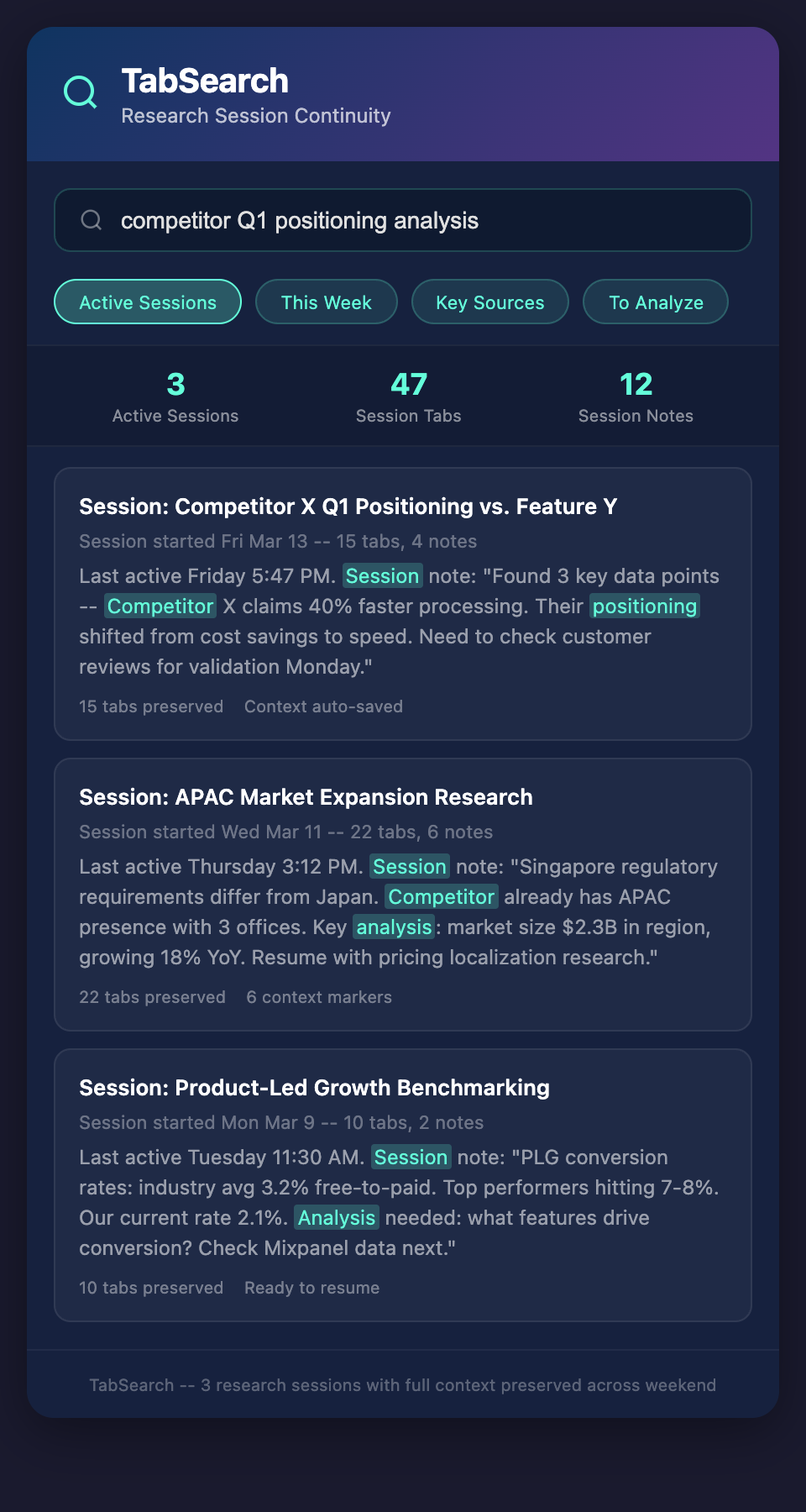
You close your laptop Friday evening. You had 47 tabs open across five research projects. Your mind was deep in competitive analysis for one of them—you'd just found three interesting data points.
Monday morning, you open the browser. All tabs are still there. But you've lost the context. What were you investigating? Why did you have that particular tab open? What were the next steps?
You spend 20 minutes reconstructing context. In that time, you reread information you've already analyzed, re-search for conclusions you'd already drawn, and re-navigate to resources you'd already found.
This context loss happens dozens of times weekly for knowledge workers. Each time, you lose 10-30 minutes reconstructing mental models. Multiply that by 50 weeks a year and you've lost 42-210 hours annually to context reconstruction.
Add in context switching between projects—the cost multiplies further.
Why Tabs Destroy Productivity
Conventional wisdom says tabs are productivity killers. That's too simplistic. Tabs are productivity tools when managed well. They're productivity killers when they're chaotic.
The tab productivity spectrum:
At one end: A knowledge worker with 8 highly organized tabs, each serving a clear purpose in a focused research session. Productivity is excellent. Context is maintained. Work is efficient.
At the other end: A knowledge worker with 87 tabs, multiple windows, unclear purposes, lost context, forgotten projects, and constant scrambling to find that one resource. Productivity is destroyed.
The difference isn't the number of tabs. It's whether the mental model behind them is organized.
Maintaining Research Context
Knowledge workers maintain continuous research sessions across days. You might research a market for three days, switching between your research and other work. The session spans 15-20 tabs but only makes sense together.
Effective productivity requires preserving this session context:
Session Capture
When you begin a research session, capture what you're investigating and why. "Analyzing competitor X's Q1 positioning relative to feature Y." Not just "research." Specific context.
This single sentence, captured when you start, lets you reconstruct your entire thinking within seconds on Monday morning.
Session Organization
Group related tabs visually and logically. Browser tab groups help, but tools designed for session management are better. Sessions that group tabs by project, with clear session descriptions, maintain context more effectively than scattered tabs.
When you return to a session, you instantly see:
-
What you were investigating
-
How deep you went (number of sources)
-
When you last worked on it
-
What you'd planned to investigate next
Session Notes
As you research, capture mini-insights. Not full analysis—just "Competitor X claims 40% faster processing than previous version." These notes serve as breadcrumbs. When you return to the session, the notes remind you what you'd learned.
Without notes, you lose these insights and have to rediscover them.
Context Markers
Within a session, mark specific tabs as:
-
Key sources: The three articles that contain most important insights
-
To analyze: Tabs you opened but haven't processed
-
Comparison: Tabs you're comparing to understand differences
-
Reference: Background information you might need
Revisiting your session, these markers instantly orient you to what's important.
The Cost of Lost Research Productivity
Consider a typical knowledge worker's weekly tab productivity loss:
-
Monday: 15 minutes reconstructing context from weekend
-
Wednesday: 25 minutes refinding competitor pricing data you searched for Tuesday
-
Thursday: 40 minutes switching between three research projects; losing track of project A while working on C
-
Friday: 30 minutes closing tabs and losing notes on what you'd found
That's 110 minutes weekly. Add up across a team and it's catastrophic.
For a 5-person team, that's 9+ hours weekly of unproductive context reconstruction. In a 50-person organization, that's 90+ hours weekly.
Solving Tab Productivity
Tab productivity solutions focus on three areas:
Preserve State
When you close your browser or tab, the session persists. Reopen it and you're exactly where you left off. Nothing is lost. This seems simple but is rarely implemented well.
Enable Search and Retrieval
Find previous sessions quickly. Search for "competitor Q1 analysis" and find the exact session, with all related tabs, within seconds.
Capture Context Automatically
As you research, the system captures:
-
What you read and when
-
Key phrases and data you encountered
-
Patterns across your research
-
Timestamps showing your research progression
When you return to a session days later, this captured context surfaces automatically, reorienting you.
Implementing Tab Productivity Systems
Effective tab management requires both tools and habits:
Tool requirements:
-
Session persistence (browser closing doesn't destroy sessions)
-
Session search and retrieval (find past research instantly)
-
Context capture (automatic notes on what's important)
-
Tab organization (visual grouping and description)
-
Activity timeline (see when you were researching what)
Habit requirements:
-
Intentional session creation (start sessions with clear purpose)
-
Regular review (weekly: what did I research, what matters?)
-
Context marking (label important tabs as you go)
-
Session cleanup (archive completed sessions, don't let them rot)
Real-World Productivity Gains
Organizations implementing tab productivity systems typically report:
-
40-50% reduction in research reconstruction time
-
30-40% improvement in research completeness (find more insights because context is maintained)
-
20-30% faster switching between projects (sessions preserve context, reducing cognitive load)
-
Better decision-making (research context is available when decisions are made)
Beyond Individual Productivity
Tab productivity extends beyond one person. When a team member hands off research, clean session context lets the next person absorb insights without redoing work. When a project resumes months later, the session still contains complete context.
This transforms research from individual knowledge to organizational knowledge.
Reclaim Lost Hours
Most knowledge workers are losing 2-4 hours weekly to tab chaos and context reconstruction. That's 100-200 hours yearly that could go to actual analysis and decision-making.
Join our waitlist to preserve research context across sessions and projects. Stop reconstructing knowledge. Start where you left off, every time. Turn browser tabs from a context killer into a context preserver.