Full Text Search Across Your Browser History: A Game-Changer for Knowledge Workers
The Browser Search Problem Nobody Talks About
Your browser history contains thousands of pages you've visited. Somewhere in there is the exact statistic you need, the competitor announcement you saw last week, the vendor pricing you meant to compare. But finding it is nearly impossible.
Browser search tools are built for finding websites by name, not by content. Search for "pricing" and you get results from every site that uses the word pricing—thousands of irrelevant results. You remember the context ("our competitor's Q3 pricing announcement") but the browser doesn't let you search by context.
For knowledge workers, this is a massive productivity drain. You spend 20 minutes searching your history for something you know exists. In a competitive business environment, that lost time costs real money. More importantly, you often give up and just proceed without the data you needed.
Full-text search solves this completely. It lets you search not by website name, but by actual content.
What Full-Text Search Actually Enables
Full-text search differs fundamentally from standard browser history search in three ways:
1. Content-Based Results, Not Title-Based
Standard search: "revenue" returns every page with "revenue" in the title or URL structure.
Full-text search: "revenue down 12% competitors" returns pages containing that exact phrase or pattern, showing you the context where the phrase appears.
2. Relevance Ranking
With thousands of results, relevance ranking matters enormously. Full-text search shows you the most relevant matches first—pages where your search terms appear together and prominently. Pages where "Q4 revenue decline" appears in a headline rank higher than pages mentioning these words separately.
3. Phrase and Pattern Matching
You can search for exact phrases: "supply chain disruption" returns only pages containing those words together in that order. You can search for patterns: "revenue decline [0-9]+%" finds pages matching that pattern. Standard browser search can't do this.
Real-World Applications
Competitive Intelligence
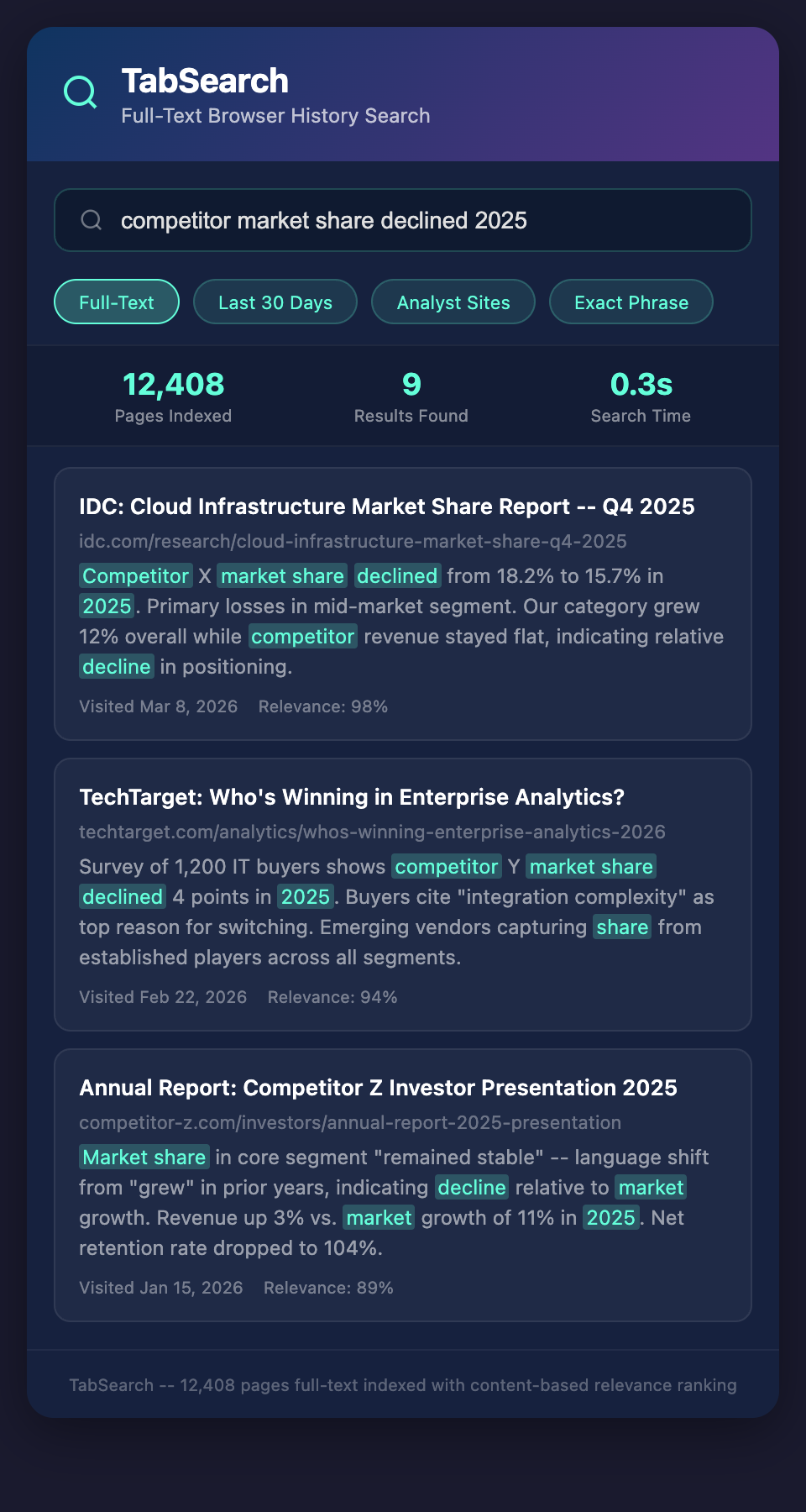
You're preparing for a board meeting and need competitive context. Search your entire browser history for "competitor market share 2025" and get every article, earnings report, and analyst summary you've read containing this information.
Within seconds, you have a complete picture of everything you've researched about competitor positioning. You don't need to reconstruct context or remember which sources you trusted—they're all there with full context visible.
Market Analysis
A prospect asks about industry growth rates. Search "market growth rate [0-9]+" and find every industry report, analyst summary, and news article you've read that mentions specific growth percentages. Find the most recent and most relevant data without scrolling through browser history manually.
Sales Research
Before a big call, search for the prospect's company name plus relevant keywords: "Acme Corp partnership technology investment." Instantly surface every article, press release, and market analysis you've read about their business moves.
Product Development
Searching "customer request dark mode" surfaces every customer email, support ticket, feedback form, and social media mention about dark mode requests that you've encountered. Quantify demand across sources instead of relying on scattered memories.
Due Diligence
In acquisition research, search for specific red flags or positive indicators: "acquisition financial problems," "market leadership category," "management changes." Compile a complete picture of company health across all sources you've researched.
Why Standard Search Fails
Consider a typical scenario: You want to find vendor pricing you researched last month. You remember it was for a software platform.
With standard browser history search:
-
Search "pricing" → 2,847 results
-
Manually scroll through pages until you find the right vendor
-
Even when you find it, you need to click through to verify it's the right version (monthly or annual pricing?)
-
Takes 15-30 minutes
With full-text search:
-
Search "vendor platform annual pricing per user"
-
8-12 highly relevant results
-
You find exactly what you need in 30 seconds
-
Results include context snippets, so you verify instantly
This is the difference between information being technically available and information being accessible.
Beyond Simple Search
Advanced full-text search includes additional capabilities that matter for knowledge workers:
Date Filtering: Find only pages visited in the last month. Useful for recent competitor news without old irrelevant results.
Source Filtering: Search only within specific domains. Find all research from analyst sites without mixing in competitor marketing pages.
Boolean Operators: Combine searches: "(competitor A OR competitor B) AND market share" finds comparisons between competitors.
Saved Searches: Turn frequent searches into saved queries. "Q4 financial performance" becomes one click instead of retyping.
The Competitive Advantage
Businesses with searchable information access have profound advantages. When a question arises, they find answers in 30 seconds instead of 30 minutes. When trends emerge, they recognize them because they've been tracking scattered data. When opportunities appear, they act because they already have context.
Knowledge workers without full-text search spend enormous time on information retrieval. Professionals with it spend time on insights and decisions.
Join the Search Revolution
Your browser contains a goldmine of research. The only problem is finding what you need inside it.
Sign up for our waitlist to access full-text search across every tab you visit. Transform your browser from an information sink into an actionable knowledge base. Stop losing research to search friction.