How to Organize Browser Tabs for Research Without Losing Important Data
The Browser Tab Chaos Problem
Most knowledge workers maintain 30-50 open tabs at any given time. Sales professionals juggling competitor analysis. Market researchers tracking industry trends. Product managers monitoring user feedback across platforms. Each tab represents a research thread—but without organization, these threads become tangled.
The cognitive load is real. Context switching between tabs kills focus. Searching your browser history is painful. Tabs get accidentally closed. Bookmarking takes too long, and folders become outdated. You know the data you need is somewhere—you just can't find it.
This isn't a productivity hack problem. It's a knowledge management crisis.
Why Traditional Tab Organization Fails
Bookmark folders seemed like the answer. They work for 20 bookmarks. At 200, they become burial grounds. You can't search within folders. Finding something you saved three weeks ago becomes a guessing game.
Browser history search is equally broken. You remember something about a competitor's pricing, but searching "pricing" returns thousands of results across every site you've visited. The signal-to-noise ratio is terrible.
Tab groups (built into Chrome) add light organization, but offer no search capability. You're still scrolling through tabs visually, which doesn't scale.
The fundamental issue: browsers treat tabs as ephemeral. They're designed for browsing, not research archiving.
The Research Tab Organization System
Effective research tab management requires three layers:
Layer 1: Capture and Categorize Immediately
When you open a research tab, decide its purpose instantly. This takes 5 seconds and saves hours later. Create project-specific workspaces for different research initiatives. A competitor analysis project gets its own workspace. A market expansion project gets another.
Within each workspace, name your tabs descriptively. Instead of "Untitled," use "Acme Corp Q4 Earnings - Revenue Down 12%." The tab title becomes a mini-summary of what you found.
Layer 2: Take Micro-Notes as You Research
Don't rely on memory. When you find something important—a statistic, a competitor move, market data—capture it immediately. Write a one-sentence note in a shared document or sticky note application. Link it to the specific tab or URL.
This creates a searchable index of why you opened each tab, not just what is in it.
Layer 3: Weekly Review and Archive
Every Friday, review your open research tabs. Ask: Do I still need this? Has this research question been answered?
Unanswered research gets moved to a project folder or pinned section. Completed research gets archived with a summary. Dead tabs get closed. This weekly discipline prevents tab count from exploding.
Implementing a Searchable Research System
The missing piece in traditional tab management is full-text search. You need to be able to search across all the content you've gathered, not just tab titles.
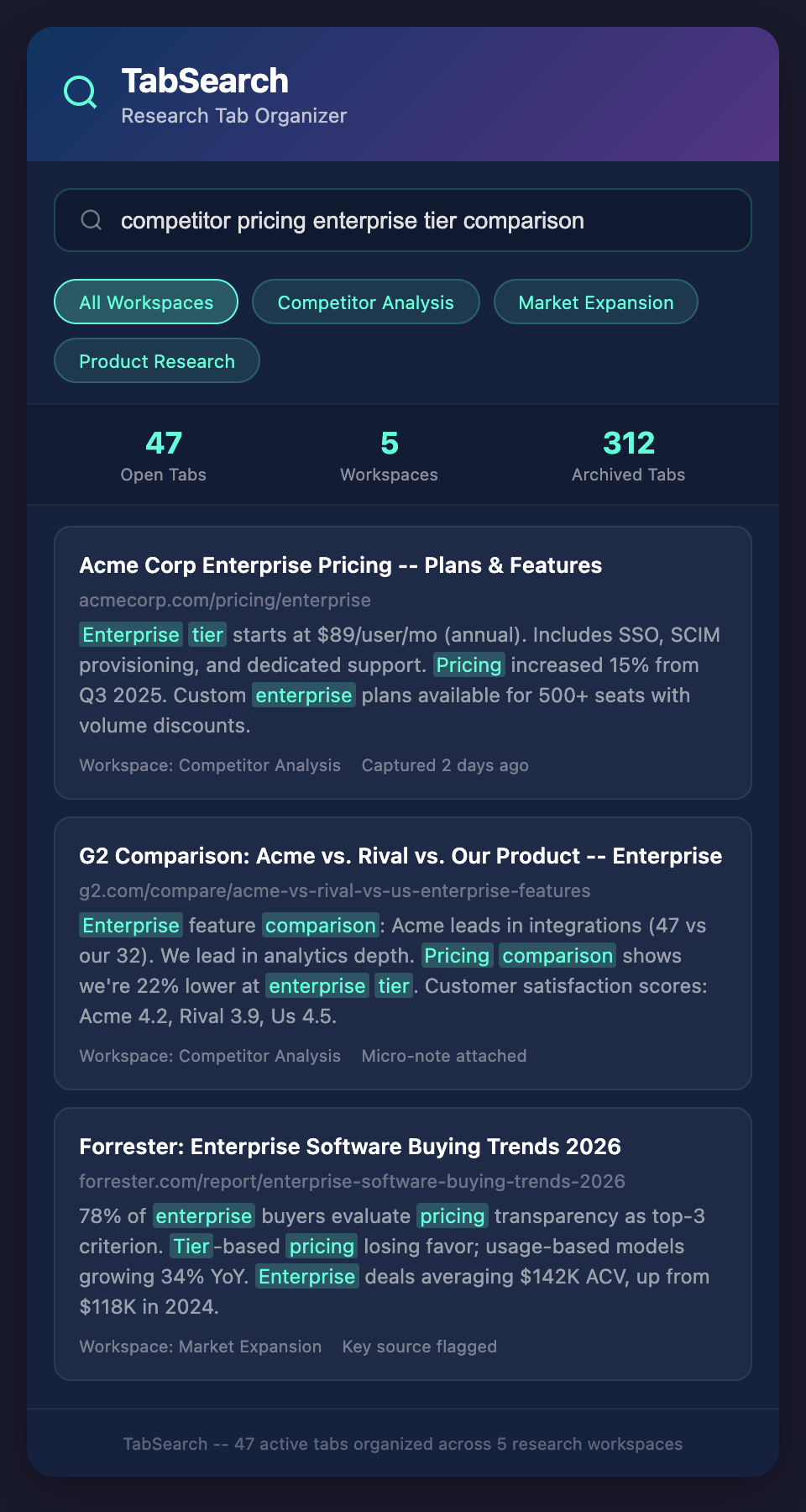
A properly designed research system captures the actual content from each tab—the article text, the data table, the market analysis—and makes it instantly searchable. When you search for "Q4 earnings down," it returns every tab containing those terms, highlighted with context.
This transforms tabs from isolated research threads into a unified knowledge base.
Applying This to Different Roles
Sales professionals: Each prospect gets a workspace. Tabs contain their website, LinkedIn profile, recent news mentions, and your previous interactions. Search across all of them when preparing for calls.
Product managers: Feature requests, user feedback, competitor features, and industry trends live in themed workspaces. Search for "dark mode requests" across all sources instantly.
Market researchers: Industry reports, competitor announcements, regulatory filings, and trend analysis are organized by market. Search capabilities let you find patterns across dozens of sources.
Business intelligence analysts: Financial data, industry benchmarks, company research, and market reports are searchable by keyword, metric, or company name.
Avoiding Information Loss
Research tabs disappear in three ways:
-
Browser crashes or updates: Your work session vanishes. Mitigate this with automatic saving systems that capture tab content before it's lost.
-
Accidental closure: You close a tab thinking you'll remember where to find that data. You won't. Implement a "recently closed" archive that persists for months.
-
Forgotten tabs: A tab sits in your browser for weeks. You forget why you opened it. Organize and review tabs regularly before they become ghosts.
The best protection is automatic capture. Whatever system you use should save the content of every tab you visit, building a permanent searchable archive. This removes the burden of manual saving and prevents information loss entirely.
Building a Research Knowledge Base
Over time, your organized research tabs become a competitive advantage. You have documented insight into competitor moves, market trends, customer feedback, and industry developments that competitors scramble to find.
The difference between scattered tabs and a searchable knowledge base is the difference between hoarding information and leveraging it. One requires you to remember where data lives. The other lets you find patterns and insights across everything you've gathered.
Join the Future of Research
Stop losing important business research to tab chaos. The best knowledge workers aren't just gathering information—they're organizing it so insights emerge naturally.
Join our waitlist to be first in line when we launch the browser extension that turns your research tabs into a searchable private database. Stop losing competitive intelligence. Start finding the insights that matter.