Save and Search Business Articles Instantly Without Bookmarking
The Article Triage Problem
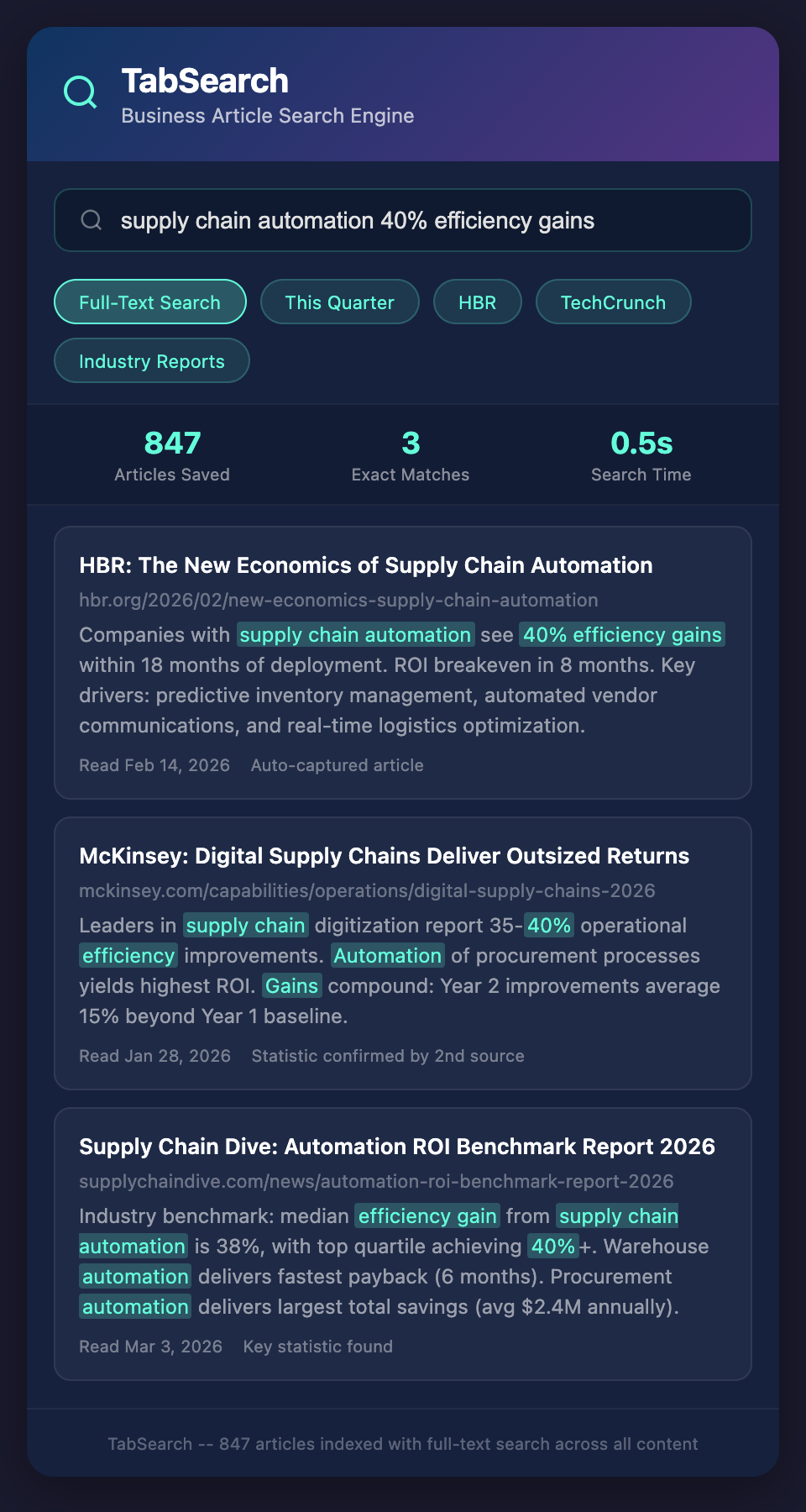
You read 20-30 business articles weekly. Articles about industry trends. Articles about competitor moves. Articles about new technologies. Articles about best practices.
Each article has value—but which ones matter?
Most articles get the same treatment: You skim it or read it, then either close it or add it to a Pocket/Instapaper backlog. Over time, that backlog becomes a graveyard. You have 847 saved articles. You can't remember what any of them contain.
When you need to reference something ("What did that article say about supply chain solutions?"), you either:
-
Search your backlog and hope tags or headlines are descriptive
-
Spend 20 minutes reading through candidates
-
Give up and just proceed without reference
You have thousands of words of valuable content. You can't access it efficiently.
Why Bookmarking and Archiving Fail
Bookmarking systems (Read Later apps, browser bookmarks) solve the "don't lose the article" problem. They fail at the "find the article when I need it" problem.
They fail because:
Problem 1: Finding articles requires remembering titles or tags
You remember reading something about supply chains but not the title. Your backlog has articles about "Supply Chain 101," "New Logistics Tech," "Manufacturing Partners," and ten other vaguely related titles. Which one was it?
Problem 2: Tags only work if you tag consistently
You save articles with tags like "supply_chain," "supply-chain," and "supply chain disruption." Searching for one tag misses articles tagged differently. Tags require discipline to maintain.
Problem 3: You read articles but forget where
You read an article that said "companies with supply chain automation see 40% efficiency gains." You remember the statistic but not the article. Finding it requires searching through 50 potential candidates.
Problem 4: Full content isn't searchable
Bookmarking systems search article titles and tags, not article content. If a statistic is buried in an article, you can't search for it. You have to open articles and read them.
The Full-Text Search Solution
What if every article you saved was full-text indexed? You could search like this:
-
"supply chain automation 40% efficiency" → Find the specific article
-
"competitor announced partnership" → Find competitor announcement articles
-
"AI adoption rate 2026" → Find articles mentioning specific statistics
-
"market size billion" → Find all articles mentioning market sizes
You'd get results in seconds, with context showing you the matching text.
Implementing Article Capture and Search
Full-text article search requires:
1. Automatic Article Capture
As you read articles, they're captured automatically. You don't manually bookmark or save them. Reading an article = capturing it.
This removes the effort friction. You read what you want to read. Everything gets saved. Nothing slips through.
2. Full-Text Indexing
Article text is extracted and indexed so every word is searchable. Searching "supply chain automation" finds all articles containing those words, in any position.
3. Context Snippets
When search results appear, show the paragraph containing the search term. You see why the article matched, not just that it did.
4. Metadata Capture
Capture article metadata automatically:
-
Title and author
-
Source and publication date
-
Key topics and entities mentioned
-
Statistics and specific data points
This enriches search capability. Search for "published 2026" to find recent articles. Search for "mentions Apple" to find articles discussing Apple.
5. Organization Without Friction
Instead of manually tagging or filing articles, let the system organize them automatically:
-
By publication source (Harvard Business Review, TechCrunch, etc.)
-
By publish date (this week, this month, this quarter)
-
By topic (inferred from content)
-
By entities mentioned (companies, people, technologies)
You can browse articles by any dimension without manual effort.
Real-World Article Search Workflows
Competitive Intelligence
Save every business article about competitors. When preparing for a board meeting, search for "competitor A announcement 2026" and instantly see every article about competitor moves. Get comprehensive competitive context in minutes instead of hours.
Market Research
Read articles about market trends, industry changes, customer needs. When you need to understand market sentiment on a topic, search "market adoption AI adoption [0-9]+%" and find all data points on the topic across your saved articles.
Sales Preparation
Before prospect calls, search the prospect company name. Find every article you've read about them, every competitive comparison you've seen, every industry trend relevant to their business. You walk into calls with complete context.
Product Development
Search "customer request feature feedback" to find all articles mentioning customer feature requests. Understand demand across sources instead of relying on scattered recollection.
Trend Analysis
Search "emerging trend 2025 2026" to find articles discussing emerging trends. Track which trends are getting attention across publications. Identify what's hype versus what's gaining real adoption.
The Statistic Discovery Problem
Articles contain statistics. "Market size $X billion." "Adoption rate Y%." "Revenue growth Z%." Finding specific statistics is nearly impossible without searching article content.
With full-text article search, finding statistics becomes easy:
-
Search for a statistic you remember partially: "market growth [0-9]+%" finds all articles mentioning market growth percentages
-
Search for specific metrics: "cost savings [0-9]+%" finds all articles mentioning cost savings metrics
-
Search for benchmarks: "industry average productivity" finds articles discussing industry benchmarks
This transforms articles from "interesting reads" into a queryable knowledge base.
Building Your Article Knowledge Base
Over time, your saved and searchable articles become a comprehensive knowledge base:
-
Industry knowledge (what experts write about)
-
Competitive knowledge (what's been reported about competitors)
-
Technology knowledge (what's emerging and evolving)
-
Market knowledge (what's changing in your space)
-
Best practice knowledge (how others approach problems)
This is deep, credible knowledge that improves decision-making.
From Reading to Retention
Most articles you read are forgotten by next week. You read dozens, retain core ideas from maybe two. With searchable articles, you retain everything. You forget the article title and author, but the information is still accessible through search.
Reading becomes an investment instead of entertainment. Each article contributes to knowledge base you can query later.
Stop Losing Articles
You have hundreds of hours of reading investment in your backlog. You're not accessing that knowledge because retrieval is too hard.
Join our waitlist to automatically save and full-text search every business article you read. Transform your reading into accessible knowledge. Stop losing valuable content.