Automating Research Note-Taking and Extraction
The Manual Note-Taking Bottleneck
You've just spent 45 minutes reading a paper. It was relevant, important, and dense. Now you face the cognitive switch: you're done reading, now you need to take notes.
Your brain is tired from comprehension. But you know that the note-taking phase is critical. If you don't capture the key findings now, you'll lose nuance you can't recreate by re-reading. So you force yourself to type:
-
Key methodology details
-
Primary findings
-
How it relates to your research question
-
What surprised you
-
Limitations or gaps
This process—reading, then note-taking—is essential but exhausting. Most researchers report that note-taking is the most psychologically draining part of research, worse than the reading itself.
The friction comes from context switching. You're no longer in the flow of comprehension; you're in the flow of transcription and interpretation. Your brain has to hold multiple cognitive loads simultaneously: you're remembering what you just read, synthesizing it, deciding what matters, and typing it coherently.
The result: Many researchers skip thorough note-taking. They take minimal notes, tell themselves they'll remember, and later discover they can't. Or they spend 10-15 hours per week on notes for their reading, eating into synthesis time.
Why Automation Matters Here
Other professions have solved the note-taking problem through automation:
-
Doctors use voice-to-text transcription to document patient notes during or immediately after interactions
-
Journalists use recorded interviews so they can focus on asking questions and taking sparse notes rather than transcribing
-
Lawyers use deposition recordings and transcripts instead of live note-taking
The common pattern: capture the full raw material and automate the extraction of key information.
Researchers should follow this pattern. Instead of asking "How do I take better notes?" ask "How do I automate the extraction of important information?"
Annotation-Based Capture
The first step toward automation is efficient capture during reading:
Highlight and Annotate as You Read
Instead of traditional note-taking after reading:
-
Read in a tool that supports annotation (PDF readers like Zotero, Mendeley, or specialized tools)
-
Highlight passages as you encounter them
-
Add margin notes when you have a thought (one sentence usually)
-
Mark up figures and tables with notation about why they matter
This keeps you in the reading flow. You're not stopping to type; you're annotating within the document.
Extract Your Annotations Automatically
Your reference manager or PDF reader can often auto-compile your highlights and notes:
-
Zotero can export highlights as formatted text
-
Mendeley has note export features
-
ReadWise connects to your highlights and generates periodic digests
The system extracts what you've marked without requiring you to retype anything.
Time saved: 5-10 minutes per paper vs. 15-20 minutes of traditional note-taking.
Structured Extraction Templates
Not all notes are equally useful. The best notes answer specific questions about every paper:
Create a Standard Extraction Template
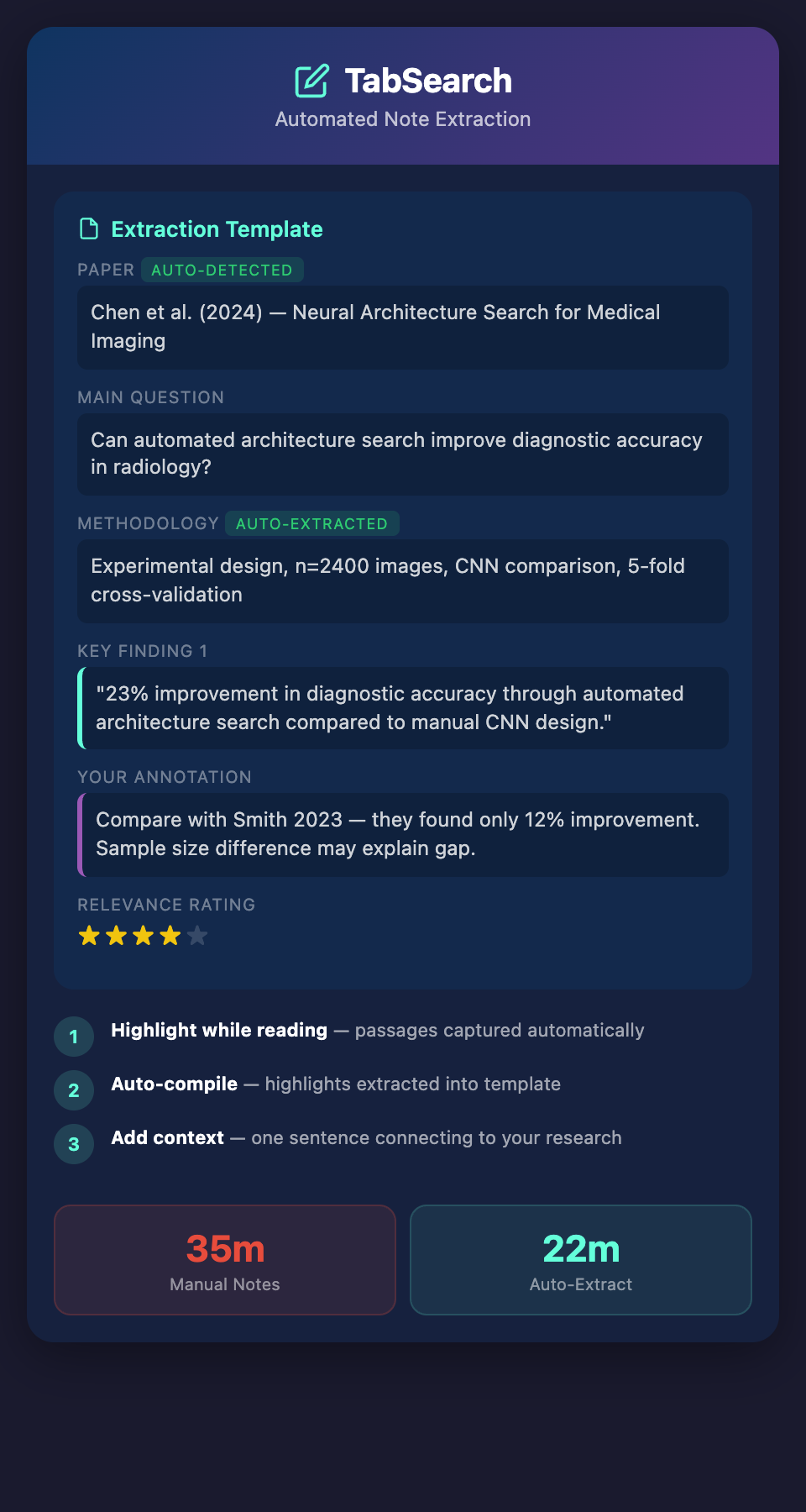
Instead of free-form notes, use a template:
Paper: [Title, Author, Year]
Main Question: What question did this paper try to answer?
Methodology: How did they study it? (Sample size, design, analysis)
Key Finding 1: [Finding + evidence]
Key Finding 2: [Finding + evidence]
Key Finding 3: [Finding + evidence]
Limitations: What are the weaknesses or gaps?
Relevance: How does this connect to my research?
Rating: [1-5 scale] on relevance to my specific question
This structure serves three purposes:
-
It guides extraction: You're not deciding what to write; the template tells you
-
It creates consistency: Your notes on every paper follow the same structure
-
It enables future search: You can search your notes by field (finding methodology-related papers by searching the methodology field)
Implement the Template in Your Tool of Choice
-
Zotero users: Create a template in the note field with these categories
-
Notion users: Create a database with these fields and populate as you read
-
Obsidian users: Create a template note and use it for every paper
The template forces you to think about the paper systematically, which typically clarifies what matters.
LLM-Assisted Extraction
This is newer territory, but emerging tools show promise:
Summarization on Demand
Some tools now offer automatic summarization of PDFs:
-
Upload your paper
-
Request a summary of key findings
-
The system extracts and formats the summary
Benefits:
-
Saves 5-10 minutes of manual summarization
-
Provides a baseline you can edit rather than write from scratch
Limitations:
-
LLM summaries can miss nuanced or technical details
-
They don't understand your research context (so they might summarize findings irrelevant to your specific question)
Use case: For background reading that's less critical, automated summaries accelerate processing. For your core research papers, use them as a starting point, then refine.
Question-Answering Extraction
More sophisticated: upload your paper and ask specific questions about it:
-
"What was the sample size?"
-
"What were the primary statistical tests?"
-
"What limitations did the authors acknowledge?"
The system reads your paper and answers. This combines the benefits of automation (fast) with specificity (answering your actual questions).
Building an Extraction Workflow
Here's a realistic workflow combining automation and strategic manual effort:
Phase 1: Strategic Highlighting (15 minutes per paper)
-
Read paper in your PDF reader
-
Highlight passages that directly address your research question
-
Annotate when you have a reaction or question
-
Leave most reading unhighlighted—you don't need every passage
Phase 2: Automated Compilation (2 minutes per paper)
-
Export your highlights and notes from the PDF
-
If using an LLM summarizer, request a summary of key findings
-
Paste both into your template
Phase 3: Context Addition (5-8 minutes per paper)
-
Review the automated extraction
-
Add one sentence of how it connects to your research
-
Rate its relevance
-
Tag it with methodology type or research question
Total time per paper: 22-25 minutes vs. 35-45 minutes with full manual note-taking.
More importantly: The cognitive load is distributed. You're not doing all comprehension-to-transcription in one exhausting block.
Creating Searchable Note Archives
Automation is only valuable if you can retrieve the information later. Your notes must be searchable:
Structure for Searchability
-
Use consistent field names: Every paper has "Key Finding 1, 2, 3"
-
Use consistent tagging: Papers are tagged with methodology type, research question, discipline
-
Use consistent ratings: Relevance is always 1-5; you can later search for papers rated 4+ as your most relevant
This consistency allows you to search questions like:
-
"Show me all qualitative methodology papers about learning"
-
"Show me papers rated 4+ on relevance"
-
"Show me findings about neural networks from papers published after 2020"
Implement Search Capability
-
Zotero: Uses full-text search on your notes; adequate for most researchers
-
Notion: Has powerful filtering and search; excellent for complex queries
-
Obsidian: Supports regex search and graph search for connections
-
Custom database: If you're technical, create a simple searchable database (even a spreadsheet with conditional formatting works)
Synthesis from Extracted Notes
Automated extraction isn't the end goal—it's the foundation for synthesis:
Once you've extracted notes from 30-50 papers in a consistent format:
-
Search for patterns: Look across your "Key Finding" fields. Do certain findings appear repeatedly? These are consensus findings. Do some contradict others? These are debates.
-
Identify clusters: Group papers by research question or methodology. What do papers within each cluster agree on? Where do they diverge?
-
Find gaps: What questions were you hoping to answer but found few papers addressing? These are research gaps you might contribute to.
-
Build arguments: Instead of writing synthetically from memory, write from your extracted and organized notes. You're citing findings backed by documented evidence.
The Evolution of Note-Taking
The researchers most efficient at note-taking have evolved beyond the traditional "read then write notes" model. They:
-
Capture continuously while reading (highlighting and annotating)
-
Automate extraction (using tools, templates, or LLMs)
-
Add contextualization strategically (how does this connect to my work?)
-
Search and synthesize from the extracted notes
This approach respects the reality that reading and note-taking are different cognitive tasks. It automates what can be automated and focuses your brain on what requires human judgment: context and synthesis.
What's Still Manual
Even with automation, you're still making critical decisions:
-
What to highlight (requires understanding relevance to your research)
-
How to rate relevance (requires domain knowledge)
-
How findings connect (requires synthesis)
These human judgments can't be automated. But the tedious transcription can be.
Ready to eliminate the note-taking bottleneck? Join our waitlist for early access to research tools that automatically capture, extract, and organize your research findings, leaving you free to focus on synthesis and thinking.