How to Extract and Index PDF Research Papers From Browser Tabs
The PDF Problem in Academic Research
PDFs are how academic research travels. Journal articles, working papers, preprints, book chapters—almost everything arrives as PDF. Yet managing PDFs remains one of the most frustrating aspects of research work.
Here's the typical problem: you find a promising research paper as a PDF, open it in a new tab, might download it to a "research" folder, possibly add it to your reference manager, and make notes somewhere else. Somewhere in this process, critical information becomes inaccessible.
Weeks later, you remember reading something relevant but can't find it. Was it in the PDF you downloaded to "Research Papers - Final - FINAL (2)" or one of the dozens of other folders? Did you bookmark it or just open the tab and close it?
The issue isn't PDFs themselves—it's that PDF content sits isolated from your other research. A paper you found and read isn't connected to your notes, isn't searchable alongside other sources, and isn't accessible from a single research interface.
Why Standard PDF Management Fails
The Download Folder Trap
Most researchers download PDFs to a single folder, creating an unmanageable mountain of files. Naming conventions quickly become inconsistent: "Smith2019.pdf," "smith-jones-climate-2019.pdf," "SMITH_full text.pdf"—the same paper under three names.
The Read vs. Unread Problem
PDF folders contain a mix of papers you've read carefully, papers you skimmed once, papers you meant to read but haven't opened, and papers you thought might be relevant but weren't. No system tracks this distinction.
The Annotation Isolation
If you annotate a PDF (highlight text, add comments), those annotations live inside the PDF file. They're not searchable, not accessible alongside your other notes, and not portable to your bibliography or document drafting tools.
The Citation Metadata Loss
PDFs contain bibliographic information (author, date, journal, DOI), but extracting this metadata manually is tedious. Most researchers end up re-typing citation information or manually creating entries in their citation manager.
Extracting Content From PDFs: The Technical Reality
Modern PDF extraction has become sophisticated but remains imperfect. Understanding the limitations helps you choose the right approach.
Text Extraction
Most PDFs contain embedded text, which can be extracted reliably. However:
-
Scanned PDFs: Some older papers or book chapters are scanned images with no text layer—these require OCR (optical character recognition)
-
Complex layouts: Papers with multiple columns, tables, or unusual formatting can produce messy extraction
-
Encoding issues: Non-English text or special characters sometimes extract incorrectly
Metadata Extraction
PDF metadata (author, title, date) is standardized but inconsistently used. Some PDFs include complete metadata; others have minimal information.
Robust extraction requires:
-
Primary metadata: Extracting from PDF document properties
-
Fallback extraction: Using header/footer analysis and common PDF structures
-
DOI detection: Searching for DOI numbers within the PDF, which unlock complete citation data
-
OCR for scanned PDFs: Converting scanned paper images to text when necessary
Layout and Structure Preservation
Simple text extraction loses important structure: where tables are, section breaks, figure captions. Research papers depend on this structure—the methodology section describes how the study worked, the results section presents data, and the discussion interprets it.
Preserving structure means:
-
Detecting and preserving section headers
-
Recognizing and encoding table structure
-
Maintaining reading order in complex layouts
-
Noting figure and table captions
Building a PDF Research Pipeline
A complete pipeline for managing PDFs involves multiple steps:
Step 1: Automatic PDF Detection
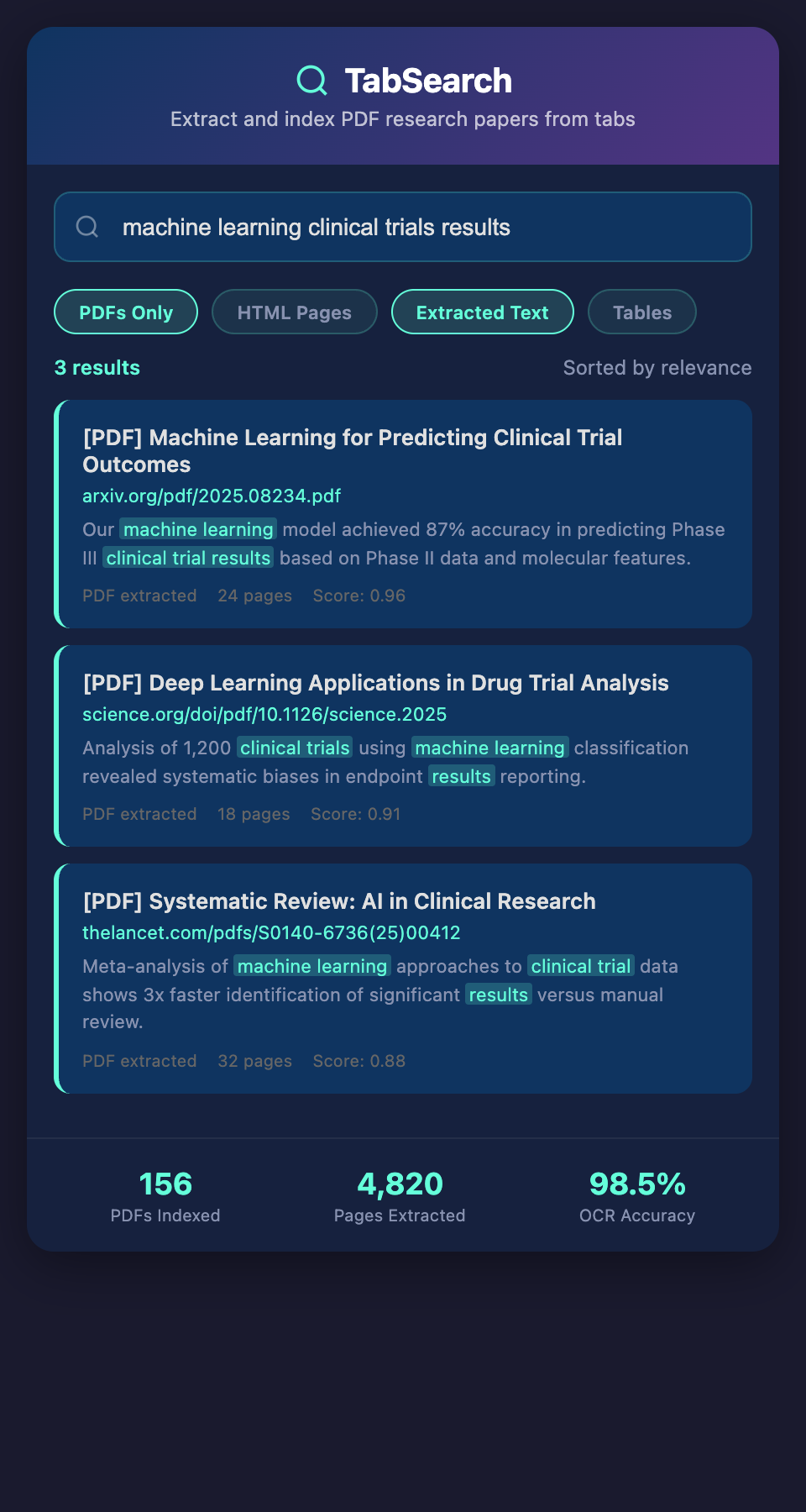
When you browse research tabs, the system should detect PDFs and stage them for processing. This requires:
-
Monitoring browser tabs for PDF files
-
Detecting PDF links in webpages (so you know about papers before downloading)
-
Capturing PDFs that are already downloaded to your computer
Step 2: Content Extraction
The extraction process should handle:
-
Text extraction from native PDFs
-
OCR for scanned documents
-
Metadata extraction for citation information
-
Structure preservation to maintain readability
The goal is extracting all useful information in a way that preserves context.
Step 3: Metadata Enhancement
Raw metadata from PDFs is often incomplete. Enhancement means:
-
Searching CrossRef API for complete citation data using the PDF's DOI
-
Resolving author names and affiliations
-
Identifying subject category and discipline
-
Extracting keywords from the paper itself
This turns incomplete PDF headers into comprehensive citation records.
Step 4: Full-Text Indexing
Once extracted, every word in the PDF should be indexed and searchable. This requires:
-
Tokenizing extracted text
-
Building an inverted index (word → locations in all PDFs)
-
Supporting phrase search ("carbon sequestration" as a phrase, not just those words anywhere)
-
Weighting relevance (words in the title/abstract count more than body text)
Step 5: Integration With Your Research System
The indexed PDF content should connect to:
-
Your annotation and notes system
-
Your citation manager
-
Your search interface
-
Your project organization
Rather than a PDF being an isolated file, it becomes one node in your unified research system.
Handling Different PDF Types
Different PDF types require different handling:
Traditional Academic Papers
These generally have clear structure: abstract, introduction, methods, results, discussion, references. Extraction should preserve this structure so you can quickly navigate to relevant sections.
Key extraction points:
-
Abstract (for quick relevance assessment)
-
Author and date (for citations)
-
Methodology section (for understanding how research was conducted)
-
Key findings (usually in results and discussion)
-
References (for follow-up sources)
Books and Book Chapters
Books lack the standardized structure of journal articles. Chapters might be written by different authors, have different formatting, and lack obvious metadata.
Special handling:
-
Extract chapter-level metadata separately from book-level
-
Preserve chapter structure and table of contents
-
Handle cross-references between chapters
-
Maintain correct page numbering across chapters
Technical Reports and Working Papers
These might be preliminary, use non-standard formatting, or contain supplementary materials. They're often crucial for accessing cutting-edge research before journal publication.
Extraction considerations:
-
Extract version and date clearly (working papers change)
-
Note institutional affiliation and availability (some are internal only)
-
Preserve supplementary materials and appendices
-
Handle hyperlinks within reports
Theses and Dissertations
These are often massive (100-400 pages) and need special handling:
-
Break into chapters for manageability
-
Extract table of contents for navigation
-
Index extensively (theses contain tremendous detail)
-
Extract bibliography separately for follow-up research
A Real-World Extraction Example
A researcher working on environmental economics finds a 140-page policy report on carbon pricing mechanisms. The PDF has:
-
Scanned images in some sections (requires OCR)
-
Tables with pricing data
-
Multiple author list
-
Complex reference formatting
The extraction process:
-
Detects PDF in browser tab, triggers processing
-
Extracts OCR text from scanned sections, native text from digital sections
-
Identifies authors and policy organization from header
-
Searches CrossRef for complete citation data using extracted DOI
-
Preserves table structure so pricing data remains organized
-
Indexes all extracted text so searching "carbon tax effectiveness" returns relevant passages
-
Creates section index so reader can jump to "pricing mechanisms" section
-
Extracts references section and identifies which references are also in the researcher's collection
Result: The 140-page report becomes a fully searchable, structured resource where the researcher can instantly find pricing models, locate cited research, and see exactly where specific claims appear—all without manually reading 140 pages.
Advanced PDF Analysis
Beyond extraction, sophisticated analysis can enhance PDFs:
Citation Network Analysis
Identifying which papers in your collection cite each other creates a network showing how research communities connect and build on each other's work.
Figure and Table Extraction
Charts, graphs, and data tables are often the most valuable research content. Specialized extraction identifies and preserves these, making them searchable and referenceable separately from text.
Methodology Tagging
Identifying and tagging research methodology (experimental design, statistical analysis, qualitative methods) lets you find papers using specific approaches.
Citation Context
Extracting not just that Paper A cites Paper B, but also the context (how it's cited) shows whether citations are supportive, contradictory, or neutral.
Storage and Organization
Extracted PDF content should organize according to:
-
Source collection: Which project or research area it belongs to
-
Personal status: Whether you've read it, your rating, your assessment
-
Temporal organization: When you found it and when it was published
-
Thematic organization: What topics and keywords apply
This organization happens automatically through tagging and classification, not manual folder creation.
Addressing Privacy and Copyright
While extracting PDFs for personal research is legal fair use in most jurisdictions, important safeguards apply:
-
Personal research databases should remain private, not shared
-
Extracted content should not be republished or redistributed
-
Attribution should be clear when citing extracted content
-
Check institutional and publisher policies for sensitive content
A well-designed extraction system respects copyright while enabling personal research efficiency.
Integration With Citation Systems
Extracted PDF metadata should automatically populate your citation manager. Rather than manually entering:
-
Author: Jane Smith, John Jones
-
Date: 2023
-
Title: Climate Policy Effectiveness in Europe
-
Journal: Environmental Policy Review, Volume 45, Issue 3
...the system automatically extracts this from the PDF and formats it correctly in APA, Chicago, IEEE, or any other style.
Building Your PDF Research System
Start by analyzing your current PDF collection:
-
How many PDFs do you have?
-
How are they organized (or disorganized)?
-
How much time do you spend relocating PDFs?
-
What information do you extract from each paper when you read it?
Most researchers with large PDF collections spend 3-5 hours per week managing PDFs that could be automated.
Ready to eliminate PDF management friction? Join our waitlist for a system that automatically extracts, indexes, and organizes every research PDF you find, turning scattered files into a searchable research database.