Faster Literature Review Workflow: Practical Systems
The Literature Review Time Trap
Literature reviews are essential but inefficient. You might spend 30-40 hours on a review that yields 50-70 relevant papers. That's roughly 30-45 minutes per paper, but that time includes:
-
Search (finding the paper)
-
Scanning (determining relevance)
-
Reading (deep engagement)
-
Extraction (pulling key information)
-
Organization (filing it in your system)
Most of that time is non-reading. It's search friction, organizational overhead, and switching costs between tools. Researchers typically report that their literature review process feels slower and more laborious than necessary because they're constantly interrupted by logistical overhead.
The efficient literature review isn't faster reading—it's fewer interruptions.
The Hidden Cost of Review Friction
Consider the typical literature review workflow:
-
Search (5-10 minutes)
-
Open Google Scholar or PubMed
-
Iterate on search terms
-
Adjust filters
-
-
Scan (2-5 minutes per paper)
-
Read the abstract
-
Look at figures and methods
-
Decide if you'll read fully
-
-
Access (3-10 minutes)
-
Paper might be behind a paywall
-
Navigate to your institution's library proxy
-
Download PDF or access HTML version
-
This single step often derails 20% of potentially relevant papers
-
-
Read (15-45 minutes)
-
Deep or quick reading depending on relevance
-
This is where the actual intellectual work happens
-
-
Extract (5-10 minutes)
-
Switch to your reference management software
-
Add the citation
-
Add the PDF
-
Type notes or highlights
-
-
File (2-5 minutes)
-
Decide on folder structure
-
Tag appropriately
-
Create connections to other sources
-
That's 32-75 minutes of total time per paper, but only 15-45 minutes of actual reading and thinking. The friction costs 50-60% of your time.
Reducing Friction at Each Stage
Consolidate Your Search Stack
Don't move between Google Scholar, PubMed, and proprietary databases separately. Use:
-
Harzing's Publish or Perish for multisource search
-
Semantic Scholar for semantically similar papers
-
Connected Papers to visualize relationships and discover influential works
Better yet, conduct your initial broad searches in ONE place. Most universities provide access to comprehensive databases (ProQuest, EBSCO, or discipline-specific collections). Spend time in the one tool rather than bouncing between five.
Time saved: 10-15 minutes per search session.
Implement Quick Relevance Screening
You don't need to read the full paper to decide relevance. Use this screening sequence:
-
Title (5 seconds) - Does it address your research question?
-
Abstract (20-30 seconds) - Is the methodology relevant?
-
Methods section (1-2 minutes) - Are the variables and sample appropriate?
-
Results figures (30-45 seconds) - Do the findings inform your research?
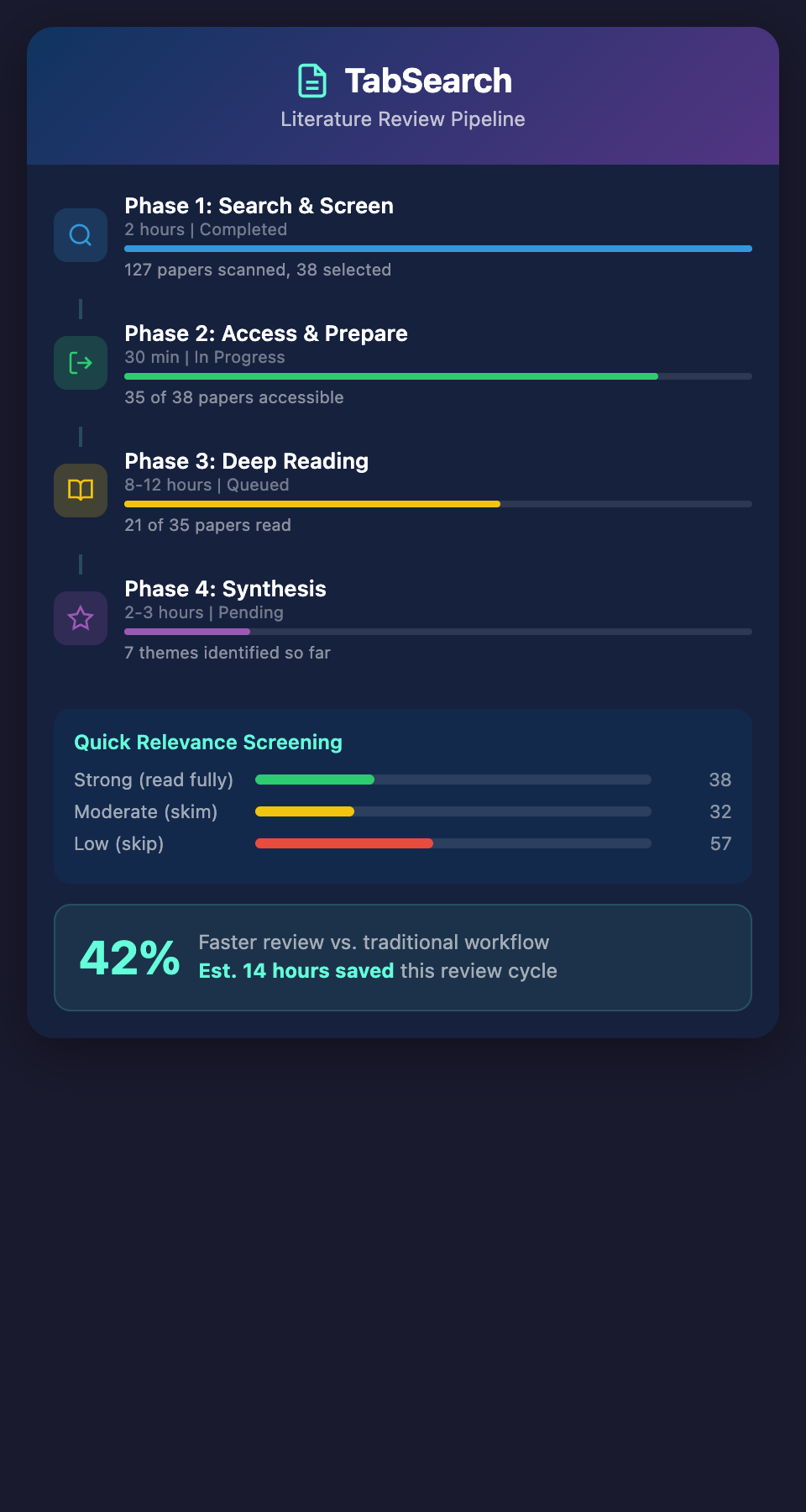
Mark papers as: Strong Relevance (read fully), Moderate Relevance (skim), or Low Relevance (skip).
Typical ratio: For every 100 papers you scan, maybe 25-30 warrant full reading. But you'll eliminate 70% in 2-3 minutes each. Total time: 140-210 minutes screening 100 papers. Traditional abstract-only screening is slower.
Time saved: 15-20 minutes per 100 papers screened.
Solve the Access Problem
This single issue kills review momentum. If 15 of your 50 papers are behind paywalls and you spend 10 minutes each trying to access them, you've lost 2.5 hours.
Solutions:
-
Use your institution's library proxy before searching; most papers become accessible automatically
-
Enable institutional login in your reference manager; many tools integrate proxy access
-
Use ResearchGate and Academia.edu; researchers often upload their own papers
-
Email authors directly (especially recent papers); most researchers will send you a copy within 24 hours
-
Use Unpaywall browser extension; it automatically finds legal free versions of papers
Eliminating "chase the PDF" overhead could save 20-30% of your total review time.
Time saved: 30-60 minutes per 50-paper batch.
Combine Reading and Extraction
Don't read in one tool and extract in another. Instead:
-
Read PDFs in your reference manager (Zotero, Mendeley, Paperpile all have PDF readers)
-
Highlight and annotate while reading
-
These annotations automatically attach to your reference
-
No context switching, no retyping
Your notes are already in the system; extraction is instant.
Time saved: 10-15 minutes per paper.
Automate Your Filing
Don't manually organize papers into folders. Instead:
-
Tag automatically based on methodology (quantitative, qualitative, mixed)
-
Tag automatically based on paper type (empirical, review, theoretical)
-
Add your research question as a tag
-
Use automatic notes with a template (Relevance rating, Key finding, Methods, Why it matters)
This template forces extraction thinking and creates searchable metadata. No decision fatigue about folder placement.
Time saved: 5-8 minutes per paper.
The Complete Fast-Track System
Here's an integrated workflow that researchers report cuts review time by 35-45%:
Phase 1: Search and Screen (2 hours total)
-
Conduct searches in your institution's primary database
-
Screen results using the 5-second / 30-second / 2-minute sequence
-
Move strong/moderate relevance papers to a reading list
-
Output: 30-40 papers identified for reading
Phase 2: Prepare and Access (30 minutes)
-
Batch-check which papers you have access to through institutional login
-
For paywalled papers, batch-email authors or use Unpaywall
-
Download full PDFs and import to your reference manager
-
Output: 35+ papers available for reading
Phase 3: Deep Reading with Extraction (8-12 hours for 35 papers)
-
Read papers in your reference manager with PDF annotation enabled
-
Highlight key passages as you read
-
Leave a summary comment at the end with the 3-4 most important findings
-
Apply tags and methodology categorization
-
Output: Fully annotated, tagged, and summarized sources
Phase 4: Synthesis (2-3 hours)
-
Review your tags and annotations
-
Identify clusters (which papers address similar questions?)
-
Note relationships (does paper B build on paper A?)
-
Create a thematic organization of your findings
-
Output: Structured knowledge base organized by theme
The Cognitive Shift
The fastest literature reviews aren't faster because people read faster. They're faster because reviewers have minimized context switching and overhead. Your brain can focus on reading and thinking instead of on logistics.
Researchers who optimize their review workflow report feeling less exhausted by the process and identifying connections they would have missed while juggling between tools and folders.
What's Still Missing
Even with optimization, there's friction. You're still managing multiple tools: your search interface, your PDF viewer, your reference manager, your notes system. You're still deciding how to tag, how to organize, how to search later.
Imagine a system where everything—search, reading, annotation, organization, and retrieval—happens in one environment. Where you never leave your research flow to manage logistics. Where every paper you read is automatically searchable and connected to related sources.
Ready to accelerate your literature review workflow? Join our waitlist for early access to a tool designed to make literature reviews faster, more thorough, and less stressful.