Organizing Research Across Dozens of Open Browser Tabs Efficiently
The Open Tab Reality
Your browser has 73 tabs open. This isn't disorganization; it's research in progress.
Tab 1-15: Journal articles about your specific research topic. Tab 16-23: Related methodology papers. Tab 24-30: Theoretical background. Tab 31-40: Data and datasets. Tab 41-50: Previous related studies. Tab 51-60: Implementation details. Tab 61-73: Context and background reading.
You've been reading across all these sources for a week. The connections are in your head, but if you close the browser, it's all lost. If someone asks "What did that one paper say about X?", you can't answer without hunting through 73 tabs.
This is the modern research reality. Tabs aren't clutter; they're your active research context.
Why Tabs Fail as Research Infrastructure
Tabs work well for brief, focused reading—one or two research sessions. But they fail at scale:
-
No search: Can't find "that paper about statistical methods" without tab hunting
-
No persistence: Closing a tab loses all context
-
No organization: Can't easily show someone your research without confused explanations
-
No synthesis support: Can't easily compare information across tabs
-
No automatic documentation: Sources aren't captured; they're just open
For serious, extended research, browsers were never designed to be your research environment.
The Hybrid Approach: Tabs + Intelligent Capture
Rather than fighting tab culture, build a system that:
Automatically Captures Everything in Your Tabs
Every source you open—whatever tab it's in—is automatically indexed with:
-
Full text content
-
Page metadata (author, title, date, URL)
-
Your reading status
-
Highlights and annotations you create while reading
Makes Tabs Searchable
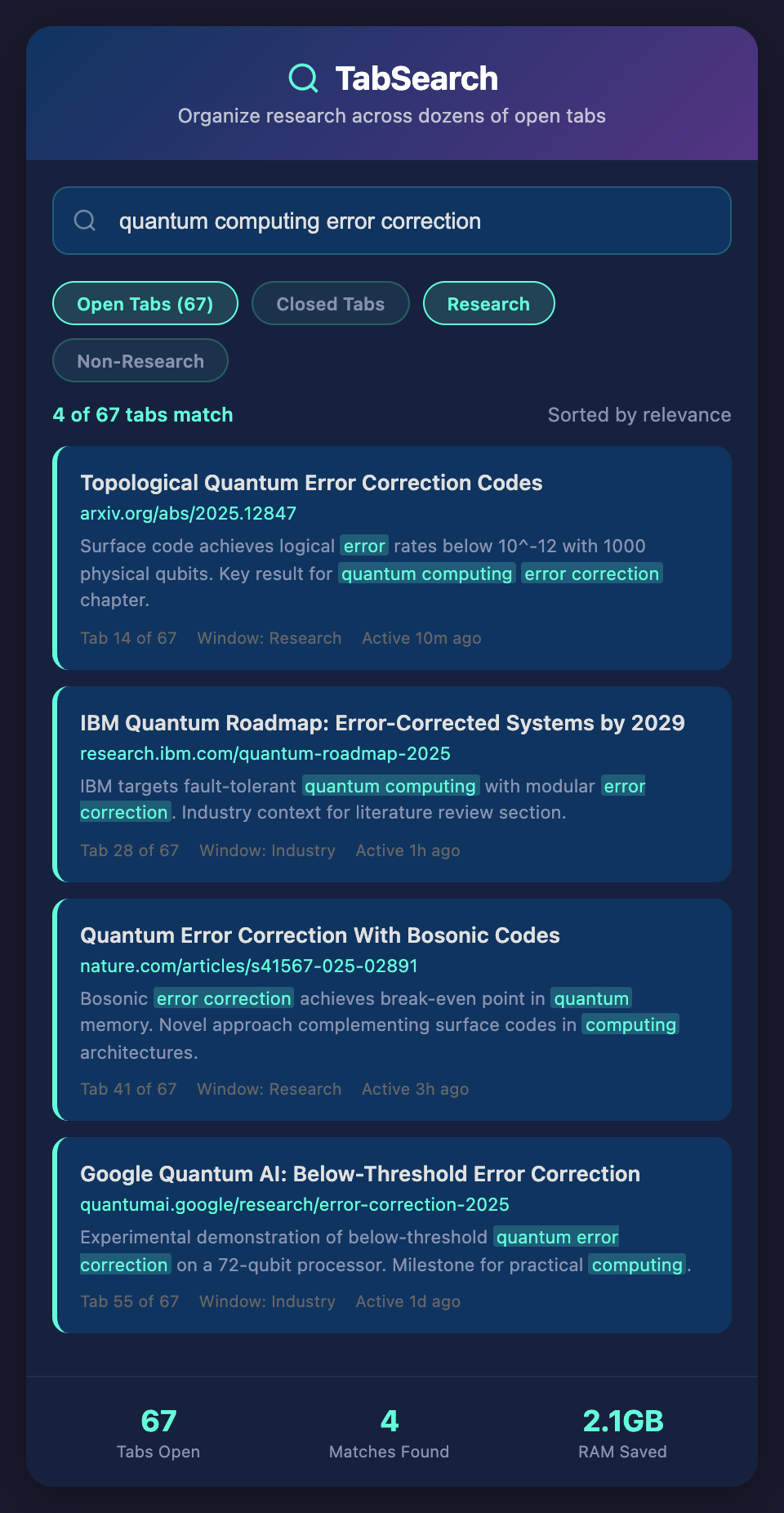
Search across everything you have open: "Give me every mention of 'statistical significance' across my 73 tabs." Results appear instantly with source context.
Preserves Tab Context While Adding Organization
Keep tabs open for focus and context. The system captures everything automatically. When you close tabs or restart your browser, nothing is lost.
Connects Across Tabs
Find relationships between sources across different tabs:
-
"Which papers discuss methodology from paper in tab 12?"
-
"Show me all sources that cite Smith et al."
-
"What conclusions do sources in tabs 30-40 agree on?"
Real-World Research with 50+ Open Tabs
A researcher studying climate policy:
Week 1: Opens 50 tabs across climate science, policy analysis, economic modeling, and case studies.
Tuesday, Week 2: Department meeting asks "What's the consensus on carbon pricing?"
With just tabs: Hunting through tabs trying to find economic policy sources. Misses important papers. Takes 20 minutes to gather thoughts.
With intelligent capture: Search for "carbon pricing effectiveness" across open tabs. 12 results appear instantly, each with source context. Cites three papers in 2 minutes with perfect accuracy.
Thursday, Week 2: Colleague asks "How do climate models handle uncertainty?"
With just tabs: Tab hunting again. Uncertainty is discussed in multiple papers, but you can't easily compare approaches.
With intelligent capture: Search for "uncertainty models" or "uncertainty quantification." Scan results across tabs. Identify three different approaches discussed in papers. Generate a comparison list in 5 minutes.
Week 3: Time to write proposal. Browser has 73 tabs.
With just tabs: Manually go through tabs again, copying sources and citations. 2+ hours of manual organization.
With intelligent capture: Search for relevant topics. Export bibliography automatically. All sources already captured, cited correctly. 15 minutes of setup.
Organizing Open Tab Research
Active Research Tabs
Keep tabs open for sources you're actively reading. The system captures everything automatically.
Topic-Based Searches
Instead of manually organizing tabs into folders, search by topic. "Show me all open sources discussing X."
Reference Preservation
When you find a quote or data point, highlight it while reading. The source and highlight are captured automatically with context.
Temporary Collections
Create lightweight collections for specific purposes (grant proposal, literature review) without reorganizing your entire tab environment.
Tab Cleanup Without Loss
Close tabs freely. Nothing is lost. All content is indexed and searchable. Reopen specific sources when needed.
Practical Workflow with Multiple Tab Research
Session 1: Discovery
Open 20 tabs exploring a new topic. Don't organize anything. Just read.
Session 2: Exploration
Open 30 more tabs as you follow references and discover related topics. Automatic capture has indexed everything.
Session 3: Analysis
Search across all 50 tabs to understand the landscape. Run searches to answer specific questions about the topic.
Session 4: Synthesis
Use search results to build understanding and identify gaps. Use captured sources to write and cite.
Session 5: Output
Create bibliography from captured sources. Write proposal or paper with full citations ready.
Handling Tab Overwhelm
Researchers often feel overwhelmed by tab numbers. The solution isn't closing tabs; it's making them searchable:
-
100 open tabs + searchability = organized research
-
100 open tabs + no search = chaos
-
10 organized tabs + no search = limited research
-
20 unorganized tabs + searchability = functional research
The tab count matters less than whether you can find information across them.
Expected Improvements
Researchers using intelligent capture with open tabs report:
-
70% faster searches: Finding sources takes seconds, not minutes
-
Zero source loss: Close tabs or restart browser; nothing is forgotten
-
Faster synthesis: Compare across 50+ sources instantly via search
-
Better organization: Natural organization emerges from usage rather than being imposed
The Pragmatic Advantage
Some researchers are "closers"—they organize as they go, keep tabs minimal. Others are "accumulators"—they open tabs and deal with cleanup later. Both approaches work if sources are searchable and capture happens automatically.
You don't need to change your tab style. You just need your tabs to be intelligent.
Keep your research tabs open and searchable. Join the waitlist for automatic capture that makes dozens of open tabs functional, organized, and searchable.