Reducing Research Time With Full-Text Search Across Your Sources
The Hidden Hours: Why Traditional Research Methods Are Slow
Imagine you're writing about sustainable agriculture and remember reading something about soil carbon sequestration in a paper from a few weeks ago. But which paper? You have 60 sources. Was it in the soil health paper or the carbon cycle paper or the regenerative agriculture review?
You start searching manually: open folder, scan files, open promising PDFs, search within each PDF one at a time. Fifteen minutes later, you find the relevant passage. Fifteen minutes for what should be a 15-second task.
Research time is consumed not by reading and analysis, but by finding information you've already read. The manual process of browsing papers, skimming chapters, and scrolling through PDFs to relocate information is among the least efficient work researchers do.
Full-text search eliminates this inefficiency entirely.
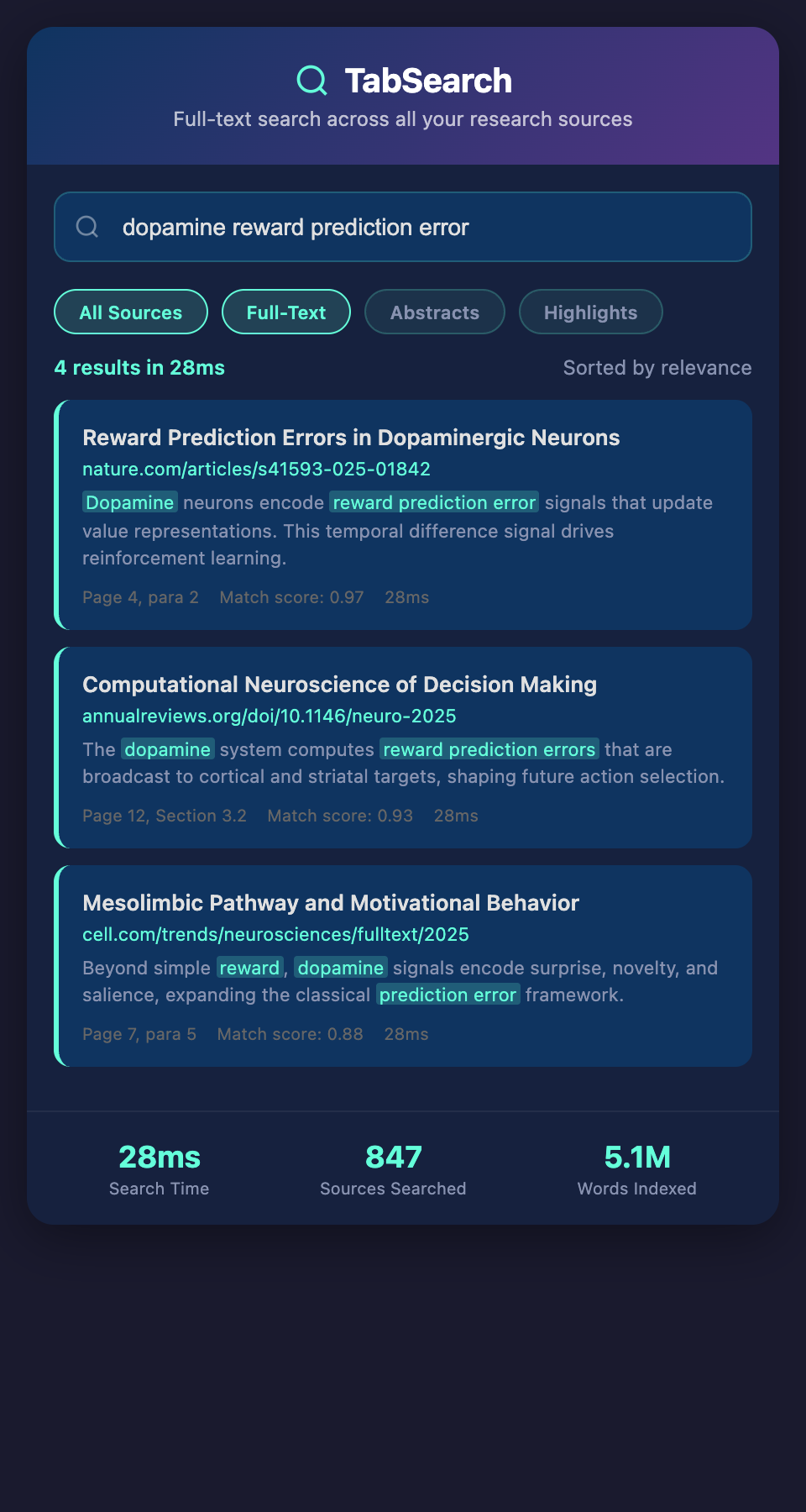
What Full-Text Search Really Means
Full-text search isn't just searching titles and author names—it's searching the complete content of every source for any word or phrase.
Imagine these search scenarios:
-
Specific phrase: Search "soil carbon sequestration" across 60 papers and instantly see every mention in context
-
Author + topic: Search papers by "Sarah Chen on climate adaptation" to see everything she's written that you've collected
-
Multiple terms: Search for papers discussing both "carbon pricing" AND "energy policy" (not just papers that mention these terms somewhere, but papers discussing both)
-
Exact phrasing: Search "the critical tipping point is" to find exact passages you remember
-
Negation: Search for papers discussing "climate models" but NOT "climate denial"
Each search returns results in milliseconds, with the relevant text highlighted and context shown.
Why Full-Text Search Changes Research Workflow
Cognitive Load Reduction
When you know you can instantly search across everything you've read, you don't need to remember which paper contained information. You can trust that searching will find it.
This is psychologically powerful: instead of worrying "where did I see that?" you simply search. Your mental energy redirects from information retrieval to analysis.
Discovery Through Exploration
Full-text search enables exploratory research. You might search for a term you vaguely remember and discover papers you'd forgotten about, creating unexpected connections.
Example: While researching renewable energy economics, you search "grid stability" and rediscover a paper on distributed generation that you'd read but not tagged. This paper might become central to your analysis.
Faster Literature Synthesis
When writing your literature review, synthesizing dozens of sources is tedious without search. You need to compile:
-
How different sources define key concepts
-
What methodologies researchers use
-
Where authors disagree
-
What the consensus views are
-
What gaps researchers have identified
With full-text search, you can instantly find:
-
Every mention of "definitional boundaries"
-
All papers using "experimental design"
-
Every instance of disagreement about "optimal carbon pricing"
-
Search for "future research" to find gaps identified by researchers
This transforms literature synthesis from days of manual reading to hours of targeted searching and synthesis.
Preventing Redundant Analysis
You're writing the methodology section and want to show how different researchers approach similar problems. Without search, you manually flip through papers. With search, you query "methodology" across papers on your topic, instantly seeing how seven different researchers describe their approach.
Citation Verification
As you write and cite sources, you want to verify the exact text. With full-text search, you instantly confirm: "Yes, the paper says 'this result suggests potential for scaling,' not 'this guarantees scalability.'" This prevents accidental misquoting.
Advanced Search Capabilities
Full-text search goes beyond simple word search:
Boolean Search
Combine terms with operators:
-
AND: "climate change" AND "agriculture" (both terms must be present)
-
OR: "global warming" OR "climate change" (either term is fine)
-
NOT: "climate change" NOT "denial" (exclude matching results)
-
Complex: ("climate change" OR "global warming") AND "agricultural adaptation" NOT "speculative"
Phrase Search
Search for exact phrases: "the following analysis demonstrates" finds pages containing these exact words in this exact order.
Proximity Search
Find terms near each other: "carbon" NEAR "pricing" finds pages where these words appear within, say, 10 words of each other.
Fuzzy Matching
Find approximate spelling: "sequestration" also matches misspellings like "sequestration" if source has OCR errors.
Weighted Search
Give more importance to certain fields:
-
Title weight: If a search term appears in the title, it's more relevant
-
Abstract weight: Authors' own summary of content is more important than body text mentions
-
Your annotations: If you've tagged something, it's more relevant
Field-Specific Search
Search within specific metadata fields:
-
Author: "Smith" as author (not just mentioned in text)
-
Publication year: Find papers published 2020-2025
-
Source type: Find only peer-reviewed papers, or only books, or only reports
Real-World Search Examples
Example 1: Finding Methodologies
Scenario: You're designing a study and want to understand different research methodologies used in your field.
Search: "mixed methods" OR "qualitative" OR "experimental design" AND "environmental policy"
Result: 12 papers discussing various methodologies. By reading these sections, you understand how environmental policy researchers approach studies—experimental vs. observational, quantitative vs. qualitative, etc.
Time saved: Instead of manually opening 12 papers and searching within each one for methodology sections, results are instant and focused.
Example 2: Understanding Disagreement
Scenario: You've read that there's disagreement about carbon tax effectiveness. You want to understand different positions.
Search: "carbon tax" AND ("beneficial" OR "effective" OR "successful") — returns papers arguing carbon taxes work
Second search: "carbon tax" AND ("ineffective" OR "insufficient" OR "regressive") — returns papers arguing against carbon taxes
Result: You instantly see which papers take which position, understanding the debate without manually reading all your sources.
Example 3: Tracking a Concept Evolution
Scenario: You want to understand how researchers' thinking about "climate adaptation" has evolved over time.
Search: "climate adaptation" sorted by publication year
Results: Papers from 2015 define it one way, papers from 2020 define it differently, papers from 2025 refine it further. You can trace how the concept evolved without manually reading chronologically.
Example 4: Finding Gaps
Scenario: You want to identify research gaps to frame your contribution.
Search: "future research" OR "gap in literature" OR "remains understudied"
Results: Every paper's own statement about what research is missing. This gives you researchers' own views on gaps rather than your inference.
Example 5: Citation Investigation
Scenario: A key paper cites three different climate sensitivity estimates. You want to find what researchers say about why they differ.
Search: "climate sensitivity" AND ("uncertainty" OR "range" OR "estimates differ")
Results: Instantly see passages where researchers discuss why climate sensitivity estimates vary, understanding the basis for disagreement.
Challenges With Full-Text Search
Quality Variation in Results
Searching across many sources means some results are more relevant than others. A paper mentioning "carbon" once in a list of topics is less relevant than a paper analyzing carbon policy extensively. Good full-text search ranks results by relevance.
OCR Errors in Scanned Documents
Papers that were scanned and converted to text via OCR might have errors. Searching "photosynthesis" might miss pages where OCR converted it to "photsynthesis." Fuzzy matching helps, but OCR errors remain challenging.
Semantic vs. Lexical Search
Searching for "climate impact" won't find pages discussing "climate consequences" or "climate effects," even though these mean similar things. True semantic search (finding meaning, not just words) remains computationally expensive at scale.
Information Overload
If you search broadly ("climate"), you get thousands of results. You need to combine search with filtering, sorting, and relevance ranking to make results manageable.
Organizing Search Results
Returned results need to be usable:
Relevance Ranking
Results sorted by relevance (weighted by whether search terms appear in titles, abstracts, or body text) rather than random order.
Context Display
When a search term is found, show it in context—the sentence or paragraph surrounding it—not just a fragment.
Highlighting
Mark matching terms so you quickly see where they appear on the page.
Grouping
Group results by source, by date, by source type to organize results meaningfully.
Saved Searches
Create saved searches you run repeatedly. "All papers on carbon pricing methodology" becomes a saved search you can run again.
Integration With Your Writing
The full power of full-text search appears when integrated with writing:
As you draft a section, you reference your search results directly:
-
Open a search result with highlighted text
-
Copy the exact passage into your document
-
The system auto-generates the citation
-
You're done—no manual citation formatting
This workflow turns research sources from static documents into active resources you query and synthesize.
Building Search Capability Into Your System
If you're starting to build research infrastructure, ensure full-text search is central:
Requirements:
-
Every document automatically indexed on addition
-
Search available across all sources
-
Results show context and ranking
-
Multiple search modes supported
-
Integration with citing and exporting
The difference between a searchable and unsearchable research database is the difference between research that flows (you find what you need instantly) and research that stutters (you manually hunt for information).
Search Behavior and Research Efficiency
Researchers using full-text search report these efficiency gains:
-
Literature review: 40% faster (because finding relevant passages takes seconds, not minutes)
-
Paper writing: 30% faster (because cross-referencing sources is instant)
-
Fact verification: 25% faster (because checking citations takes seconds)
-
Concept understanding: 50% improvement (because you see how every source addresses a concept)
These aren't tiny optimizations. If you spend 20 hours writing a paper, full-text search saves you 6-10 hours.
Practical Implementation
Start by assessing your current research:
-
How much time do you spend searching for specific information in sources?
-
How many times do you open a paper, search for something specific, and then close it?
-
How often do you relocate sources you've already read?
If the answer to any of these is "frequently," full-text search will transform your workflow.
Ready to eliminate the hours spent hunting for information in your research sources? Join our waitlist for a full-text searchable research database that puts all your sources' content at your fingertips.