Debug Faster: How Searchable Browser Tabs Speed Up Problem Solving
The Debugging Tab Nightmare
You're tracking down a tricky bug. It's 2 AM, and you've got seventeen tabs open: three Stack Overflow threads, four documentation pages across different frameworks, two GitHub issue discussions, a blog post about memory leaks, and your own project files. You found something relevant twenty minutes ago, but now you can't remember which tab it was in. You click through each one methodically, growing more frustrated with each irrelevant page.
This scenario is painfully familiar to most developers. Studies show developers spend an average of 40% of their time searching for information rather than writing code. When you're debugging, this number climbs even higher. Every second spent clicking through tabs is a second lost from actually fixing the problem.
The native browser tab system wasn't designed for the way modern developers work. You're juggling multiple projects, multiple documentation sources, multiple code repositories, and multiple research tabs simultaneously. Browser bookmarks are too static. Tab management tools offer no search functionality. Your IDE gives you code navigation but not web research organization.
Why Browser Search Isn't Enough
Your browser comes with a search function. You can press Ctrl+F and search the current page. But that's the problem—it searches only the current page. When you're debugging, you don't just need to search within one documentation page. You need to search across all your open tabs and recent browsing history.
Native browser features have severe limitations:
-
No cross-tab search: You can only search the active tab, forcing you to manually check each tab
-
No persistence: Closing a tab means losing all that research, even if you might need it tomorrow
-
No organization: Tabs are a flat list with tiny titles, impossible to categorize by project or problem domain
-
No semantic understanding: Browser search is substring matching, not intelligent full-text search
-
No context during searches: You can't quickly jump back to a solution you used last month because you don't remember which tab it was in
Developers work around this by opening new search tabs, taking screenshot notes, or copying content into local files. But none of these solutions are efficient or scalable. You need a better system.
Full-Text Indexed Browser Tabs: The Solution
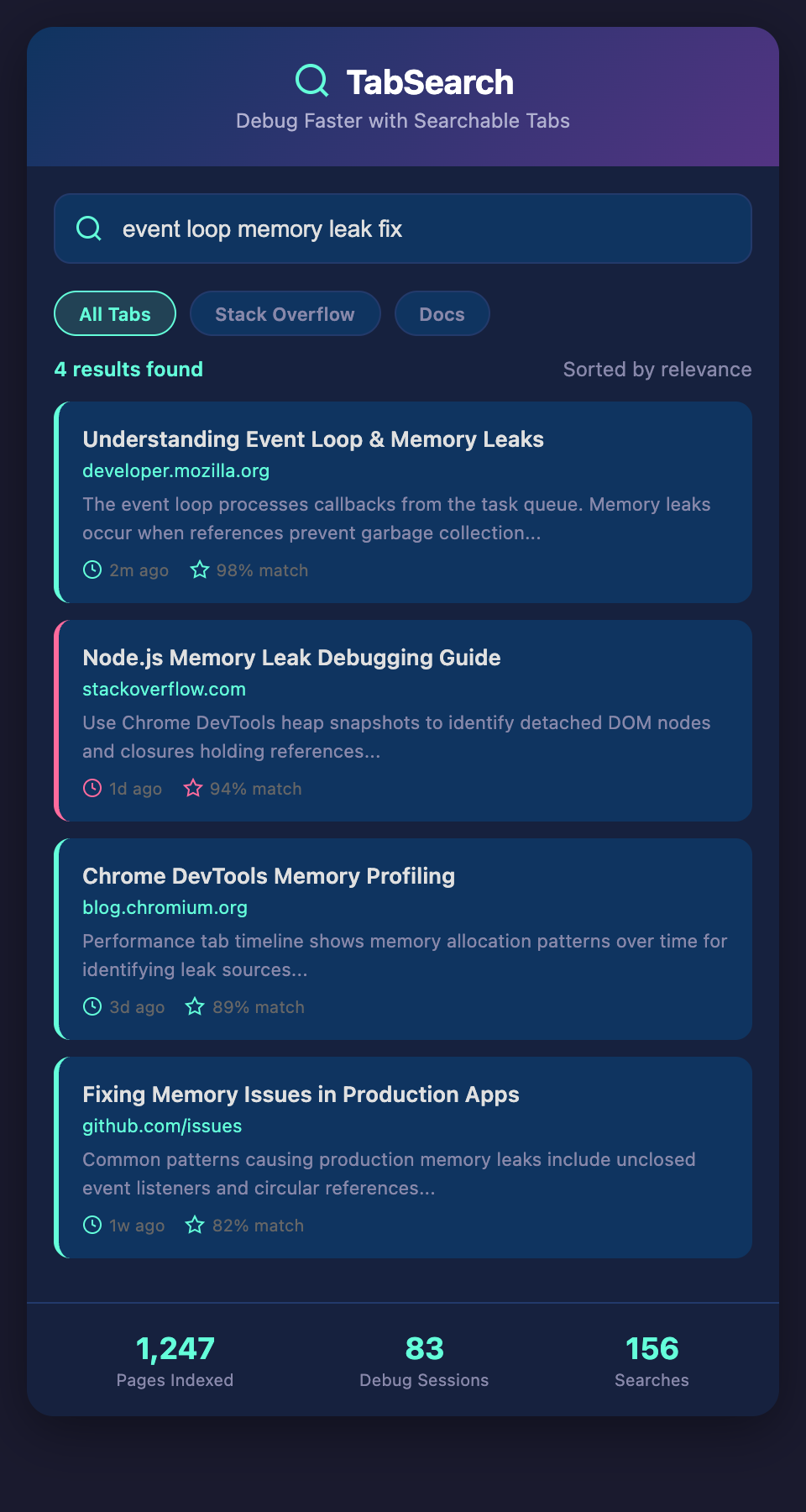
Full-text indexing means every word on every page you visit gets indexed and searchable. When you type "event loop memory leak," the system instantly returns every tab and page where those concepts appear together, ranked by relevance.
This changes everything about how you research and debug:
Instant Access to Everything: Type your problem, get results from every resource you've ever referenced. No more tab clicking, no more "I know I read about this somewhere."
Persistent Knowledge: Even after you close tabs, your research is preserved. You can search for solutions you found months ago without rebuilding your research from scratch.
Organized by Project: Your extension automatically groups findings by the browser tabs you had open during specific projects, making it easy to find "oh right, I solved something like this in the payment integration project."
Relevance Ranking: Instead of seeing raw search results, you get pages ranked by how thoroughly they address your query. A blog post that discusses your exact problem rises to the top.
Real-World Debugging Scenarios
Scenario 1: Multi-Framework API Confusion
You're integrating three different APIs in one project: Stripe for payments, Auth0 for authentication, and Twilio for SMS. You've got documentation for each open, plus Stack Overflow threads about integration problems, plus GitHub issues from users hitting the same bugs. When you encounter an issue with authentication flow affecting payment processing, you need to search across all these sources simultaneously. Full-text search finds the relevant discussion in the Auth0 docs and the GitHub issue where someone encountered the exact same edge case.
Scenario 2: Framework Version Compatibility
You upgraded from React 17 to 18 and everything broke. You need to find all the breaking changes, check your code against them, and locate migration guides. You've got three tabs on the official migration guide, two on community blog posts with upgrade experiences, and countless Stack Overflow answers about specific broken patterns. Searching "useEffect dependencies" instantly shows you every source discussing this specific issue, rather than clicking through tabs hoping to find the right one.
Scenario 3: Algorithm Implementation
You're implementing a complex algorithm you haven't built before. You've researched the theory, found implementation examples, and bookmarked academic papers. Now you're debugging your code and hitting a specific issue. Rather than manually searching through your seven research tabs, you search "binary tree balancing rotation," and the system shows you exactly where you read about rotations, the code example you found, and the Stack Overflow answer that addressed your specific edge case.
Building Your Searchable Research System
Getting started is straightforward. Install the browser extension on your development browser. The extension begins indexing every page you visit. Pages are full-text indexed locally in the extension's storage, so your research stays private.
To use it effectively during debugging:
-
Keep your research tabs open normally—don't change your workflow
-
When you need something, use the extension's search instead of clicking through tabs
-
Organize by project—the system automatically groups your research by when you were actively on a project
-
Search naturally—type your actual question or problem, not keywords
The system learns from your patterns. Pages you visit more frequently during certain types of work get higher relevance. The longer you use it, the better it understands your development context.
The Cumulative Productivity Impact
Shaving five minutes off your debugging sessions sounds small. But developers debug constantly. If searchable browser tabs save you five minutes per debugging session, and you have four debugging sessions per day, that's 20 minutes daily. Across a year, that's over 80 hours recovered—time you could spend writing features, improving code quality, or learning new technologies.
More importantly, you're reducing context switching. Every time you lose track of which tab contains the information you need, your brain context-switches. Research shows context switching costs developers up to 40% of their productive time. When you can instantly find what you need, you maintain focus and flow state longer.
And there's the knowledge retention benefit. When you can search your own research history, you're less likely to solve the same problem twice. That frustrating moment—"Wait, didn't I figure out how to do this last month?"—disappears entirely.
Stop Searching, Start Finding
The tools you use shape how you work. Right now, your browser is optimized for discovering new information, not organizing research you've already done. That's about to change.
If you're tired of losing tabs during debugging sessions, frustrated by redundant research, or spending too much time searching instead of coding, try our full-text searchable browser extension. Keep all your research instantly accessible. Debug faster. Focus longer.
Join the waitlist to get early access when we launch. We're building this specifically for developers like you who want research to stop being a bottleneck.