Full-Text Search Across All Your Reference Tabs Instantly
The Full-Text Search Advantage
Traditional browser search is primitive:
-
Search by keywords in URL and title only
-
Can't search page content
-
Can't search across multiple pages simultaneously
-
Results are binary: found or not found
Full-text search is fundamentally different:
-
Search actual page content, not just metadata
-
Search across thousands of pages instantly
-
Rank results by relevance
-
Find information even with different terminology
This difference is transformative for developer productivity.
Why Full-Text Search Matters for Reference Materials
The Terminology Problem
Different sources use different words for the same concept:
-
"Async functions" vs "promises" vs "coroutines" vs "futures"
-
"Error boundary" vs "error handler" vs "exception handling"
-
"State management" vs "flux pattern" vs "reducer"
-
"API endpoint" vs "route" vs "resource"
A developer might know to search for "async functions" but the best explanation uses "coroutines". Without full-text search, you miss it.
Full-text search with semantic understanding finds it regardless of terminology.
The Implicit Information Problem
Reference materials often contain information not obvious from the title:
-
A page titled "React Hooks API" contains information about "performance optimization" in a deeply nested section
-
A Kubernetes page about "Deployments" contains important information about "rolling updates"
-
A database article about "Indexes" discusses "query performance"
Keyword search of titles would miss these. Full-text search finds them.
The Multi-Source Problem
The same concept exists in multiple sources with different explanations:
-
"Error handling in async code":
-
MDN explains it with Promises
-
TypeScript Handbook explains it with async/await
-
Node.js docs explain it for callbacks
-
3 different blog posts offer different perspectives
-
Full-text search surfaces all of them. You pick the explanation matching your context.
How Full-Text Search Works
Indexing
Every page you reference is indexed word-by-word:
-
Document: "React hooks allow you to use state in functional components"
-
Index includes: ["react", "hooks", "allow", "use", "state", "functional", "components", "react hooks", "use state", ...]
This index is built once and searched millions of times.
Ranking
When you search, results are ranked by relevance:
-
Exact matches ranked higher than partial matches
-
Phrase matches ranked higher than scattered words
-
Field weight: Title matches weighted higher than body text
-
Recency: Recent content ranked higher than outdated
-
Frequency: How often the term appears relative to document length
-
Your usage: Pages you've used before ranked higher
This ranking means top results are almost always what you need.
Advanced Searching
Full-text search supports:
-
Phrase search: "error boundary" (exact phrase)
-
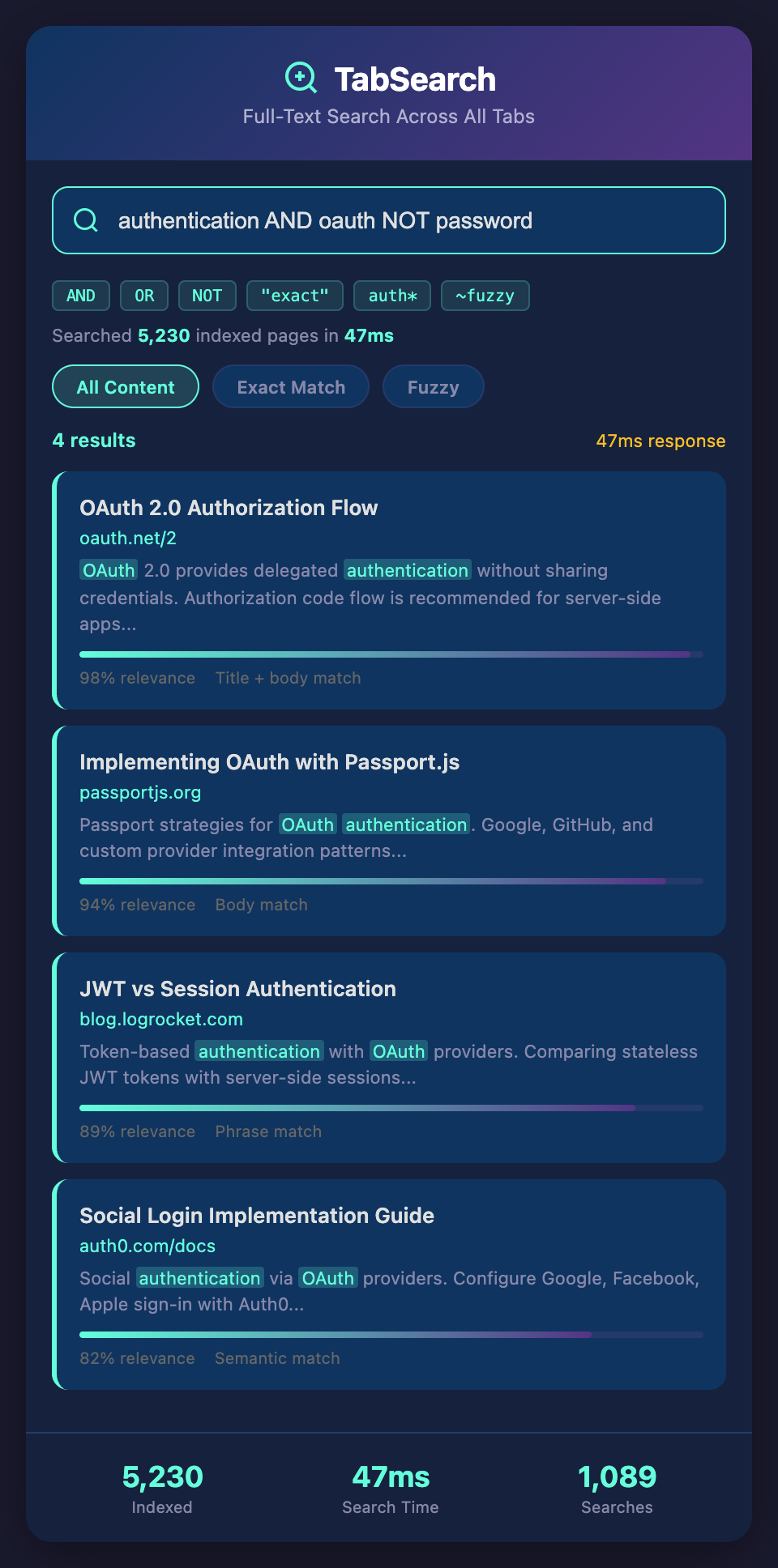
Boolean operators: "authentication AND oauth"
-
Negation: "authentication NOT password"
-
Wildcard: "auth*" (auth, authentication, authorize, etc.)
-
Fuzzy matching: "cuistomer" finds "customer"
These advanced features help you find exactly what you need.
Full-Text Search In Practice
Scenario 1: Debugging an Obscure Error
You get error: "Cannot read property 'map' of undefined"
-
Search: "cannot read property map undefined"
-
Results include: React documentation, JavaScript documentation, Stack Overflow discussions
-
Best result ranks first—it's the exact error with explanation
-
You find the solution in seconds
Without full-text search, you would:
-
Search Google "cannot read property"
-
Get millions of results
-
Dig through several pages
-
Finally find a Stack Overflow answer
Scenario 2: Finding Examples with Specific Pattern
You need to find an example of "pagination with cursor-based tokens" but you're not sure what to search:
-
Search: "pagination cursor token"
-
Results show: API documentation with cursor-based pagination, blog post explaining token-based pagination, GitHub example with cursor implementation
Full-text search understands all these are related to your concept, even if phrased differently.
Scenario 3: Cross-Source Learning
You're learning "higher-order components" in React. You want to understand:
-
Official React explanation
-
Tutorial blog post comparison with Hooks
-
Real-world example from open source
-
Search: "higher-order component example implementation"
-
Results surface all three sources because they all discuss the concept
-
Each explains it differently—you learn from multiple perspectives
Scenario 4: Finding Related Concepts
You're reading about "middleware" in Django. You realize there's a pattern connection to "middleware" in Express.js and "middleware" in Kubernetes.
-
Search: "middleware pattern"
-
Results show all three (Django, Express, Kubernetes) because they all discuss the pattern
-
You understand that the concept transcends frameworks
Building Your Full-Text Search System
Requirements
Fast indexing: New pages indexed in milliseconds as you visit them.
Instant search: Results returned in <100ms, even across thousands of pages.
Rich ranking: Results ranked by relevance, authority, recency, and usage.
Advanced operators: Boolean logic, phrase search, wildcards.
Privacy: Index lives on your machine or in your private account.
Integration: Works automatically as you browse—no configuration needed.
Implementation Approach
Most developers use:
-
Capture system: Browser extension captures pages you visit
-
Indexing engine: Full-text indexing of captured pages
-
Search interface: Fast, responsive search UI
-
Result ranking: Algorithmic ranking for relevance
The architecture is mature. Several open-source full-text search libraries exist (Lunr.js, Typesense, Meilisearch).
Real Performance Gains
With full-text search of your reference materials:
-
Information retrieval: 10x faster than browser history + Google
-
Learning retention: Finding previous research reinforces learning
-
Decision making: Access all related information, not just the first result
-
Onboarding: New team members search your indexed knowledge
A developer might spend:
-
Before: 3 hours searching for documentation on a complex topic
-
After: 20 minutes with full-text search
That's 2 hours 40 minutes saved per occurrence. Over a year, the cumulative time saved is enormous.
When Full-Text Search Changes Everything
This matters most when:
-
You're learning new technologies (every page you read is indexed)
-
You're debugging complex issues (search across multiple error explanations)
-
You're researching architecture decisions (find all pros/cons across sources)
-
You're mentoring others (search your indexed knowledge)
-
You're refactoring legacy code (search for patterns you've seen)
Essentially: full-text search matters for everything developers do.
Transform Your Reference Materials into Searchable Knowledge
Every page you read, every documentation site you visit, every code example you study—all becomes part of your searchable knowledge base.
Ready to search your reference materials at full-text speed? Join developers building instant search across all their documentation. Join our waitlist for early access to full-text search across your reference tabs.