How to Manage Multiple Language Documentation Tabs
The Documentation Tab Explosion
Every developer has experienced this: you start researching a feature, open the Python docs, then realize you need to check JavaScript behavior, then you want to compare Go syntax, and suddenly you have 47 tabs open spanning five different languages and frameworks. Your browser is sluggish, your context is fragmented, and when you inevitably need to revisit something you found 30 minutes ago, you have no idea which tab contains it.
The problem is fundamental to how modern development works. We're polyglot programmers, working across multiple languages, frameworks, and ecosystems in a single day. A backend engineer might jump between Python, JavaScript, SQL, and Bash. A full-stack developer lives across TypeScript, CSS, HTML, and various frameworks. The documentation for each is scattered across different websites, with different navigation patterns and search capabilities.
Why Traditional Tab Management Fails
Browser bookmarking doesn't help because you're looking for multiple related pages, not just a single URL. Browser history is linear and doesn't capture context—you remember reading about async handling but not whether it was in the Python docs or the JavaScript spec. Tab groups and pinning provide marginal improvements, but they don't solve the core problem: you can't search across the open documentation contextually.
Consider a typical research session:
-
You're implementing a caching layer in Python
-
You open Django documentation
-
You need to understand TTL concepts, so you cross-reference Redis docs
-
You want to see how Node.js handles cache expiration for comparison
-
You check a StackOverflow answer about cache invalidation patterns
-
You peek at the PostgreSQL docs about query caching
-
Now you have six tabs, three search tabs with results, and you've lost track of which tab had the specific Redis TTL example
When you close some tabs to declutter, you lose the research thread. When you try to revisit the research later, you have to re-open everything from memory or search history.
Strategies for Better Documentation Organization
Use Separate Browser Profiles
Create distinct profiles for different project types or languages. A "Python Backend" profile, a "Frontend" profile, a "DevOps" profile. This prevents cross-language contamination and gives your brain a context switch. Within each profile, you have fewer total tabs because they're dedicated to that domain.
Limitation: This only works if your work cleanly separates by domain. Full-stack work breaks this model.
Adopt Progressive Narrowing
Start research broadly, then narrow focus as you understand the problem better. Instead of immediately opening six documentation sites, open one, read thoroughly, take notes, close it, then move to the next. This requires discipline and works better for planned research than exploratory problem-solving.
Limitation: In real debugging sessions, you often need comparison across multiple sources simultaneously.
Implement a Tab Naming Convention
Immediately rename your tabs to include the source and key topic: "[Django] Cache TTL Config" instead of letting the site's default title dominate. Use consistent prefixes: [DOCS], [StackOverflow], [Blog], [Internal]. This makes tab bars more scannable.
Limitation: Still doesn't help you search or connect concepts across tabs.
Create a Research Markdown File
As you research, maintain a .md file in your project directory with links, snippets, and notes. This forces you to synthesize what you're learning and creates a searchable artifact.
Caching Architecture Investigation
Redis TTL Behavior
-
Default TTL: none (key persists indefinitely)
-
SET with EX option: expiration in seconds
-
Expire command: set TTL on existing key
Django Cache Framework
-
Multiple backends: Redis, Memcache, Database
-
TTL set via TIMEOUT in settings
This works, but you're context-switching between documentation and your editor, and you have to manually discover and document connections.
The Full-Text Indexing Solution
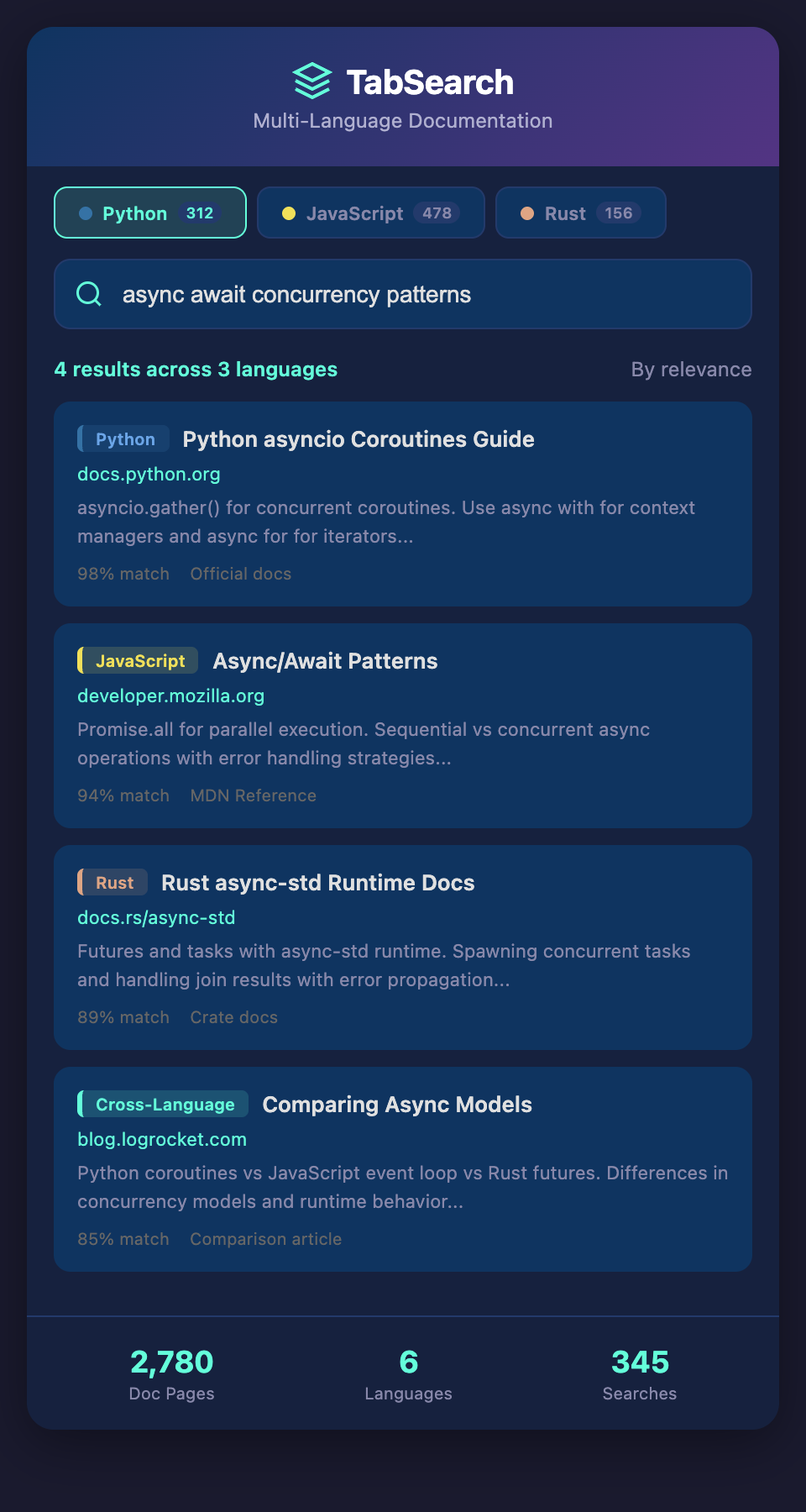
The real solution isn't managing tabs better—it's making all your open documentation searchable and connected. Imagine if every tab you opened had its content automatically indexed with full-text search. You could search for "TTL expiration" and instantly see that concept mentioned in the Redis docs, the Django cache docs, and that StackOverflow answer, all in one interface.
Full-text indexing lets you:
-
Search across languages: Find "async handling" and see results from both Python asyncio docs and JavaScript Promise documentation
-
Discover connections: See that Redis TTL and Django cache TIMEOUT refer to the same concept
-
Build context: As you accumulate tabs during a session, they form a searchable corpus of your research
-
Preserve research: Your investigation doesn't disappear when you close tabs; it's archived and searchable
-
Prevent re-research: You can search your history instead of re-opening old tabs or re-reading documentation you've already studied
Implementation Patterns
Passive indexing automatically captures every tab you open, building an index in real-time. Over time, your browser becomes a knowledge repository.
Selective tagging lets you mark important tabs or snippets for emphasis. A tab tagged "important-pattern" would rank higher in searches, letting critical documentation take priority.
Cross-reference extraction identifies when multiple tabs discuss the same concept and surfaces those connections automatically.
For developers juggling multiple languages, this transforms the research experience from chaotic tab management to focused, searchable investigation.
Starting Your Documentation Management Journey
Begin by enforcing a single rule: before opening a new documentation tab, complete your current task in the open tab, or explicitly note why you need the new tab. This consciousness around tab creation reduces accumulation.
Then, as you develop your research workflow, consider how full-text search could extend your current approach. Could you search across your open resources faster than manually navigating tabs? Could a searchable archive of past research save you from re-investigating the same questions?
The goal isn't perfection—it's working with your natural exploration tendencies rather than against them. Most developers research by opening tabs; the solution is making that chaos searchable.
Ready to stop drowning in documentation tabs? Join developers building better research workflows. Add your email to our waitlist and get early access to tools designed specifically for managing the documentation chaos of polyglot development.