Quickly Locating Archived Documentation References Without Tab Searching
The Documentation Archaeology Problem
You need to reference something from the Next.js documentation. You might have visited it last week during feature development, or maybe three months ago while setting up a project. You remember the concept—something about static generation and dynamic routes—but you don't remember the exact page or section.
So you do what most developers do: open a new browser tab and re-search. You could dig through your browser history, but that means manually checking dozens of pages. You could try to remember which bookmark folder it's in, but if it was ever there, it's been buried under dozens of other bookmarks.
This is documentation archaeology—excavating through fragmented knowledge sources to find information you've already researched. Every developer does this regularly, wasting time on information retrieval instead of using the information productively.
The inefficiency compounds across your career. How many times have you searched the same documentation? How many times have you re-read the same Stack Overflow answer? How much time have you spent re-researching things you already knew?
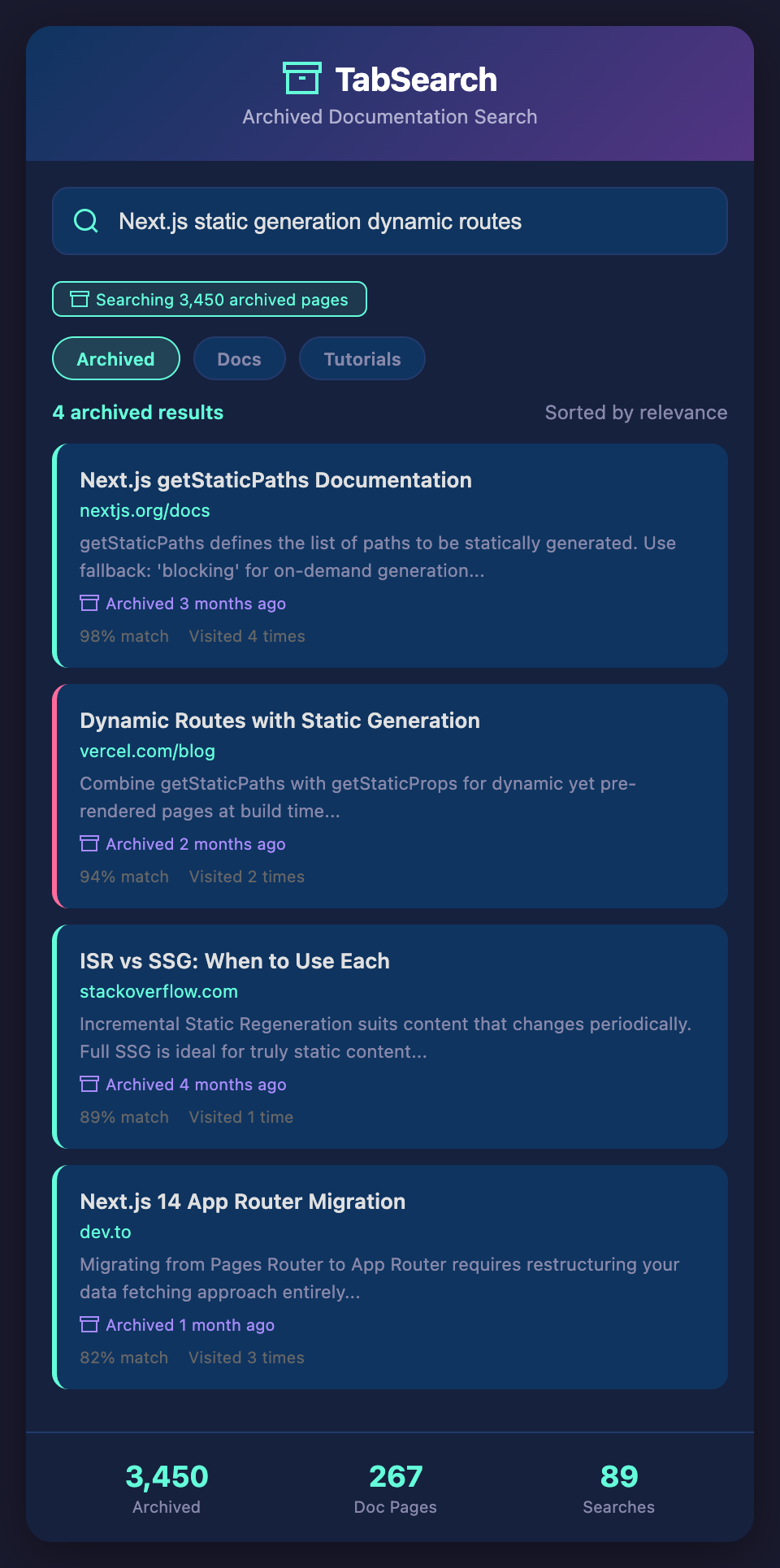
Why Archives Are Underutilized
Smart developers recognize this problem and try to solve it. They bookmark documentation pages. They save articles. They keep important resources in note-taking apps. But these solutions have a critical limitation: they're only useful if you remember to consult them.
When you need information, your instinct is to search. You reach for your browser search bar before you think to check your archives. Even if you wanted to check your archive, finding something requires remembering where you saved it, which note it's in, or which bookmark folder contains it.
Your archive fails because it requires you to maintain it actively and remember to use it. Instead, you search the public web, find the answer again, and repeat the cycle.
What if your archive was so effortless to use that it became your first instinct? What if every page you've ever visited was automatically archived and indexed, making it instantly searchable?
Full-Text Archives: Always Knowing What You Know
When every resource you've researched is indexed and searchable, everything changes. You maintain an implicit archive of your entire professional research history without doing anything special.
Here's what happens: Every page you visit during development—whether it's official documentation, blog posts, Stack Overflow answers, GitHub repositories, or technical wikis—gets indexed automatically. You don't need to bookmark. You don't need to save. Just browsing creates an archive.
Later, when you need that information again, you search instead of re-researching. The system shows you pages from your archive, ranked by relevance, alongside current web results. You often find your previous research first, because it exactly matches your needs—you found it before because it solved your problem before.
Real Archive Scenarios
Scenario 1: Framework Documentation Deep Dives
You spent a day learning about React's new features during its release. You visited multiple official documentation pages, read several blog post comparisons, and worked through tutorials. Months later, you're building a new feature and need to reference that feature, but can't recall the documentation structure.
With a searchable archive, you search "React concurrent features suspense", and immediately see all the documentation pages you visited during that learning day. The blog posts comparing old vs new approaches appear. The tutorials you worked through are all there. You're not re-learning, just referencing what you already know.
Scenario 2: Configuration and Deployment References
You worked through Docker configuration and deployment best practices for a project six months ago. Now you're setting up Docker for a new project. Instead of trying to recall the exact documentation sections or re-searching from scratch, you search "Docker multi-stage builds production optimization". Your archive shows you exactly which documentation pages and guides you read before, saving hours of re-research.
Scenario 3: Algorithm and Data Structure Archives
You researched binary search trees for a coding interview six months ago. Now you're building a feature requiring tree traversal. You search "binary tree traversal algorithms depth-first", and your archive shows you the computer science blog posts and interactive tutorials you studied before, plus the Stack Overflow answers about implementation tradeoffs.
Building Your Implicit Knowledge Archive
The key insight is that your archive shouldn't require maintenance. You don't actively "save to archive." Instead, your browser research is automatically archived as you browse naturally.
When you're reading documentation, you're building your archive. When you're researching solutions on Stack Overflow, you're building your archive. When you're exploring GitHub repositories, you're building your archive. No manual action required.
The archive becomes useful because it's comprehensive. It contains everything you've researched, not just what you remembered to bookmark. And it's searchable, so you can find relevant resources based on the concept you're thinking about, not based on remembering where you saved it.
The Reference Speed Multiplier
Consider how often you reference documentation or research. Maybe you look up API references five times per day. Maybe you search for best practices multiple times per week. If your archive lets you reference existing research instead of searching the public web, you've optimized repeated tasks.
Each reference is faster—you skip the search results page and external sites, going straight to resources that worked for you before. But the bigger gain is psychological. You feel confident that you have good references because you've curated them before, even if that curation happened implicitly.
Within weeks, your archived research becomes more valuable than general web search. You've found solutions that work for your specific stack. You've read explanations that matched your learning style. You've built upon documentation multiple times. Your archive is customized to you in ways generic search results can never be.
Never Excavate for Documentation Again
Your research history is too valuable to be scattered and unsearchable. Every page you visit during development is part of your knowledge system—make it retrievable.
Join our waitlist to get a searchable documentation archive. Access everything you've researched instantly. Reference instead of re-research. Build faster with confidence that you know what you already know.