Track Solutions to Recurring Programming Problems Efficiently
The Recurring Problem Curse
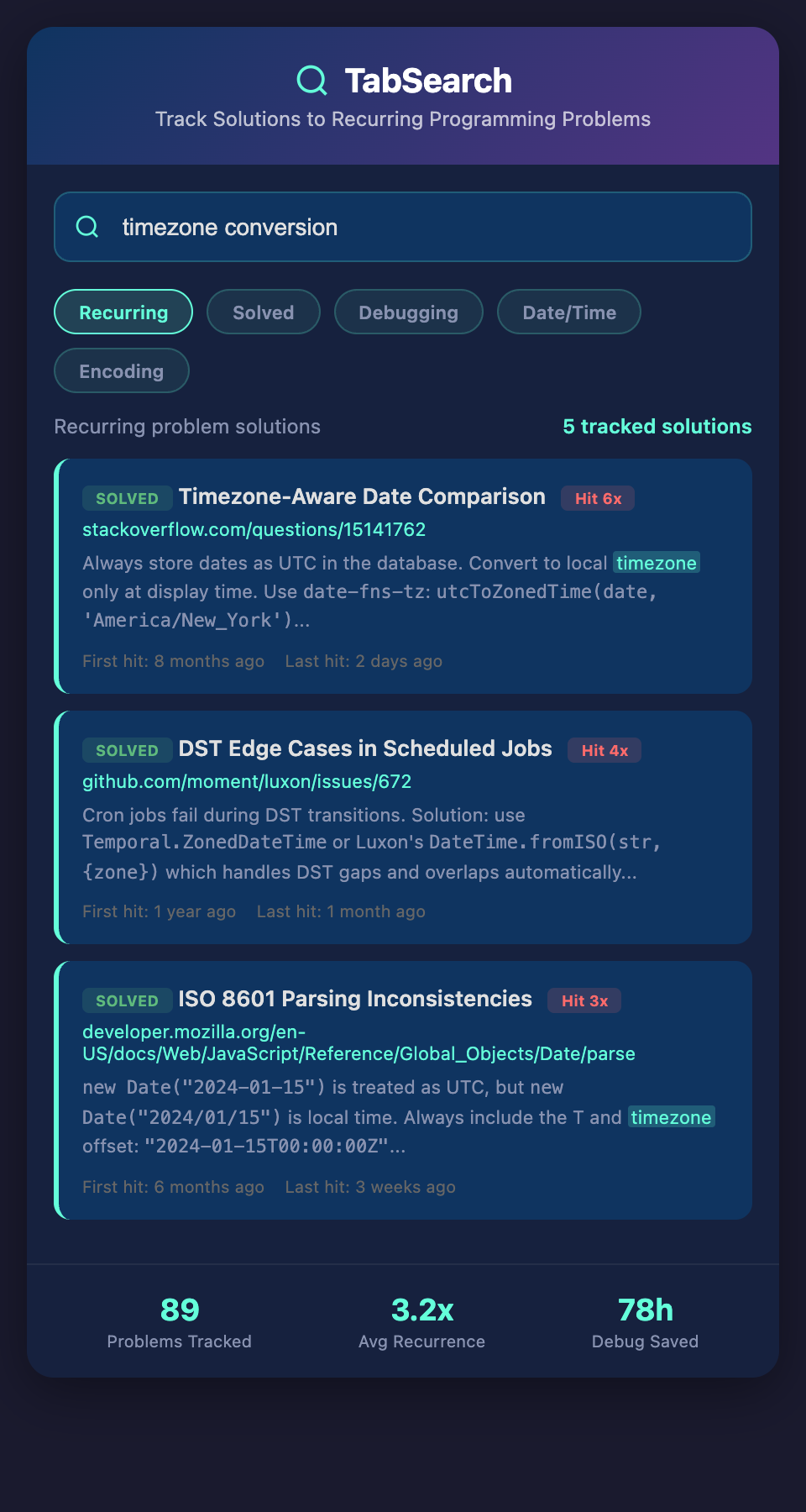
You've debugged the same issue at least five times across different projects. It's a "feature" of your tech stack. Race conditions in concurrent operations. Memory leaks from event listeners. CORS issues. State synchronization problems.
Each time, you remember solving it before, but you don't remember how. So you debug again from scratch. Same 4-hour debugging session you've had before.
If you could search "CORS error in Node.js when calling AWS Lambda," you'd instantly see the three posts you found, the Stack Overflow answer that explained it, and the code fix you implemented. 10 minutes instead of 4 hours.
Debugging is Expensive
Debugging is one of the most expensive activities in software development:
-
Senior developers spend 30-40% of their time debugging (vs. writing new code)
-
Each debugging session costs hours
-
Debugging the same issue twice is pure waste
-
Team members often debug the same issue independently
A team of five developers, each debugging the same issue independently once per year, wastes 5 × 4 hours = 20 hours annually. Just for one recurring issue.
Track 10 recurring issues, and you're wasting 200 hours per year. At $150/hour, that's $30,000 in wasted debugging time.
Why Issues Recur
These issues recur because:
They're environment or configuration-dependent. The race condition only shows up under load. The CORS issue only happens in production. You see it sporadically.
They're version-dependent. The issue exists in version 2.1 but was fixed in 2.3. When you upgrade, you forget the issue existed. When you're stuck on 2.1 for some reason, you debug it again.
Knowledge isn't shared. One developer debugs an issue and fixes it. The rest of the team doesn't know the issue exists or how to fix it, so they debug it independently.
It's not documented. Most debugging sessions aren't documented. The fix gets committed, but the reason for the fix and the debugging process aren't recorded.
Building a Debugging Knowledge Base
The solution is a searchable database of problems you've encountered and how you solved them.
When you encounter a bug:
-
Search your debugging knowledge base for similar issues
-
See solutions you've already found and how you debugged them
-
Apply the same fix or debugging approach
Or, if it's a new issue:
-
Document your debugging process as you go
-
Add the solution to the knowledge base
-
Tag it so it's findable later
Six months later, someone encounters the same issue. They search and find it. Debugging takes 10 minutes instead of 4 hours.
What Should Be Documented
Not just the solution, but the debugging process:
The problem: "Memory leaks when event listeners aren't cleaned up in React components"
The symptoms: "App gets slower over time, memory usage increases, no error messages"
The diagnosis: "Event listeners added in useEffect but not cleaned up in cleanup function"
The root cause: "Forgot to return cleanup function from useEffect"
The solution: "Always return cleanup function that removes listeners"
The prevention: "Linting rule to warn about missing cleanup"
The code fix: (actual code showing before/after)
Related resources: (blog post explaining the concept, Stack Overflow answer, documentation link)
Someone trying to debug a similar issue can follow the entire debugging story, not just copy the fix.
Pattern Recognition Across Issues
When you document recurring issues, patterns emerge:
You notice you have five different memory leak issues. All because event listeners aren't cleaned up. You write a utility function and share it.
You see three CORS issues. All with similar root causes. You add documentation about CORS configuration and link all three issues to it.
You identify four different race conditions. All in different contexts but with the same pattern. You write a guide about race conditions in your tech stack.
Team Debugging Efficiency
For teams, this is even more valuable:
When a new developer joins and encounters a bug, they can search "memory leak" and see how your team has debugged similar issues. They learn your debugging approach, not just the specific solution.
When you're pairing on a bug with a junior developer, you can reference your documented issues. "Remember that memory leak issue from last year? This is the same pattern."
When you're deciding whether to upgrade a library, you can search "version X is buggy" and see what bugs your team has hit and how to work around them.
Different Issue Types
Different problems need different documentation:
Bugs: Specific issues you've debugged and fixed. How to recognize them, how to fix them.
Performance problems: Bottlenecks you've identified and optimized. What to measure, how to improve.
Configuration issues: Setup problems you've solved. How to configure correctly, what mistakes to avoid.
Integration issues: Problems when integrating services. How to debug connection issues, authentication problems, etc.
Environment issues: Problems specific to development, staging, or production. How to diagnose, how to fix.
Making Issues Findable
The challenge is making issues discoverable. When you encounter a new bug, you might not know you've debugged something similar before.
The solution: good tagging and searchable content.
Tags by symptom: "slow performance", "memory leak", "race condition", "CORS", "auth error"
Tags by technology: "React", "Node.js", "PostgreSQL", "Redis", "Docker"
Tags by root cause: "missing cleanup", "event listener leak", "synchronization issue"
When you encounter a bug with memory increasing, you search "memory increase" or "memory leak" and find relevant previous issues.
Proactive Prevention
Taking this further: if you could analyze your codebase for patterns that lead to known issues, you could prevent bugs before they happen.
You have a documented issue: "Unhandled promise rejections cause server crashes in Node.js." Your system scans for Promise usage without .catch() handlers and warns you.
You have a documented issue: "Race conditions in state updates when API calls return out of order." Your system looks for code patterns that match this issue and suggests the documented solution.
From Reactive to Proactive
The spectrum:
Reactive: You encounter a bug. You search known issues. You find the solution quickly.
Proactive: Your system recognizes code patterns that match known issues and warns you before the bug happens.
Preventive: Your linting rules enforce patterns that prevent categories of bugs entirely.
Building Your Debugging Handbook
Over time, you build a handbook:
-
50+ documented bugs you've encountered
-
The debugging process for each
-
Solutions and workarounds
-
Prevention strategies
A new developer can learn from your entire debugging history. The time to first meaningful contribution drops from weeks to days.
A developer switching to a new language or framework learns from issues similar teams have hit. They avoid mistakes that they would otherwise have to learn through experience.
Institutional Learning
The real power: your team learns from every debugging session, not just the difficult ones.
Debugging is an expensive activity. If you can document and learn from that expense, you stop paying it repeatedly.
Join the waitlist to track problem solutions. Stop debugging the same issues repeatedly. We're launching a system that helps you document, track, and instantly find solutions to recurring problems—turning expensive debugging sessions into reusable knowledge.