Organizing Campaign Notes: Systems That Scale With Your Game
The Note-Taking Crisis Every GM Eventually Hits
Every GM starts with a system. A notebook. A wiki. A shared Google Doc. And for the first ten sessions, it works. Then the campaign grows. NPCs multiply. Plotlines branch. Locations stack up. And suddenly your "system" is a maze of half-organized information that takes longer to search than to just make something up from scratch.
This is the note-taking crisis, and it hits every GM who runs a campaign longer than three months. The root cause is not laziness or disorganization — it is that most note-taking systems are designed for linear information, and campaigns generate networked information.
A campaign is not a journal. It is a web of interconnected facts, characters, locations, events, and possibilities. The note-taking system you use needs to reflect that, or it will collapse under its own weight.
Evaluating Note-Taking Systems
There is no single best system. The best system is the one you will actually maintain. But every viable system needs to handle four core functions:
- Capture — Recording new information quickly during or after sessions
- Retrieve — Finding specific information when you need it during prep or at the table
- Connect — Linking related pieces of information so you can see relationships
- Update — Modifying existing information as the campaign evolves without losing the history
Let's evaluate common approaches against these functions:
The Physical Notebook
Capture: Excellent. Nothing beats the speed of writing by hand during a session. No loading times, no apps to switch between.
Retrieve: Poor. Finding a specific NPC detail from twelve sessions ago means flipping through dozens of pages. Indexes help but are tedious to maintain.
Connect: Poor. You cannot link entries in a physical notebook. You can use page references, but this quickly becomes unwieldy.
Update: Poor. Crossing out and rewriting is messy. Inserts and sticky notes help but create physical chaos.
Verdict: Great for in-session capture, terrible for everything else. If you use a notebook at the table, transfer key information to a digital system after each session.
The Single Long Document
Google Docs, Word, or a plain text file where you write session recaps in chronological order.
Capture: Good. Typing after the session is fast, and chronological order is natural.
Retrieve: Moderate. Ctrl+F works for exact terms but fails when you cannot remember the name of the NPC or the exact wording you used.
Connect: Poor. A linear document has no structural way to show relationships between entries. You can use hyperlinks within the document, but maintaining them is a chore.
Update: Moderate. You can edit previous entries, but if your document is fifty pages long, you will never scroll back to update old information.
Verdict: Works for campaigns under twenty sessions. Beyond that, the document becomes an archaeological dig.
The Wiki
Dedicated tools like Notion, Obsidian, World Anvil, or even a private MediaWiki instance.
Capture: Moderate. Wikis require you to decide where to put information (which page, which section) before you can record it. This friction slows capture.
Retrieve: Excellent. Wikis are built for retrieval. Search functions, page titles, and structured categories make finding information fast.
Connect: Excellent. Links between pages create a navigable web of information. This is the wiki's superpower.
Update: Good. Editing a specific page is straightforward, and the information stays in its logical location rather than being buried chronologically.
Verdict: The strongest overall system for long campaigns, but requires significant setup and ongoing maintenance. The risk is spending more time curating the wiki than prepping the game.
The Hybrid Approach
Most experienced GMs land on a hybrid that combines the strengths of multiple systems:
At the table: Physical notebook or a simple text file for raw capture. Do not worry about organization — just get it down.
After the session (10-15 minutes): Transfer key information to your structured system. Update NPC entries. Log session events. Note any decisions or promises made.
During prep: Work from the structured system. Use it to review active storylines, check NPC statuses, and verify continuity.
This hybrid approach separates capture (which needs to be fast and frictionless) from organization (which needs to be thorough and structured).
The Information Architecture That Works
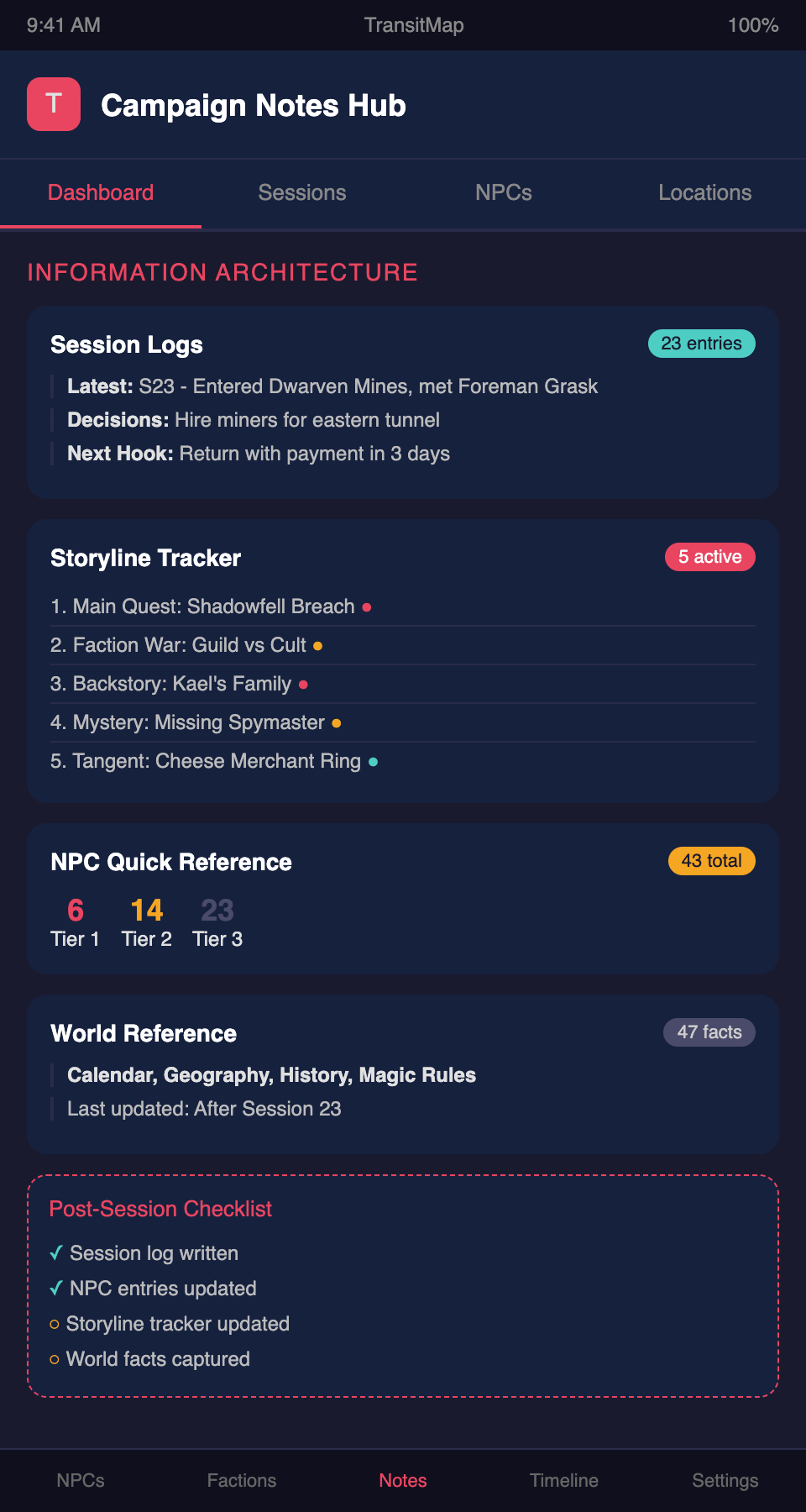
Regardless of which tool you use, organize your campaign information into these categories:
Session Logs — Chronological record of what happened. One entry per session. Brief — three to five paragraphs maximum. Focus on decisions made, information revealed, and what the players said they would do next.
Character Pages — One page per significant NPC. Current state, motivation, relationships, history with the party. Update after every session where this NPC appeared or was affected.
Location Pages — One page per significant location. Key features, NPCs present, connections to storylines. Update when the location changes.
Storyline Tracker — A list of every active storyline with its current status and next expected beat. This is your most-consulted document during prep.
World Reference — Established facts about your world: calendar, geography, history, magical rules, cultural details. Append-only — add new facts but rarely modify existing ones.
Session Prep Notes — Your prep for the upcoming session. This is ephemeral — it serves its purpose and then becomes raw material for the session log.
Common Organization Mistakes
Over-categorizing — Creating so many categories and subcategories that you cannot decide where information goes. If you spend more than five seconds deciding where to file something, your system is too complex.
Under-linking — Recording information in isolation without connecting it to related entries. An NPC page that does not link to the faction they belong to or the storyline they are part of is an orphaned node that will be forgotten.
Redundant entry — Recording the same information in multiple places. When you update one instance and forget the other, you create contradictions. Every piece of information should live in exactly one place, with links pointing to it from other relevant locations.
Perfectionism — Spending hours formatting your wiki pages with custom templates, images, and elaborate styling. Your notes are a tool, not a publication. Function over form, always.
Neglecting the archive — Never moving completed storylines, departed NPCs, or resolved quests out of your active notes. Your working documents should only contain information relevant to the current state of the campaign. Move everything else to an archive section.
The Maintenance Habit
No system survives without maintenance. The single most important habit is the post-session update: ten to fifteen minutes after each session, updating your tracking documents while your memory is fresh.
If you skip this habit, every system will degrade into chaos within a few months. If you maintain it, even a mediocre system will serve you well for years.
Schedule the update immediately after the session if possible. If you play on weeknights and are tired, do it the next morning. Do not let more than 24 hours pass — your memory degrades rapidly.
Looking for a note-taking system built specifically for campaign storyline tracking? Join the TransitMap waitlist — a visual organization tool that maps your campaign's storylines, NPCs, and events like a transit network you can navigate at a glance.