Integrating Digital Tools into RPG Module Design
The Digital Table Reality
A significant and growing portion of RPG play happens on virtual tabletops or uses digital tools at physical tables. Roll20, Foundry VTT, Fantasy Grounds, and other platforms host millions of sessions. Even at physical tables, players use digital character sheets, GMs use tablet-based references, and groups use shared digital maps.
Module publishers who ignore this reality lose sales to publishers who embrace it. A module with VTT-ready maps, digital handouts, and tool integration is more valuable to the modern GM than an equivalent module without these features.
VTT Integration
VTT-ready maps. Provide maps in formats compatible with major VTT platforms:
- High-resolution PNG or JPG files with grid alignment
- Separate GM and player versions (with and without secret areas, traps, and notes)
- Specified grid size (typically 70 or 140 pixels per square)
- Consistent scale across all maps in the module
Dynamic lighting data. For VTTs that support dynamic lighting (Foundry VTT, Roll20 Pro), provide wall and door placement data. This saves GMs hours of setup time and is a significant value-add.
Token images. Provide circular or square token images for all named NPCs and unique creatures in the module. Include both the character art and a token-formatted version with border.
Pre-built encounters. For supported VTTs, offer pre-built encounter scenes with maps, tokens, lighting, and initial positioning already configured. This is the highest-value digital integration because it makes the module plug-and-play.
Digital Handouts
Formatted handout files. Provide player handouts as separate, shareable files — not embedded in the module PDF. Include:
- Letters and notes as styled text documents or images
- Maps as separate image files
- Illustrations of key NPCs, items, or locations as shareable images
- Puzzle elements as interactive or printable files
Screen-optimized formats. Handouts designed for screen viewing should use landscape orientation, high contrast, and readable font sizes at typical screen viewing distances.
Printable formats. Handouts designed for physical table use should be formatted for standard paper sizes with appropriate margins.
Companion App Considerations
Character sheet integration. If your module introduces custom items, abilities, or conditions, provide these in formats compatible with popular character management tools (D&D Beyond, Demiplane, etc.).
Module-specific tools. Consider whether your module benefits from a simple companion tool:
- A state tracker for non-linear modules (which conditions are active)
- A timeline tracker for modules with ticking clocks
- A faction reputation tracker for modules with complex faction dynamics
- A clue tracker for mystery modules
These tools can be as simple as a fillable PDF or a Google Sheet template.
Digital-First Design Principles
Hyperlink everything. In digital modules, every cross-reference should be a clickable hyperlink. Every NPC mention links to their stat card. Every location mention links to its description. Every rule reference links to the relevant section.
Searchable text. Ensure all text in your PDF is actual text, not images of text. GMs frequently search PDFs during play — a non-searchable PDF is a significant usability failure.
Bookmarks and table of contents. A comprehensive bookmark tree in your PDF that mirrors the module's structure. GMs should be able to jump to any section in two clicks.
Layered PDFs. Consider providing layered PDFs where GMs can toggle elements: show/hide grid on maps, show/hide GM notes, show/hide player-visible content. This flexibility adds significant value.
Asset Packaging
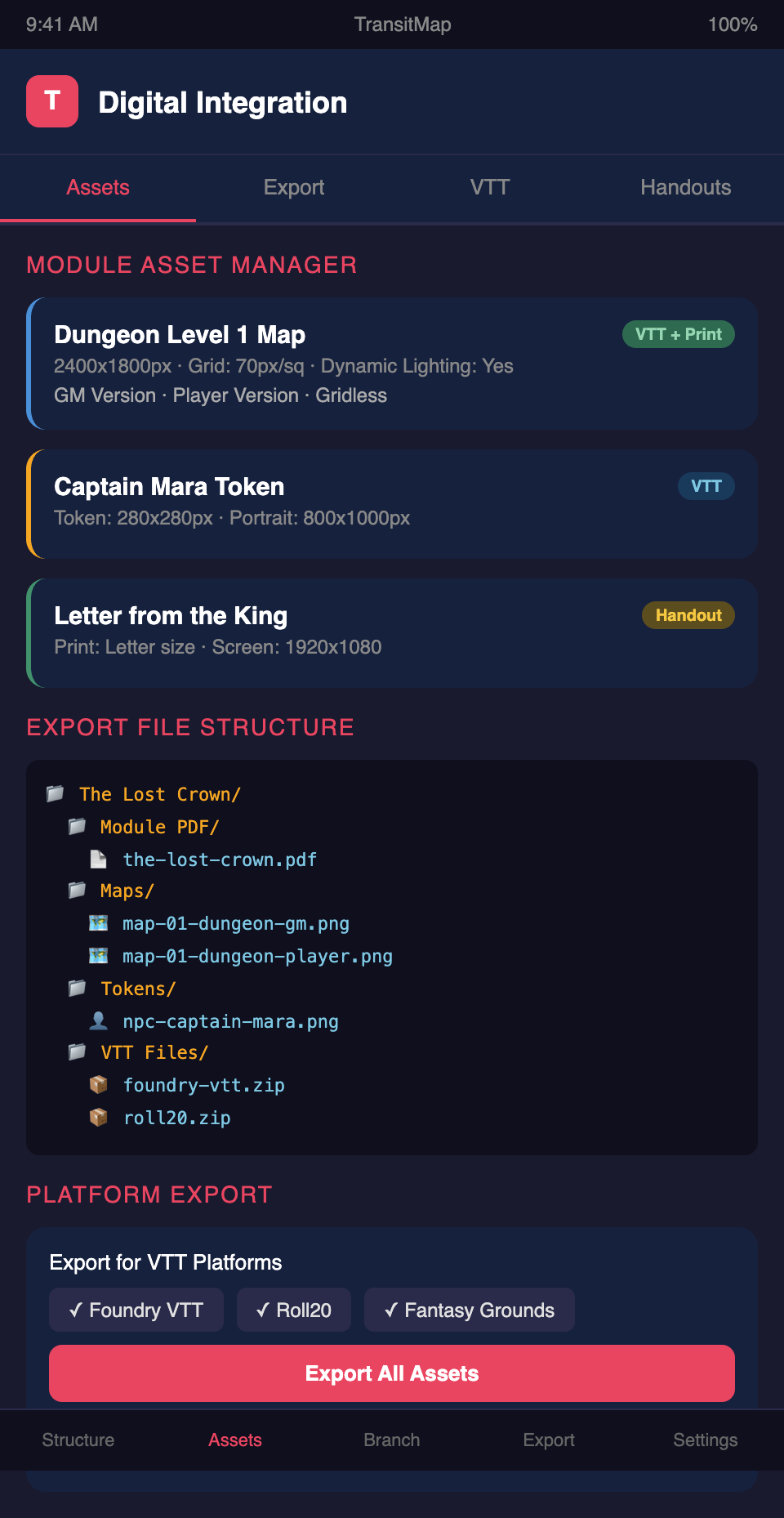
Organized file structure. When providing digital assets, organize them logically:
Module Name/
  Module PDF/
    module-name.pdf
  Maps/
    map-01-dungeon-level-1-gm.png
    map-01-dungeon-level-1-player.png
    map-02-town-overview.png
  Handouts/
    handout-01-letter-from-king.png
    handout-02-treasure-map.png
  Tokens/
    npc-captain-mara.png
    npc-selin-merchant.png
  VTT Files/
    foundry-vtt-module.zip
    roll20-module.zip
Naming conventions. Use clear, descriptive file names. The GM should be able to find the right asset by file name alone without opening every file.
Resolution guidelines. Provide assets at resolution appropriate for their use. Maps should be high resolution for zooming. Tokens should be appropriately sized. Handouts should be readable at intended display size.
The Digital Premium
Digital integration adds value and justifies higher pricing:
Bundle pricing. Offer a PDF-only version and a digital bundle that includes VTT files, digital handouts, and companion tools. The bundle commands a premium over the PDF alone.
Platform-specific versions. Offer platform-specific versions for major VTTs. A Foundry VTT module that installs with one click is worth more than a collection of loose assets.
Update support. Digital products can be updated. When you fix errors or improve assets, provide updated files to existing customers. This builds trust and encourages future purchases.
Integrating digital tools into your module design? Join the TransitMap waitlist — design your module with built-in digital integration, export maps and encounter data for VTT platforms, and provide GMs with a visual navigation tool that works on any screen.