How Tab Indexing Captures Listing Details That Screenshots Miss
The Screenshot Folder Nobody Searches
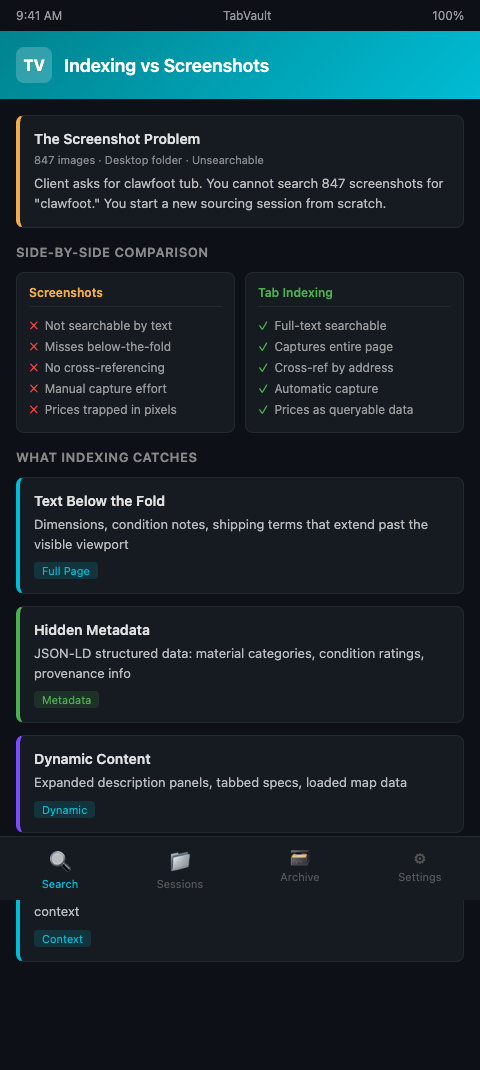
A dealer in Nashville keeps a folder on her desktop labeled "Salvage Screenshots 2025." It contains 847 images -- listing pages from EstateSales.net, auction previews from LiveAuctioneers, Craigslist posts for reclaimed lumber, and demolition notice pages from Metro Nashville's permit portal. When a client calls asking for a clawfoot tub, she does not open that folder. She cannot search 847 screenshots for the word "clawfoot." Instead, she starts a new sourcing session from scratch, browsing the same sites she already visited, hoping to find a listing she probably already saw.
This is the fundamental limitation of screenshots as a research tool. They preserve visual information -- the layout of a listing page, the appearance of a photo gallery -- but they do not preserve searchable text. A screenshot of an auction listing that describes "cast iron clawfoot tub, 5-foot, original ball-and-claw feet, refinished interior, circa 1910" is just a collection of pixels. No search engine, no file manager, no browser can find that screenshot when you search for "clawfoot" or "cast iron" or "1910."
The Carnegie Mellon University study on browser tab behavior found that people keep tabs open because they fear losing information they worked hard to find (Carnegie Mellon University, 2021). Screenshots are one attempt to solve that problem -- close the tab but keep the image. The attempt fails because it trades one unsearchable format (an open tab you cannot find among 40 others) for another unsearchable format (an image file you cannot find among 800 others).
How Tab Indexing Listing Details Differs From Screenshots
Tab indexing captures the full text of a web page and stores it in a searchable local index. Every word that appears on the page -- titles, descriptions, dimensions, prices, addresses, dates, contact information, material specifications -- becomes a queryable entry in your private database.
TabVault performs this indexing automatically as you browse, turning chaotic browser sessions into a searchable private database. When you view an auction listing for a batch of reclaimed heart pine, TabVault indexes every word on that page. When you view an estate sale listing featuring Eastlake-era doorknobs, the listing description, address, sale dates, and company name all enter your index. When you view a demolition permit page, the address, permit number, filing date, and property description become searchable text.
The difference between screenshots vs full-text indexing is the difference between a filing cabinet full of photographs and a database you can query. Both contain the same underlying information. Only one lets you find what you need in seconds.
Consider the practical comparison for salvage listing detail capture.
Finding a specific material. Screenshot approach: scroll through hundreds of images hoping to visually recognize the listing. Tab indexing approach: search "heart pine" and retrieve every indexed page containing those words. Time saved: minutes versus hours.
Comparing prices across listings. Screenshot approach: open multiple screenshots side by side and manually read price information from images. Tab indexing approach: search the material name and scan the text results, which include prices as searchable data. The indexed results give you a price comparison in one view.
Locating a seller's contact information. Screenshot approach: find the right screenshot, zoom in, read the phone number or email from the image. Tab indexing approach: search the seller's name or company and retrieve their contact details from any page they appeared on.
Cross-referencing addresses. Screenshot approach: impossible without reading every image. Tab indexing approach: search an address and find every page -- permit filings, estate sale listings, real estate records, historical society entries -- that mentioned that address. The ACM research on browser tab costs documented that a significant segment of users faces "tab overload" when managing research across multiple sources, and that the cognitive cost of maintaining context across open tabs increases as the number of cross-referenced sources grows.
Tracking source history. Screenshot approach: organize hundreds of images by folder, then remember which folder corresponds to which source. Tab indexing approach: search the estate sale company name or auction house and retrieve every listing page you viewed from that source, complete with dates and content. The source history builds automatically over time.
What Screenshots Miss That Indexing Captures
Screenshots have specific blind spots that matter for architectural salvage listing research.
Text below the fold. A screenshot captures what was visible on screen at the moment of capture. If the listing description continued below the fold -- additional dimensions, condition notes, shipping terms, seller disclaimers -- that text is missing from the screenshot unless you scrolled down and took a second image. Tab indexing captures the entire page regardless of viewport position.
Updated content. Some listing platforms update pages after the initial post -- price reductions, additional photos, revised descriptions. A screenshot preserves the page at one moment in time. If you revisit the page later and TabVault re-indexes it, your archive contains both the original and updated versions, giving you a more complete record.
Hidden metadata. Page titles, meta descriptions, and structured data (like JSON-LD markup used by auction platforms to describe lots) are often invisible on the rendered page but captured by text indexing. This metadata can include machine-readable material categories, condition ratings, and provenance information that the page does not display visually.
Dynamic content. Some listing platforms load content dynamically -- expanding description sections, tabbed specifications, or embedded maps. A single screenshot might miss content in collapsed sections. Full-text indexing captures the rendered page content more comprehensively, including text in expanded panels and loaded sections.
Link and reference text. Listing pages often contain hyperlinks to related items, seller profiles, or previous sales. Screenshots capture the visual appearance of these links but not the underlying text in a searchable format. Indexing captures the anchor text and surrounding context, making even peripheral details on the page findable by search.
The EPA best practices for C&D material reuse emphasize that documentation of salvaged materials supports their market value. Indexed listing data provides exactly this documentation -- a timestamped, text-searchable record of what was available, where, when, and at what price.
The same screenshots-versus-indexing tradeoff applies in other research fields. Investigative podcast producers face identical challenges when retrieving public record details from past research sessions -- screenshots of court documents are no substitute for searchable text.
The cumulative effect of these blind spots is significant. Over the course of a year, a dealer who relies solely on screenshots accumulates thousands of image files containing information that is effectively inaccessible. The data exists -- it is just trapped in a format that no search tool can penetrate. Full-text indexing eliminates this problem entirely by storing the same information as searchable, queryable text from the moment the page is viewed.
Advanced Capturing Salvage Listing Data Strategies
Index competitor pricing systematically. Browse competitor inventory pages weekly. TabVault indexes their prices, descriptions, and material details. Over months, you build a searchable pricing database that helps you set competitive rates. When a client asks whether your price for reclaimed white oak is fair, search your archive for "white oak" and see what competitors have charged across dozens of indexed pages.
Capture full-text listing data before listings expire. Estate sales end. Auction lots close. Craigslist posts get deleted. The listing page disappears, and with it, all the details you might have needed later. If TabVault indexed the page during your browsing session, the content survives in your archive. Three months later, when you need to recall what a similar lot sold for, the data is there.
Combine indexing with your photo archive. Screenshots still have value for visual reference -- the actual appearance of a fireplace mantel, the color of reclaimed tile, the condition of vintage hardware. Use screenshots for visual documentation and TabVault for text-searchable details. The two systems complement each other: the screenshot shows you what the item looks like, and the index tells you where it was listed, what it cost, and how to contact the seller.
Use indexed listing data for insurance documentation. When you purchase salvage materials, the original listing page -- with its description, price, and source details -- constitutes purchase documentation. Your indexed archive preserves this data even after the listing is removed from the original platform. For insurance valuations, inventory audits, or tax documentation, the indexed archive provides timestamped evidence of what you purchased, where, and at what market price.
Index period hardware catalogs and reference material alongside listings. When you browse online catalogs from companies like Olde Good Things or House of Antique Hardware, the product descriptions and specifications get indexed. These become reference entries in your archive -- when a client asks about a hardware style you cannot identify, searching your archive for descriptive terms may surface a catalog page with the exact match.
The Carnegie Mellon study documented that people feel invested in their open tabs precisely because of the effort it took to find that information. Indexing validates that investment. The research effort you put into finding a listing is preserved permanently in a searchable format, regardless of what happens to the tab.
Stop Screenshotting, Start Indexing
Screenshots feel productive -- you captured something, saved something. But a folder of unsearchable images is not a research tool. It is a graveyard of information you will never retrieve. TabVault turns every listing you view into searchable text, making your sourcing research as findable as it is thorough. Join the waitlist and replace your screenshot folder with a system that actually works.
Replace that folder of 847 unsearchable screenshots with an indexed archive you can query in seconds. Every dimension, every price, every contact detail that appeared on a listing page becomes searchable text the moment you view it. After three months of indexed browsing, a search for "Eastlake hinge" returns every catalog page, auction listing, and estate sale description where those words appeared -- with seller details, pricing, and availability all intact. That is the difference between a research tool and a graveyard of pixels.