Retrieving Any Public Record From Any Past Research Session
The Filing You Need Is Somewhere in Three Months of Tabs
A podcast producer working a financial fraud investigation received a tip in month four that connected a previously minor figure to a key shell company. She knew she had read a PACER filing mentioning this person during her first week of research, but the filing had been one of dozens she skimmed that week. Her browser history contained 14 PACER URLs from that period, each formatted as a string of numbers and session tokens that revealed nothing about the content behind them. She clicked through each one. Three returned login walls. Two returned "session expired" errors. Five loaded docket pages that did not contain the name she was looking for. She eventually re-found the filing by running a fresh PACER search and paying for the document again — a process that took two hours and cost $3.00 for a record she had already read for free.
This retrieval problem is baked into the structure of public record portals. PACER URLs are session-specific and contain no human-readable identifiers. County clerk websites use dynamic URLs that change with each search. State agency portals frequently reorganize their file structures, breaking old links. The Free Law Project's RECAP Archive has made millions of PACER documents freely available, but its coverage depends on other users having previously accessed and shared those specific documents. If no one uploaded the filing you need, it is not in RECAP.
The federal court system processes hundreds of millions of docket entries across thousands of cases. Finding old court records tabs from a past research session using browser history or bookmarks is functionally a guessing game when the URLs carry no meaningful content and the pages behind them may no longer load.
For investigative podcast producers, retrieving public records from tabs is not an occasional inconvenience — it is a recurring bottleneck. Every investigation involves revisiting earlier research as new leads emerge. The Columbia Journalism Review documented that FOIA requesters typically wait more than 140 days for responses. When a response finally arrives and references a court filing you read months ago, you need to retrieve that filing immediately, not spend hours re-finding it.
Full-Text Retrieval From Every Past Session
The solution is an archive that stores not just URLs but the full text of every page you visited, searchable by any word or phrase that appeared on the page. When you need to find a PACER filing that mentioned a specific person, you search for that person's name. The indexed page appears — complete with the text you read during your original session, timestamped to the date you visited it.
TabVault operates as a public record retrieval tool by indexing every page you visit during research sessions, turning chaotic browser sessions into a searchable private database. A PACER docket page that lists party names, filing dates, and motion titles gets indexed in full. A county assessor page showing owner names, parcel numbers, and assessed values gets indexed. A FOIA response PDF rendered in your browser gets indexed. All of it becomes searchable from one interface, regardless of which portal it came from.
Past research session search transforms from a memory exercise into a database query. The producer who needed that week-one PACER filing would search for the person's name, find the indexed docket page from her first research session, read the full text including the case number and motion type, and navigate directly to the relevant document. Five seconds instead of two hours.
The retrieval advantage extends to every type of public record, not just court filings. Property records on county assessor sites frequently use parcel-number-based URLs that are meaningless out of context. Campaign finance disclosures on state election commission portals use session-based links that expire. Business filings on secretary of state websites use reference numbers that appear nowhere in the URL. In each case, the URL in your browser history tells you nothing about the content of the page. The full-text index tells you everything.
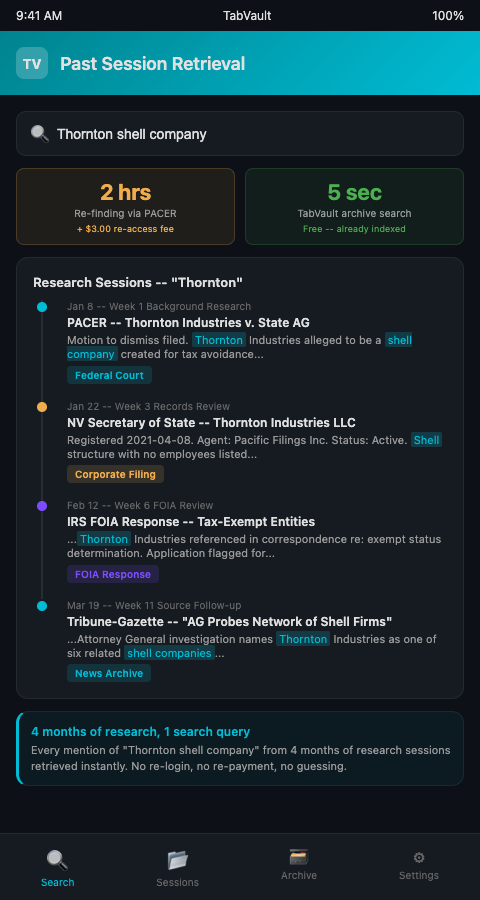
Research session history search becomes especially valuable during the later stages of an investigation. Months of indexed sessions create a deep archive. A name that meant nothing during background research in week one might become the key figure in week twelve. Searching for that name across all past sessions surfaces every page where it appeared — court filings, news articles, corporate records, FOIA documents — giving the producer an instant dossier assembled from their own prior research.
This retrieval capability feeds directly into case file construction from public record browsing. Instead of building a case file by manually compiling documents, the case file already exists in the form of your indexed archive. Search, filter, and organize the results by topic or by date to produce a structured file for any aspect of the investigation.
For court records specifically, TabVault complements portal-specific search. When you cannot remember which court system or jurisdiction held the document you need, a full-text search across your entire archive bypasses the need to know. The content itself tells you where to look.
Reducing Costs and Improving Response Time
The financial cost of retrieval failures adds up as well. PACER charges up to $3.00 per document access, and while fees are waived for quarterly totals under $30, an investigation that revisits dozens of filings can easily exceed that threshold. When a producer has to re-access a document because she lost track of it after the initial viewing, that is a cost that a searchable archive would have eliminated. The RECAP project mitigates this for documents that other users have uploaded, but relying on RECAP coverage is unpredictable. Your own indexed archive is comprehensive by definition — it contains everything you viewed.
Retrieval speed also matters for audience engagement. Listeners who email tips or corrections expect timely responses. A producer who can search her archive for the relevant source material and respond within hours demonstrates credibility. A producer who needs days to re-find the underlying document loses both the listener's trust and the potential lead.
Advanced Tactics for Public Record Retrieval
Search by document type language. Court filings use consistent terminology: "motion to dismiss," "memorandum in support," "order granting," "notice of appeal." Searching for these phrases narrows results to specific document types without needing to remember the case number or court.
Use date-range filtering for temporal precision. If you know you read a filing during a particular week, filter your search to that date range. This eliminates results from later sessions that might contain the same names or terms in different contexts.
Retrieve across portals simultaneously. A single search in TabVault returns results from PACER, county clerk sites, secretary of state databases, and any other portal you visited. This cross-portal retrieval is impossible in any individual portal's own search and is the core advantage of a local full-text index.
Build retrieval shortcuts for recurring searches. If your investigation involves a set of key names or entities that you search for repeatedly, save those search queries. Run them after each new research session to see if fresh indexed pages contain any of your key terms.
Preserve access to ephemeral portal content. Some government portals display records only for a limited time or require re-authentication after session timeouts. TabVault captures the page content during your active session, preserving access to material that the portal may not display again without a fresh login or fee payment. The Reporters Committee for Freedom of the Press advises journalists to save copies of all documents obtained through public records requests — indexing is the automated version of that advice.
Trace how your understanding evolved. Search for a key term and sort results chronologically. The pages you indexed early in the investigation show your initial exposure to a topic. Later pages show deeper research. This chronological view helps you understand how your investigation progressed and identify the moment a particular lead first appeared. The same retrieval challenge appears across research-intensive fields — genealogy cold case researchers who need full-text indexing of census and obituary records face the identical problem of locating a specific detail from a page visited months ago.
Prepare for depositions and legal challenges with retrieval-ready research. If your investigation leads to legal proceedings — libel claims, subpoena challenges, or regulatory inquiries — the ability to retrieve every source document from your research on demand demonstrates the thoroughness and good faith of your reporting. A searchable archive is not just a production tool; it is a legal defense asset.
Stop Re-Buying Records You Already Read
Every hour spent re-finding a public record is an hour not spent on investigation. TabVault gives podcast producers a private, local, full-text archive of every public record page they have visited across every research session. Retrieval becomes a search, not a scavenger hunt. Join the waitlist and make every past research session permanently accessible.
Three months into a financial fraud investigation, a new tip points back to a PACER filing from week two. Your browser history shows 14 identical-looking PACER URLs. Three return login walls. Two return session-expired errors. TabVault would have indexed the full text of that filing -- case number, party names, motion language -- the moment you read it, making retrieval a five-second search instead of a two-hour reconstruction. Producers who index from day one report cutting retrieval time by 90 percent and eliminating duplicate PACER charges for records they already accessed. Join the waitlist and stop re-buying records you already read.