Building a Searchable Case File From Public Record Browsing
Fifty Portals, Zero Organization
A podcast producer investigating a series of suspicious land deals across three counties logged into PACER to pull federal court filings, visited two separate county assessor websites for property records, searched a secretary of state database for corporate registration documents, and opened FOIA response PDFs from a state environmental agency. By the end of the day, she had 53 tabs open across four browser windows. She had no case file. She had a collection of open tabs that would disappear the moment she closed her browser, restarted her machine, or suffered a crash.
PACER alone contains hundreds of millions of docket entries across nearly every federal case, according to the Free Law Project's RECAP Archive. Add in state court systems, county-level portals, and agency-specific databases, and the number of distinct websites a single investigation might touch easily reaches dozens. Each portal has its own interface, its own search syntax, and its own session timeout. None of them talk to each other. None of them build a case file for you.
The federal government received over 1.5 million FOIA requests in fiscal year 2024, and each fulfilled request generates documents that live on a portal page until the agency decides to move or delete them. For podcast producers building digital case files from public record browsing, every one of those pages is a potential piece of evidence — and every one is ephemeral unless captured.
Court records organization at this scale cannot rely on bookmarks or browser history. Bookmarks preserve a URL, not the content at that URL. Browser history stores titles and timestamps but not full text. Neither allows you to search across the content of 53 different pages to find every mention of a specific name, address, or dollar amount.
From Scattered Browsing to a Searchable Case File
The shift is from treating public record browsing as a series of isolated page visits to treating it as a data collection process whose output is a permanent, searchable index. This is the principle behind turning chaotic browser sessions into a searchable private database — every page flows into a local full-text index as you browse.
TabVault applies this principle to the specific workflow of building digital case files. Open a PACER docket page and the full text of that page — case number, party names, filing dates, docket entries — enters your index. Open a county assessor's property record and the parcel number, owner name, assessed value, and legal description enter the index. Open a FOIA response PDF in your browser and the visible text of that document enters the index. Every page, every portal, every session.
The result is a podcast producer research database that spans every source you have visited. Search for a person's name and get results from PACER filings, property records, corporate registrations, and FOIA documents simultaneously. Search for an address and find the property record, the building permit history, and the environmental violation notice you read three weeks ago on a state agency's website. The case file assembles itself from your normal browsing behavior.
This public records search tool approach eliminates the most time-consuming part of case file construction: manual compilation. Without it, producers spend hours copying URLs into spreadsheets, writing summaries of what each page contained, and organizing links by topic. With TabVault, the full text is already captured and searchable. The organizational work collapses from hours to seconds.
The case file also grows more valuable as the investigation progresses. Early sessions tend to be exploratory — broad searches across multiple portals to identify which records exist. Later sessions are targeted — deep reads of specific filings, detailed analysis of financial records, close comparison of witness statements. Both phases produce indexed content, and the ability to search across both means a targeted search in month four can surface exploratory browsing from month one that now carries new significance.
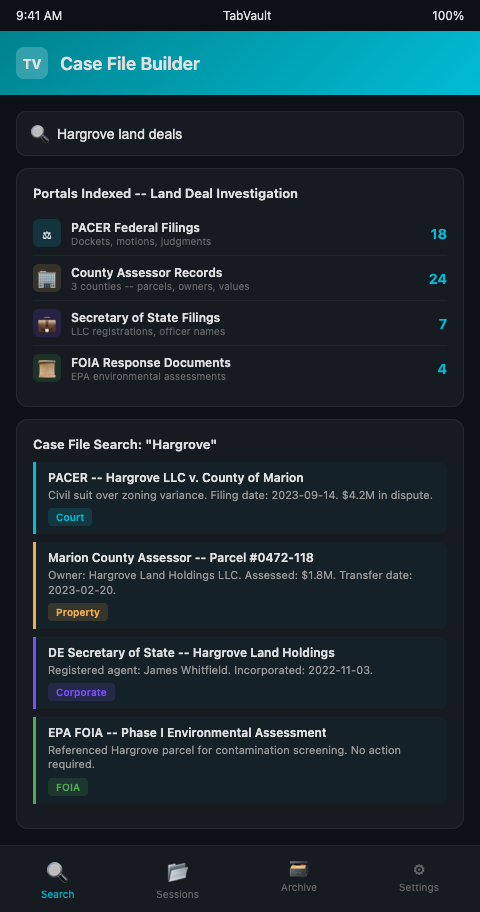
The value extends to FOIA request tab search specifically. FOIA responses often arrive as multi-page PDFs with heavy redactions. Indexing the visible text means you can later search for any unredacted phrase — a name, a date, a dollar figure — and find the specific response that contained it, even if you have received dozens of responses across multiple agencies over the course of months.
TabVault also functions as a public record retrieval tool for past sessions. Six months into an investigation, when a new lead requires revisiting a property record you glanced at during week two, your archive lets you search for it by content rather than trying to remember which county portal you were on and what the parcel number was. The same principle applies across research disciplines — genealogy researchers have found that the discoveries they forget to save from GEDmatch and similar platforms are exactly the ones that turn out to matter most months later.
The searchable case file also provides defensibility. When a subject of your investigation challenges a claim, you can demonstrate exactly which public records you reviewed, when you reviewed them, and what they contained at the time. The Society of Professional Journalists Code of Ethics calls on journalists to "be accountable and transparent" — a timestamped, searchable case file built from indexed public records is a concrete implementation of that principle. Rather than relying on memory or scattered notes to justify a reporting choice, you have a verifiable archive of every source you consulted.
Court records organization at this scale also benefits from the cross-jurisdictional reach of a unified index. Federal, state, and county court systems do not share databases. A person involved in a federal lawsuit might also be a party in a state court case and a subject of a county code enforcement action. Searching a single portal misses the others. Searching your TabVault index — which spans every portal you visited — surfaces all three, revealing the full scope of a subject's legal involvement across jurisdictions.
Advanced Tactics for Public Record Case Files
Index the search results pages, not just the individual records. When you run a search on PACER or a county clerk's website, the results page itself contains valuable metadata — case numbers, filing dates, party names — for multiple records at once. Indexing the results page gives you a summary view that is searchable later, even if you did not click into every individual record.
Build cross-portal connections through shared identifiers. Genealogy researchers have found that the discoveries they forget to save from GEDmatch turn out to matter most months later -- the same applies to public records connections you encounter early in an investigation. Public records are linked by common identifiers: names, addresses, case numbers, corporate entity numbers. After a research session, search your TabVault index for a specific identifier to see every portal where it appeared. A corporate entity number that shows up in both a secretary of state filing and a court docket connects two otherwise separate records — a connection that would be invisible without full-text search across sources.
Preserve PACER pages before they update. Federal court dockets are living documents. New filings get added, and some older entries may become restricted. Index PACER pages during each research session so your archive captures the docket as it existed on the date you reviewed it. The federal court system processes hundreds of millions of requests annually, and docket pages you indexed last month may show different information than the same pages today — making your timestamped snapshots a valuable historical record.
Organize sessions by jurisdiction. When an investigation spans multiple jurisdictions — federal courts, state courts, county records — label your research sessions accordingly. This lets you filter search results by jurisdiction when you need to locate a specific type of record quickly.
Export search results for episode scripts. When writing a script, search your TabVault index for the key facts and names in each segment. Copy the relevant excerpts directly from your search results into your script notes. Each excerpt carries a reference to the original source page, giving you a built-in citation trail for fact-checking.
Track which records you have obtained versus which you have only viewed. Some public records require formal requests or fee payments to obtain official copies. Use session labels to distinguish between records you have formally obtained and records you have only previewed in a portal. This distinction matters for citation accuracy — citing a record you viewed in a search result is different from citing a record you obtained and reviewed in full.
Build jurisdiction-specific search profiles. For each jurisdiction in your investigation, note the portal URLs, search capabilities, and access limitations. Index these notes alongside your research so that when you need to run a new search in a specific jurisdiction, the procedural information is in the same archive as the substantive findings.
Your Case File Should Not Depend on Open Tabs
Public records do not organize themselves, and open browser tabs do not constitute a case file. TabVault turns your public record browsing sessions into a searchable, permanent, private database — a real case file that grows with every session and survives every crash. If your investigations depend on court records, FOIA responses, and government databases, join the waitlist and start building case files that last.
Consider a land-deal investigation spanning three counties: 53 tabs across PACER, two county assessors, a secretary of state database, and state environmental agency FOIA responses. Close the browser and that case file vanishes. With TabVault running, those 53 pages become a searchable corpus where a single query for a parcel address returns the property record, the corporate filing for the LLC that owns it, and the environmental violation notice -- all cross-referenced automatically. Within six weeks of active research, your case file holds 300 to 400 indexed pages that no crash, portal redesign, or session timeout can erase. Join the waitlist and build case files that outlast your browser sessions.