Understanding Full-Text Indexing for Census and Obituary Research
The Cross-Reference You Almost Missed
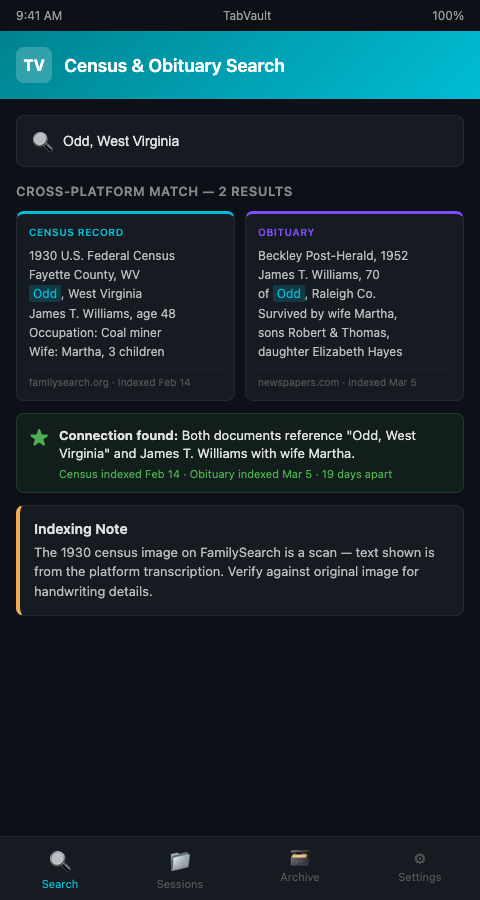
A genealogist working a cold case in West Virginia had a 1930 census page open in FamilySearch and a 1952 obituary from the Beckley Post-Herald open in Newspapers.com. Both documents mentioned Odd, West Virginia — an unincorporated community small enough that its appearance in two separate records for the same time period was significant. But the genealogist did not notice the connection for three weeks, because the census page had been closed and the obituary was buried in a folder of 40 bookmarks. The link between the two records only emerged when she happened to re-open both on the same afternoon.
This story illustrates a structural gap in how genealogists work with documentary evidence. Census records and obituaries are individually searchable within their host platforms — FamilySearch's index covers more than 14.3 billion searchable records, and Newspapers.com recently passed one billion digitized newspaper pages. But no platform lets you search across both simultaneously against your own research history. The cross-reference between a census entry and an obituary — the kind of connection that breaks cold cases — depends entirely on the researcher's memory or luck.
Full-text indexing census records and obituary pages changes this from a matter of luck to a matter of routine.
The sheer volume of available records makes manual cross-referencing impractical. The National Archives maintains census schedules from 1790 to 1950, each decade's records offering different data fields and different geographic coverage. A single family line might appear in eight or nine decennial censuses, each entry containing details that could connect to obituaries, marriage records, or DNA match trees from entirely different platforms. Without a system for searching across all of these sources simultaneously, the most valuable connections remain hidden in plain sight.
What Full-Text Indexing Actually Does
Full-text indexing is the technology behind every search engine. When Google indexes a webpage, it reads every word on the page, tokenizes the text into individual terms, and stores the location of each term in an inverted index. When you search for a term, the engine looks up that term in the index and returns every page containing it. The entire process — from crawl to query — takes fractions of a second because the index is pre-built.
Genealogy document indexing applies the same principle to your personal research. Instead of indexing the entire web, you index only the pages you visit during your research sessions. A census record page from FamilySearch, an obituary from Newspapers.com, a probate record from a county clerk's portal — each page is captured, tokenized, and added to your private index.
The key advantage over platform-native search is scope. FamilySearch can search FamilySearch. Newspapers.com can search Newspapers.com. Your personal full-text index can search across every platform you have visited, because the index contains content from all of them. This is the core mechanism for turning chaotic browser sessions into a searchable private database.
TabVault implements this as a background process. While you browse census records and obituary pages, the indexer captures each page's text content and adds it to your local archive. No manual data entry, no copy-paste into spreadsheets, no switching between five different platform search bars. One search, across everything.
Census Record Cross-Referencing Through Search
Census records are uniquely valuable for genealogy because they provide periodic snapshots of a household: who lived where, their ages, occupations, birthplaces, and relationships to the head of household. The National Archives maintains census schedules from 1790 to 1950, each decade offering a new data point for every family line.
The challenge is cross-referencing entries across decades. Finding a family in the 1900 census and then locating them in the 1910 census often requires searching for slightly different name spellings, new household members, and different geographic locations. A full-text index that contains both census pages lets you search for any term that appeared on either page — a surname, a birthplace, an occupation, a street name — and retrieve both results together.
Census record cross-referencing also extends to other document types. An 1880 census entry listing a man's birthplace as "Bavaria" gains new meaning when cross-referenced with a church baptismal record (also in your index) that names the specific town. The connection exists only if both documents are searchable in the same system.
For researchers working with tab indexing across Ancestry and GEDmatch, adding census and obituary pages to the same index creates a unified evidence base that spans DNA data and documentary records — exactly the kind of comprehensive archive that the Board for Certification of Genealogists standards envision.
Newspapers.com Obituary Indexing in Practice
Obituaries are among the richest single-document sources in genealogy. A well-written obituary names the deceased, lists surviving relatives, identifies hometowns, mentions occupations, and sometimes references church memberships, military service, or fraternal organizations. A single obituary can name three generations of a family.
Newspapers.com obituary indexing — capturing and indexing the full text of obituary pages you view — makes this richness permanently searchable. When you read an obituary during a research session, every name, every location, every date mentioned in that obituary enters your index. Weeks later, when you encounter the same surname in a DNA match's tree on Ancestry, a search of your index retrieves the obituary alongside the tree page, surfacing a connection you might otherwise have missed.
The obituary research browser search capability is especially powerful for identifying maiden names and family relationships. Obituaries often list women by both married and maiden names and identify in-laws by name — information that may not appear in any other single document. When that maiden name also appears in a census record or a marriage index you previously viewed, the full-text index brings all three sources together in a single query result.
Veterinary toxicology researchers face an analogous challenge when cross-referencing clinical notes from multiple sources, and their adoption of full-text tab search for poison control data follows the same pattern: index everything from every source, then search once.
The combination of Newspapers.com obituary indexing with census record cross-referencing is particularly potent for breaking through brick walls. A researcher stuck on a family that seems to vanish from the census between 1900 and 1920 might find the answer in an obituary that mentions a move to another state, a name change, or a remarriage. That obituary, indexed alongside the census records from both decades, appears in the same search results — turning a two-platform, multi-session research task into a single query.
Avoiding Common Indexing Mistakes
Do not skip image-only records. Many census pages on FamilySearch are digitized images without transcribed text. A full-text indexer captures rendered text, not image content. For image-only records, you still need to manually transcribe key details or use the platform's existing index. Know which records in your archive are text-based and which are image-based.
Index the search results page too. When you search Newspapers.com for obituaries matching "Henderson" in "Raleigh County, WV" and get 14 results, index that results page. It functions as a log of the search you conducted, which is valuable both for avoiding duplicate work and for documenting your research methodology. Researchers working on obituary and birth record cross-referencing benefit especially from capturing the search context alongside the records themselves.
Use specific search terms, not broad ones. Once your index contains hundreds of census pages and obituaries, a search for "Smith" will return too many results to be useful. Search for "Smith" combined with a location, a date range, or a co-occurring name. The full-text index supports multi-term queries, so use them.
Preserve the surrounding context. A census page contains more than the entry for your target individual. It shows neighbors, household structure, and community context. An obituary published in a small-town newspaper appears alongside other local content. This surrounding material is captured by the indexer and becomes searchable — which means a search for a neighbor's surname might retrieve a census page you originally viewed for a different household. These serendipitous discoveries are one of the strongest arguments for comprehensive indexing.
Keep indexing sessions going. A 2024 study published in ScienceDirect found that information overload causes poor decision-making and decreased productivity across knowledge-intensive work (ScienceDirect, 2024). Consistent indexing actually reduces overload by creating a searchable system that remembers what you have already reviewed, freeing cognitive bandwidth for analysis rather than retrieval.
Build a habit of post-session review. After each research session, spend five minutes scanning the list of pages your indexer captured. This quick review serves two purposes: it confirms that all pages were indexed completely, and it refreshes your memory of what you encountered during the session. Connections between a census entry and an obituary are most likely to surface while the session is still fresh in your mind.
Let the Index Do the Remembering
Census records and obituaries contain the documentary evidence that transforms DNA matches into identified ancestors. Full-text indexing ensures that every census entry, every obituary, and every record page you encounter during your research becomes a permanent, searchable part of your evidence base. TabVault builds this index automatically from your browser sessions, giving you a unified search across every platform and every record type. Join the waitlist and let your next cross-reference find itself.
The cross-reference between a FamilySearch census entry and a Newspapers.com obituary should not depend on whether you happen to remember both. Once your sessions are indexed, a single search for an obscure township name or a maiden name variant pulls up every census page, every obituary, and every vital record where that term appeared, regardless of which platform hosted the document or how many weeks ago you viewed it. Researchers who join the waitlist and begin indexing their documentary research find that connections between census records and newspaper clippings surface within the first few sessions, turning what used to be accidental discoveries into repeatable, systematic retrieval across their entire research history.