Tab Indexing 101 for Ancestry and GEDmatch Research
The Bookmark Trap
A veteran genetic genealogist recently tallied her Ancestry bookmarks folder: 312 entries, accumulated over two years of unknown parentage casework. She clicked the first twenty. Four led to deleted profiles, six pointed to trees that had gone private, and three loaded pages with substantially different content than what she remembered saving. The bookmarks had preserved URLs. They had not preserved the research.
Bookmarks and tab groups are the default organizational tools browsers offer, and both fail the same way: they store a pointer to a location, not the content at that location. For static websites, that distinction barely matters. For Ancestry and GEDmatch — platforms where profiles vanish, match lists recalculate, and algorithm updates reshuffle results — it is the difference between having evidence and having a broken link. AncestryDNA's database of over 27 million customers is in constant flux. GEDmatch's 1.5 million profiles shift daily as users upload and delete kits.
Tab indexing for Ancestry research solves this by capturing page content at the moment you view it and storing it in a searchable local index. The concept is borrowed from how search engines work: crawl the content, build an inverted index, and make every word queryable. The difference is that your index is private, local, and limited to the pages you actually visit during your research.
How Tab Indexing Works for Genealogy Browser Tabs
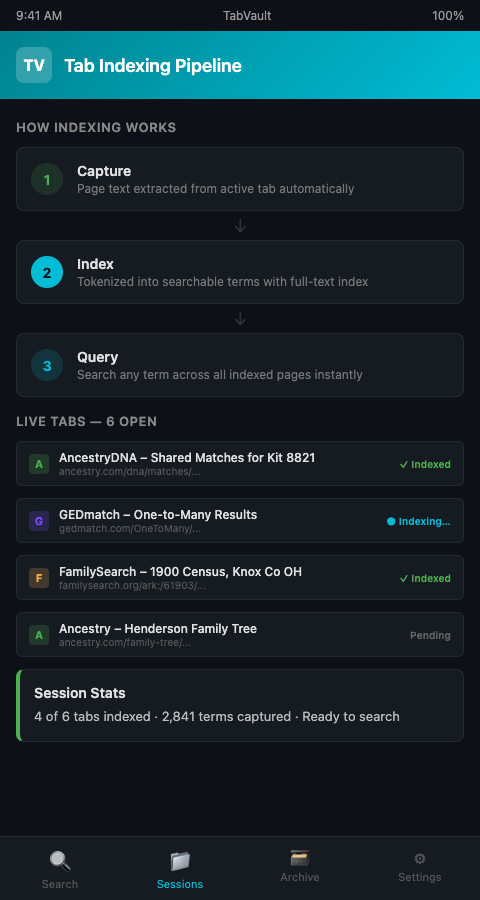
Tab indexing operates in three stages: capture, index, and query.
Capture. When you open an AncestryDNA match page, a GEDmatch one-to-many result, or any web page during a research session, the indexer extracts the visible text content of that page. This includes names, centimorgan values, shared match lists, tree data, notes, and any other text rendered by the browser. The capture happens automatically — no clicking a save button, no copying to a spreadsheet.
Index. The captured text is tokenized and added to a local full-text index. Tokenization breaks the text into individual searchable terms. A page containing "shared DNA: 47 cM across 3 segments" becomes queryable by any of those terms — "47," "cM," "segments," or any combination. This is the same fundamental technology behind every search engine, scaled down to your personal research. For a deeper look at full-text indexing mechanics, see how indexing applies to census and obituary research.
Query. After indexing, you search your archive the way you would search a database. Type a surname, a location, a centimorgan value, or a phrase, and every indexed page containing that term appears in your results. The search is instantaneous because the index is pre-built — you are not re-reading every page, you are looking up pre-computed term locations.
TabVault implements this three-stage pipeline as a browser-native tool. Your AncestryDNA browser workflow stays exactly the same: open matches, review trees, check shared segments. The indexing runs in the background, and the archive accumulates automatically. When you need to find something, TabVault's search bar replaces the frantic scrolling through 60 open tabs.
GEDmatch tab organization benefits especially from this approach. GEDmatch's interface is information-dense: a single one-to-many page can contain dozens of kit numbers, email addresses, centimorgan totals, and ancestral surnames. Manually copying that data into a spreadsheet takes 15 to 20 minutes per result set. Indexing captures it in seconds, and the content becomes part of your searchable DNA research archive permanently.
The approach of turning chaotic browser sessions into a searchable private database applies across research disciplines. Architectural salvage dealers, for instance, use full-text browser indexing to catalog inventory from dozens of supplier websites — the underlying technology is identical, just applied to reclaimed lumber instead of reclaimed ancestors.
DNA Database Search Tools: What Indexing Adds
Each major DNA platform has its own internal search, and each has limitations genealogists work around daily.
Ancestry's search only covers its own database, and it filters results by its proprietary relevance algorithm. You cannot search across your match list for a specific county name unless Ancestry's interface exposes that field. GEDmatch offers more flexible search parameters but no way to query across your previous sessions — today's one-to-many results overwrite yesterday's in your browser.
A local full-text index removes these constraints. Because the index contains the raw text of every page you visited, you can search for any term that appeared on any page from any platform. This turns your indexed sessions into a unified DNA database search tool that works across Ancestry, GEDmatch, FamilyTreeDNA, and every other site in your workflow.
The practical impact is clearest during clustering work. When you are grouping DNA matches into paternal and maternal clusters, you need to cross-reference dozens of match pages for shared surnames, common locations, and overlapping tree entries. On Ancestry, this means clicking back and forth between match pages, holding details in working memory, and hoping you do not lose track. With a local index, you search for a surname and instantly see every match page — from any platform — where that surname appeared. The clustering happens through search rather than through memory.
FamilySearch, with its 14.3 billion searchable records, adds another dimension. When your index contains both DNA match pages and census records from FamilySearch, a single search can reveal that the surname on a DNA match's tree also appears in a census record you reviewed two weeks ago. That cross-domain connection — DNA evidence meeting documentary evidence — is exactly the kind of breakthrough that indexing genealogy browser tabs makes routine.
Researchers at Carnegie Mellon found that 28% of participants in their browser tab study struggled to find the tabs they needed amid the clutter (Carnegie Mellon University, 2021). Indexing eliminates that problem entirely: you do not need to find the tab because you can find the content directly.
Consider a concrete example. You spent an evening reviewing 30 AncestryDNA matches, and somewhere among those 30 pages, one match's tree mentioned "Putnam County, Indiana." Two weeks later, you discover that a census record also references Putnam County. On Ancestry, there is no way to search your own match history for a county name. In your local full-text index, you type "Putnam County" and the match page appears instantly alongside the census record — two pieces of evidence from different platforms, linked by a geographic term, surfaced in a single query.
Mistakes to Avoid When Starting
Do not index selectively at first. The temptation is to index only pages you think are important. Resist it. Breakthroughs in genetic genealogy often come from connections you did not anticipate — a surname on a distant match's tree that links to a census record you viewed three weeks ago. Index everything and let the search surface the unexpected connections. The same principle drives full-text browser indexing in other research-intensive fields — comprehensive capture beats selective saving every time.
Do not confuse indexing with backing up. An indexed archive stores text content for search. It is not a pixel-perfect copy of the webpage. If you need to preserve the visual layout of a GEDmatch chromosome browser comparison, take a screenshot separately. The index gives you searchability; screenshots give you visual fidelity. Both matter, and they serve different purposes.
Watch for dynamic content that loads late. Some Ancestry pages load match data asynchronously — the page appears first, and shared matches populate a second or two later. Make sure the page is fully loaded before moving on, so the indexer captures the complete content. A page indexed before its AJAX calls finish will have gaps. The ISOGG wiki on autosomal DNA statistics documents the data fields each platform displays, which provides a useful checklist for verifying complete captures.
Plan for growth. A serious genealogist indexing daily sessions will accumulate thousands of pages within a few months. Organize your sessions with descriptive names or tags from the start. "Tuesday evening research" is useless six months later. "Johnson paternal — Ohio cluster — GEDmatch" tells you exactly what you were working on and why.
Combine indexing with note-taking. Tab indexing captures what was on the page. It does not capture your analysis of what the page means for your case. Pair your indexed archive with brief session notes: "Match #A12345 shares 34 cM, tree shows Henderson line in Pickaway County — possible paternal connection." These notes, stored alongside the indexed content, create a richer research log that the Board for Certification of Genealogists would recognize as proper documentation of your analytical process.
Test your index regularly. After your first few sessions, run a search for a surname or location you know appears in your archive. Verify that the expected pages appear in the results and that the content is complete. This validation step catches configuration issues early — before you have invested months of research in an index that is not capturing content correctly.
Start Indexing Before You Lose the Next Match
Every research session you conduct without indexing is a session whose content exists only in your browser's temporary memory and the platform's current database state. Both are unreliable. Tab indexing for Ancestry and GEDmatch research gives you a permanent, searchable record of every page you visit — a private database built from your own investigative work. TabVault makes this automatic. Join the waitlist and stop losing research to closed tabs and changed platforms.
Picture your next evening of Ancestry and GEDmatch research. You review twenty match profiles, run four one-to-many comparisons, and check a dozen FamilySearch census pages. By the end of the night, every one of those pages is indexed and full-text searchable on your own machine. Two weeks later, a new match appears whose tree mentions a township name you vaguely remember from a census record. Instead of scrolling through your browser history or reopening thirty bookmarks, you type the township name into a single search bar and the census page appears alongside the match profile in seconds. That retrieval speed is what turns casual browsing into systematic research, and it starts working from your very first indexed session.