Building a Searchable DNA Research Archive From Your Browser Tabs
The Match You Cannot Find Twice
Last year an adoptee posted in a genetic genealogy forum that she had spent three months building a cluster of AncestryDNA matches pointing to a birth father in rural Ohio. She had 47 tabs open — shared-match pages, ThruLines trees, surname searches, cemetery records — when her laptop updated overnight and Chrome restarted. Every tab was gone, and so was the trail. That story is not unusual. AncestryDNA's database now exceeds 27 million tested customers, and each of those kits can generate hundreds or thousands of potential matches. Researchers working unknown parentage cases routinely juggle 40, 60, even 100 tabs across multiple platforms at once.
A Carnegie Mellon University study on browser tab behavior found that more than half of participants felt they could not close any of their tabs, fearing they would lose information that took significant time and effort to gather in the first place (Carnegie Mellon University, 2021). For genealogists, the stakes are higher than for casual browsing. A shared-match page on Ancestry is dynamic: the match can delete their kit, change their tree, or adjust privacy settings at any moment. What you see today may not exist tomorrow.
The core problem is not the number of tabs. It is that tabs were never designed to be a research archive. They are ephemeral pointers, not durable records. And genetic genealogy demands durability.
The scale of the problem grows with every new kit added to the major databases. GEDmatch alone holds over 1.5 million uploaded profiles, and FamilySearch provides access to more than 14.3 billion searchable records. A single evening of research can produce dozens of pages worth preserving, each one a potential link in a chain of evidence that may take months to complete. Without a systematic way to capture and search that material, researchers are forced to choose between keeping an unmanageable number of tabs open and accepting that closed tabs mean lost evidence.
From Tabs to a Searchable DNA Research Archive
The shift that matters is conceptual before it is technical. Instead of treating your browser as a workspace you will return to, treat it as a collection point whose contents flow into a permanent, searchable index. This is the principle behind turning chaotic browser sessions into a searchable private database — every page you visit during a research session gets captured, indexed, and made available for full-text search long after the tab is closed.
TabVault applies this principle directly to genetic genealogy browser tabs. When you open an AncestryDNA shared-match page, a GEDmatch one-to-many result, or a FamilySearch record, TabVault indexes the full text of that page locally on your machine. Close the tab whenever you want. The content persists in your private archive, and you can query it later the same way you would query a database.
Consider what this means for AncestryDNA match indexing. Instead of keeping 47 tabs open as breadcrumbs, you browse normally — reviewing matches, checking trees, scanning surnames — and every page is silently added to your archive. The mechanics of how tab indexing works for Ancestry and GEDmatch are straightforward, but the cumulative effect is transformative. A week later, you type "Henderson" and "Pickaway County" into a single search bar. Every indexed page containing both terms appears, whether it was a census record, a tree profile, or a shared-match note. You have built a full-text search system for genealogy records without manually copying a single URL into a spreadsheet.
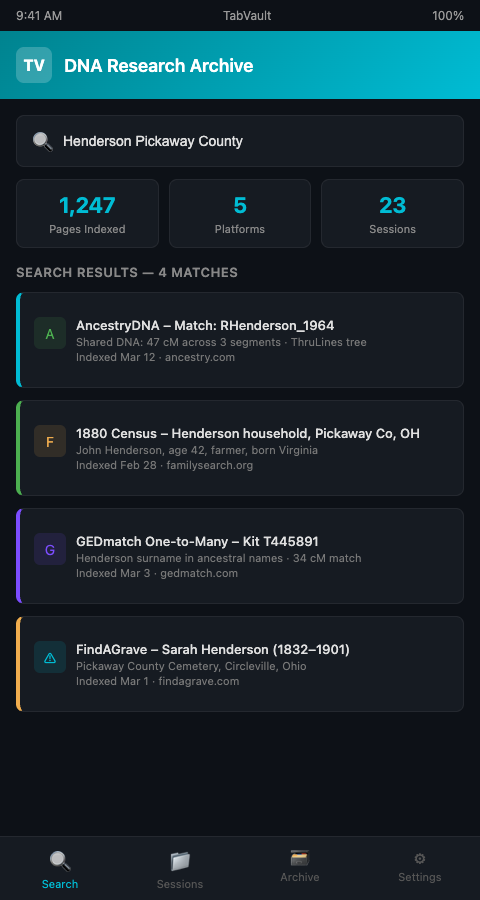
This approach solves the volatility problem too. AncestryDNA matches are living data: people delete kits, trees go private, ThruLines recalculate after database updates. If you indexed the page during your session, the content is preserved in your local archive even after the source changes. That indexed snapshot becomes a piece of evidence you can cite, revisit, and cross-reference.
The value compounds over time. After six months of indexed sessions, your archive contains a longitudinal record of your research — not just what exists on the platforms today, but what existed on specific dates when you were building your case. If a match disappears, you still have the indexed page from the day you reviewed it. If Ancestry recalculates centimorgan values after an algorithm update, your archive preserves both the old and new values, giving you a comparative view that the platform itself does not provide.
The same logic extends to DNA database tab management across platforms. Most serious researchers work simultaneously in Ancestry, GEDmatch, FamilyTreeDNA, and 23andMe. Each site has its own interface and its own search. A local index collapses all of them into one unified search layer — query once, get results from every site you visited during any session.
This cross-platform capability matters because genetic genealogy breakthroughs often come from correlating data across sites. A match on AncestryDNA might share a surname with a match on GEDmatch whose tree connects to a census record on FamilySearch. Without a unified index, spotting that three-way connection depends on the researcher's memory and manual comparison. With an index, a surname search surfaces all three pages regardless of their source platform, and the connection becomes visible in seconds.
Advanced Tactics for Scaling Your Archive
Once you have the indexing habit, the archive grows fast. Here are strategies for keeping it useful as it scales.
Separate DNA evidence from documentary evidence — then search both. Your archive will contain two fundamentally different types of content: DNA match pages (centimorgan values, shared segments, kit numbers) and documentary records (census entries, vital records, obituaries). Both types are full-text searchable in the same index, which means a search for a surname retrieves DNA matches and census records side by side. This integration is what makes a searchable DNA research archive genuinely different from a bookmark folder or a spreadsheet of URLs.
Tag sessions by case. If you work multiple unknown parentage cases or surname lines, prefix your research sessions with a case identifier. When you search later, filter by session to isolate results for the Johnson paternal line versus the Garcia maternal line. This prevents cross-contamination between cases, a real hazard when two investigations share common surnames.
Use date-based searches to trace your research timeline. Because each indexed page carries a timestamp, you can search your archive by date range to reconstruct what you were working on during a particular week or month. This is invaluable for case reviews: when you need to summarize six months of research for a collaborator or prepare a formal report, the dated index provides a built-in chronology.
Re-index periodically. AncestryDNA updates its matching algorithm and database regularly. A match page you indexed six months ago may now show different shared matches or revised centimorgan totals. Revisit key pages quarterly and let them re-index so your archive reflects current data alongside historical snapshots. The International Society of Genetic Genealogy (ISOGG) documents how thresholds vary across companies, making periodic re-indexing especially valuable when platforms change their cutoffs.
Export before platforms disappear. The 2025 bankruptcy of 23andMe, once valued at $6 billion, put the genetic data of more than 15 million customers in legal limbo (NPR, 2025). Researchers who had indexed their 23andMe match pages locally retained access to data that others lost entirely. Platform risk is not hypothetical — it is a documented pattern.
Build toward proof arguments. The Board for Certification of Genealogists requires that proof arguments cite every source contributing to a conclusion. A searchable archive of indexed browser sessions gives you a citation-ready corpus. When you need to document that you reviewed a particular shared-match page on a particular date, the archive provides that provenance — a foundation for building your first evidence log from indexed sessions.
Researchers in other evidence-heavy fields face the same structural problem. Veterinary toxicology responders, for instance, have built searchable archives from browser history for emergency reference material — the underlying need for durable, query-ready web research is not unique to genealogy, and the indexed-session approach transfers across disciplines.
Watch for full-text search genealogy records limitations. An indexed archive captures rendered text, not images. If a FamilySearch census page displays only a scanned image without a text transcription, the indexer captures the surrounding metadata but not the handwritten content in the image itself. For image-heavy records, supplement your index with brief manual notes about what the image contains — "1880 census, John Henderson household, Fayette County, WV, page 12" — so the search can still surface the record when needed.
Stop Treating Your Browser Like a Filing Cabinet
Your browser was built to display web pages, not to store and organize months of genetic genealogy research. Every open tab is a liability — one crash, one accidental close, one platform change away from vanishing. A searchable DNA research archive built from indexed sessions turns that liability into a permanent asset. TabVault gives genealogy cold case researchers exactly this: a private, local, full-text search index of every page you visit during your investigations. If you are tired of losing the trail, join the waitlist and start building the archive your research deserves.
Most researchers who join the waitlist have already lost at least one critical AncestryDNA match to a browser crash or an overnight kit deletion. TabVault changes that trajectory immediately. Your first indexed session captures every shared-match page, every ThruLines result, and every centimorgan value you encounter, preserving them locally even if the match owner deletes their kit the next morning. After two weeks of regular research, you can search across hundreds of indexed pages by surname, county, or segment size. By the six-month mark, your archive holds a longitudinal record of how your match list evolved, giving you comparative snapshots that no DNA platform provides natively. The research hours you have already invested start compounding instead of evaporating.