Searching FamilySearch, Ancestry, and FindAGrave in One Query
Three Searches Where One Would Do
A genealogist tracking a great-grandmother's migration from Tennessee to Indiana runs three separate searches every time she sits down to work. First, she searches FamilySearch for census records linking the family to specific counties. Then she switches to Ancestry to check tree entries and DNA match connections. Then she opens FindAGrave to locate burial records and memorial pages. Each platform returns results in its own format, sorted by its own relevance algorithm, with no awareness of what the other two contain.
FamilySearch holds more than 14.3 billion searchable records from over 200 countries. Ancestry's database includes 27 million DNA customers alongside billions of historical records. FindAGrave contains over 250 million memorials from more than 615,000 cemeteries worldwide. Together, these three platforms hold the largest accessible corpus of genealogical data ever assembled. Separately, they force researchers to run the same search three times and mentally merge the results.
The fragmentation is not a design flaw from any one platform's perspective — each company built its search for its own data. But from the researcher's perspective, it means that cross-platform connections — the census record that confirms the burial location, the DNA match whose tree references the same FindAGrave memorial — are invisible unless you happen to notice them during parallel browsing.
How a Unified Genealogy Database Search Works
A cross-platform genealogy query becomes possible when you stop searching the platforms and start searching your own research history. The principle is simple: if every page you visit during your research sessions is indexed in a local archive, then searching that archive is equivalent to searching across every platform simultaneously — but only for content you have actually reviewed.
This is the core mechanism of turning chaotic browser sessions into a searchable private database. Your local index does not contain all of FamilySearch, all of Ancestry, and all of FindAGrave. It contains the specific pages from each platform that you visited during your research. When you search for "Williamson County" in your index, you get the FamilySearch census page you viewed last Tuesday, the Ancestry tree page you reviewed on Thursday, and the FindAGrave memorial you found two weeks ago — all in one result set, ranked by relevance to your query.
TabVault builds this unified search layer automatically. As you browse FamilySearch, Ancestry, FindAGrave, and any other site, each page is indexed locally. The multi-site genealogy search tool is your own research archive, and the search bar queries everything in it.
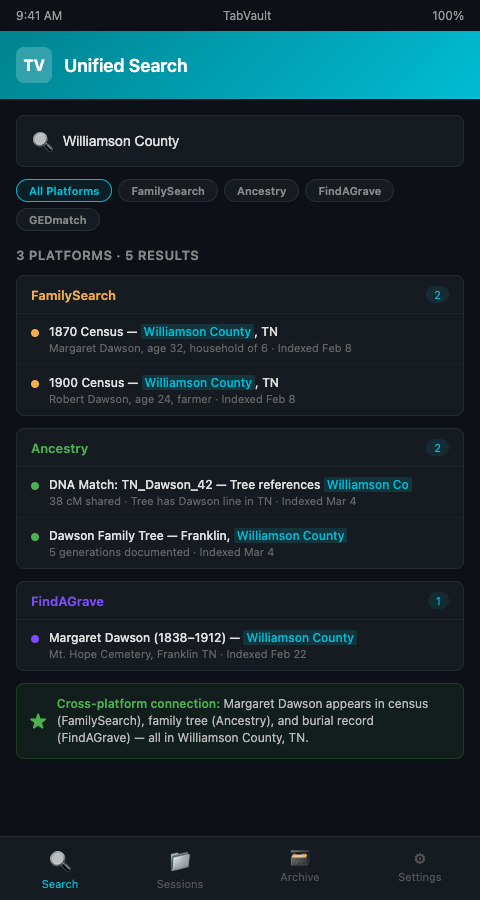
The power of this approach scales with the breadth of your research. A researcher who spends a year working across five platforms accumulates an index containing thousands of pages from all five. A single search query surfaces connections across all of them — connections that no individual platform's search could reveal because no platform has access to data from the others.
FindAGrave Memorial Indexing: Why Burial Records Matter
FindAGrave memorials deserve special attention because of the unique information they contain. A memorial page can include birth and death dates, burial location, a biographical summary contributed by volunteers, family links to other memorials, and photographs of headstones. This combination of structured data and free-text narrative makes memorials exceptionally rich for full-text indexing.
FindAGrave memorial indexing captures all of this content. When you view a memorial page during a research session, the full text — including the biographical narrative, the family links, and the location data — enters your local index. A search for a surname, a town name, or even a phrase like "beloved mother of" can retrieve memorials alongside census records and DNA match pages from other platforms.
The biographical narratives on FindAGrave are particularly valuable because they often contain information not found in any official record. A volunteer contributor who knew the deceased may include nicknames, occupation details, church memberships, or migration stories. These details can corroborate or challenge evidence from other sources, but only if they are searchable alongside those other sources.
For researchers already using tab indexing for Ancestry and GEDmatch, adding FindAGrave pages to the same index creates a three-dimensional evidence base: DNA data, documentary records, and burial records, all searchable in a single query.
Cross-Platform Connections That Break Cases
The practical value of a unified search shows up in the connections it surfaces.
Name variants across platforms. A great-grandmother listed as "Margarethe" in a FamilySearch German church record, "Margaret" in an Ancestry census transcription, and "Maggie" in a FindAGrave memorial is the same person. Platform-specific searches may not connect these variants, but a search of your personal index for any one of these names retrieves all three pages, because you have already reviewed all three during your research.
Geographic confirmation. A FindAGrave memorial placing a burial in Greenville, Ohio, corroborates a FamilySearch census entry showing the family in Darke County, Ohio (where Greenville is the county seat). This geographic confirmation is immediate when both pages appear in the same search result.
Kinship links. FindAGrave memorials often link to other family members' memorials. An Ancestry DNA match whose tree references the same surname as a FindAGrave family link creates a triangulation point between genetic and documentary evidence. Your unified search surfaces this connection when both sources are in the index.
The National Archives hosts census records spanning 1790 to 1950, and researchers who index those pages alongside their Ancestry and FindAGrave sessions create an evidence base that spans genetic data, federal records, and community-sourced burial data — a combination no single platform offers natively.
Architectural salvage dealers face a parallel version of this problem, needing to search inventory across multiple supplier websites. Their approach to basic tab search for reclamation yards follows the same unified-search principle, applied to salvaged materials rather than ancestor records.
Making the Most of Unified Search
Index broadly, search specifically. The temptation is to index only the pages you think are important. Resist it. Index every FamilySearch, Ancestry, and FindAGrave page you visit, because the connections that break cases are often the ones you did not anticipate. Search with specific, multi-term queries to cut through the volume.
Use location terms as connectors. Surnames change through marriage, misspelling, and Anglicization. Locations are more stable. Searching for a township name, a county, or a parish across your multi-platform index often reveals connections that surname searches miss.
Combine with census and obituary indexing for maximum coverage. Census records, obituaries, FindAGrave memorials, and DNA match pages each contribute a different type of evidence. When all four are in the same index, your unified search becomes a genuine cross-platform genealogy query tool that integrates genetic evidence with documentary and community-sourced records.
Respect platform terms of service. Indexing captures text from pages you view in your browser for your personal research use. This is analogous to taking research notes. It is not scraping, bulk downloading, or redistributing platform content. Stay within the bounds of personal research use, and the approach is consistent with each platform's terms.
Leverage memorial photographs and metadata. FindAGrave memorial pages often include headstone photographs with dates that can confirm or correct information from other sources. While the photograph itself is not captured by text indexing, the memorial metadata — contributor name, photograph date, GPS coordinates of the cemetery — enters the index and becomes searchable. A search for a specific cemetery name retrieves every memorial you viewed from that cemetery, creating a virtual visit log that is useful for tracking which cemeteries you have already researched.
A 2022 report found that 47% of global workers spend more than one hour per day searching for specific data to do their jobs properly (BigDATAwire, 2022). For genealogists splitting that search time across three or more platforms, a unified index recovers a substantial fraction of that time every session.
Build your archive incrementally. You do not need to index every FamilySearch, Ancestry, and FindAGrave page from your entire research history on day one. Start with your current active cases. Browse your usual platforms as you normally would, and let the indexer capture each session. Within a few weeks, your archive will contain enough content to make unified searches productive. Within a few months, it will contain a comprehensive record of your research across all three platforms — a personal genealogy database built from your own investigative work.
One Search to Find Them All
FamilySearch, Ancestry, and FindAGrave are individually powerful. Together, they are the most comprehensive genealogical evidence base available to any researcher. But "together" has always meant three tabs, three searches, and three sets of results that you mentally merge. A unified genealogy database search built from indexed browser sessions collapses those three into one. TabVault makes this automatic: browse your usual platforms, and every page joins your searchable archive. One query, every source, every session. Join the waitlist and search your entire research history from a single bar.
For researchers ready to integrate this unified search into their full genetic genealogy workflow, the next step is connecting your indexed archive to your case management process.