Integrating Tab Search Into Your Genetic Genealogy Workflow
The Browser Is Already Your Primary Research Tool
A 2021 study published in Forensic Science International: Genetics documented that the genealogy process is typically the most time-consuming part of -- and a limiting factor in the success of -- genetic genealogy investigations. The study mapped the workflow that professional genetic genealogists follow: uploading DNA data, reviewing match lists, building speculative trees, cross-referencing historical records, and documenting conclusions. Nearly every step happens in a web browser.
The typical genetic genealogy workflow involves at minimum three DNA platforms (AncestryDNA, FamilyTreeDNA, 23andMe), at least one third-party analysis tool (GEDmatch, DNA Painter), and multiple genealogical record databases (FamilySearch, Ancestry, FindAGrave). On a productive research day, a genealogist might open forty to sixty tabs across these platforms. Each tab contains information -- a match profile, a shared segment view, a census record, a family tree -- that connects to the larger case.
The problem is not the number of tabs. The problem is that every tab represents an unrecorded research finding that disappears when the browser closes. You reviewed a FamilyTreeDNA match who shares 87 cM with your client -- but you cannot remember their username or which chromosome segments they share. You built a speculative tree on Ancestry connecting a DNA match to a suspected great-grandparent -- but the tree was in a tab you closed yesterday. The browser-based genealogy workflow generates enormous volumes of research data, and the browser itself discards almost all of it.
Integrating Tab Search Into Each Workflow Phase
TabVault integrates into the genetic genealogy workflow by indexing the content of every page you visit, turning chaotic browser sessions into a searchable private database. The integration is not about changing how you work -- it is about preserving the work you are already doing.
Match review phase. When you open a DNA match profile on AncestryDNA, FamilyTreeDNA, or 23andMe, TabVault indexes the page content: the match's username, shared cM amount, predicted relationship, shared matches, and any linked tree information. Later, when you need to recall whether you already reviewed a particular match, you search your archive by username or cM range. FamilyTreeDNA match tracking becomes a byproduct of your normal browsing rather than a separate logging task.
Tree building phase. As you build speculative family trees to test hypotheses about how a DNA match connects to your client, you visit dozens of record pages -- census entries, vital records, church records, immigration manifests. Each page gets indexed. When you need to revisit the 1910 census entry that placed a suspected ancestor in a particular county, you search your archive instead of re-navigating FamilySearch.
Analysis phase. When you use GEDmatch's one-to-many comparison or DNA Painter's chromosome mapping, the result pages get indexed. The ISOGG Wiki on autosomal DNA tools catalogs dozens of analysis tools that genetic genealogists use regularly. Each one generates browser-based results that are typically lost when the session ends. Tab search DNA research integration preserves those results for later retrieval.
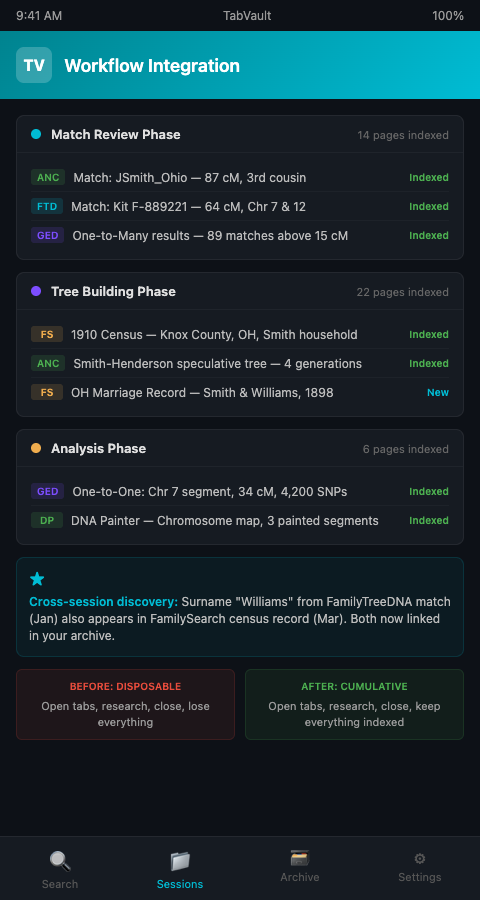
Researchers who have already built a searchable DNA research archive will recognize this as the workflow that makes the archive grow. Each research session adds indexed pages. Each search of the archive retrieves connections across sessions.
Making the Workflow Cumulative Instead of Disposable
The fundamental shift is from a disposable workflow (open tabs, do research, close tabs, lose everything) to a cumulative one (open tabs, do research, close tabs, keep everything indexed). This shift has three practical consequences for genetic genealogy workflow optimization.
First, you stop re-reviewing matches. The most common time sink in genetic genealogy is opening a match profile, spending ten minutes evaluating it, closing the tab, and then opening the same profile two weeks later because you forgot you already reviewed it. With indexed sessions, a quick search for the match username confirms whether you have already seen it and what you found.
Second, you discover connections across sessions. A match you reviewed on FamilyTreeDNA in January might share a surname with a census record you found on FamilySearch in March. Without indexing, you would need to remember that coincidence. With indexing, a surname search surfaces both results side by side. The genealogy research workflow tools built into your browser become a retrospective discovery engine.
Third, you build a searchable case file without extra effort. The Board for Certification of Genealogists expects thorough documentation of sources consulted. An indexed browser history serves as that documentation automatically, capturing not just the sources that produced results but also the sources that returned nothing -- the negative evidence that proves thoroughness.
Advanced Tactics for Browser-Based Genealogy Workflow
Segment your sessions by research question. Rather than opening all your DNA platforms simultaneously and jumping between them, dedicate each session to answering one specific question: "Which of my client's AncestryDNA matches share a connection to Knox County, Ohio?" This focus produces cleaner indexed sessions that are easier to search later. The same principle applies to researchers building an emergency triage toolkit from browser-based reference materials.
Index your GEDmatch one-to-many results regularly. GEDmatch's match list changes as new users upload their data. Running the same one-to-many comparison monthly and indexing each result page creates a time-stamped record of your match list's evolution. New matches that appear in the April results but not the January results are immediately identifiable.
Use your archive to prepare collaboration handoffs. When you hand off a case to another researcher or a search angel, your indexed sessions provide a complete record of what has already been done. Rather than writing a summary from memory, you can point the collaborator to specific indexed pages. Researchers who package indexed sessions as shareable evidence build this handoff capability into their standard workflow.
Track platform-specific quirks. Each DNA platform calculates shared DNA slightly differently. DNA Painter's Shared cM Project, based on nearly 60,000 known relationships, is the standard reference for interpreting cM values. When you compare a match's cM value across AncestryDNA and FamilyTreeDNA, index both pages so you have a documented record of the discrepancy and the likely explanation.
Preserve ethnicity estimate pages alongside match data. DNA platforms periodically update their ethnicity algorithms, and earlier estimates disappear when new versions roll out. Indexing your ethnicity estimate pages alongside your match review sessions creates a historical record of how the platform categorized your client's ancestry at each point in time. When a match shares an unusual ethnicity component with your client, having both ethnicity pages indexed lets you cross-reference that signal against the shared cM data without relying on a platform that may have already overwritten the earlier estimate. This longitudinal view of ethnicity estimates also reveals when a platform's algorithm update shifts a client's regional percentages, which can affect how you interpret geographic clustering among their DNA matches.
Review your indexed sessions for DNA cluster analysis patterns. After several weeks of match review, search your archive for patterns -- surnames that appear across multiple match profiles, locations that recur in different trees, cM ranges that cluster together. These patterns are invisible in individual sessions but become apparent when you search across your entire indexed history.
If your genetic genealogy workflow generates dozens of tabs per session and you are losing that research every time your browser closes, TabVault preserves it all. Join the waitlist to turn your daily research sessions into a permanent, searchable case file that grows with every click.