Cross-Referencing Newspaper Obituaries and Birth Records Across Sessions
When the Obituary Holds the Key You Already Found
A genetic genealogist working a cold case in rural Pennsylvania spent two hours on Newspapers.com locating the 1947 obituary of a woman she suspected was her client's biological grandmother. The obituary named the woman's parents, her birthplace in West Virginia, and three surviving children. Three weeks later, searching West Virginia vital records, the genealogist pulled a birth certificate that matched one of those children -- but she could not remember the obituary's exact wording or which Newspapers.com search had produced it. She spent another ninety minutes retracing her steps.
This pattern repeats constantly in genealogy cold case work. Obituaries are among the richest single-page sources in genealogical research. Family Tree Magazine notes that newspaper obituaries may contain the decedent's death date and place, birth date and place, parents' names, occupation, military service, religion, and places of residence over time. But that richness only matters if you can retrieve the obituary when you need it -- weeks or months after you first found it.
The disconnect happens because obituary research and vital records research typically occur in separate browser sessions, on separate days, using separate databases. The obituary lives in a Newspapers.com tab that got closed. The birth certificate lives in a state vital records portal that got closed. The correlation between them lives only in the researcher's memory, which is unreliable at the scale of a serious cold case.
Turning Separate Sessions Into a Unified Archive
Cross-referencing obituaries birth records requires a system that preserves both the newspaper clipping and the vital record page in a searchable format. TabVault does this by indexing every page you visit during your research sessions, turning chaotic browser sessions into a searchable private database. The obituary page from Newspapers.com and the birth certificate page from the West Virginia vital records portal both become searchable entries in the same archive.
The practical power emerges when you search your archive by name. Type the surname from the obituary, and your results include both the newspaper page and the vital record page -- even though you found them weeks apart on different websites. The obituary birth record correlation that would have required you to remember, re-search, and re-find now surfaces in seconds.
This approach transforms the newspaper archive genealogy workflow from a linear process (search, find, close, forget, re-search) into a cumulative one (search, find, index, build). Every Newspapers.com research session adds to your searchable archive. Every vital records session adds to the same archive. The cross-references between them become discoverable rather than dependent on your memory.
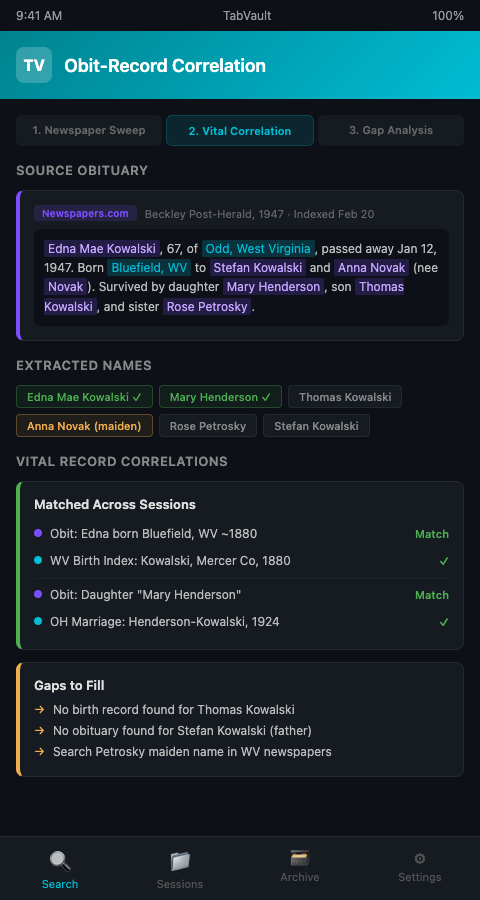
Researchers who already maintain evidence logs from indexed browser sessions will recognize this as a natural extension. The evidence log documents what you found and where. The indexed session preserves the actual content of what you found so you can re-read the obituary text without returning to the source.
A Workflow for Systematic Cross-Referencing
The most productive researchers treat historical newspaper indexing as a distinct phase of their workflow rather than an ad hoc activity mixed into other research.
Phase 1: Targeted newspaper sweeps. Dedicate a session to searching newspaper archives for every name associated with your case. Use GenealogyBank, which holds over 316 million obituaries and death records from more than 16,000 newspapers dating back to 1690, alongside Newspapers.com and the FamilySearch newspaper collection. Search each archive for every surname variant, every known location, and every known date range. Let each result page get indexed.
Phase 2: Vital records correlation. In a separate session, search state and county vital records portals for the names, dates, and locations mentioned in the obituaries you found. When you pull a birth certificate that matches an obituary reference, both documents are now in your indexed archive. The connection between them becomes permanent.
Phase 3: Gap identification. Search your archive for obituaries that mention people for whom you have not yet found vital records. These are your next research targets. Search for vital records that reference people whose obituaries you have not yet found. These are your next newspaper targets. The archive reveals the gaps that your memory would have missed.
This structured approach prevents the scattershot browsing that eats research hours. Researchers working multi-state vital records searches can extend this workflow across jurisdictions, treating each state's newspapers and vital records as paired research targets.
Advanced Tactics for Newspaper-Vital Record Correlation
Mine obituary survivor lists systematically. A single obituary might name eight to twelve family members. Each name is a potential vital records lead. Index the obituary, then open a separate session to search for each named survivor's birth, marriage, or death record. The discipline of building a research target list from the obituary text, rather than chasing whichever name catches your eye first, prevents missed connections.
Use date math to narrow vital records searches. Obituaries frequently give approximate ages ("survived by her daughter Mary, age 42"). Calculate the approximate birth year and use it to narrow your search in state birth record databases. Index both the calculation and the search results so you have a documented chain from obituary to birth record.
Cross-reference across newspaper archives. The same death might be reported in newspapers in multiple cities -- the city where the person died, the city where they were born, and the city where their children live. Each newspaper account may include different details. Legacy Tree Genealogists emphasizes that newspapers report family information within notices of births, marriages, and deaths, and unlike government records, newspaper articles are not limited to a form, so they may contain details not found in more structured records.
Watch for maiden name clues in older obituaries. Pre-1970 obituaries frequently identify married women by both their married and maiden names ("Mary Smith, nee Kowalski"). This maiden name is often the critical link to birth records filed under the original surname. Researchers who also combine newspaper archives with AncestryDNA match reviews use these maiden name discoveries to identify which DNA match clusters correspond to which family lines.
Distinguish between indexed and non-indexed newspaper collections. Not all newspaper archives offer full-text search. Some collections are image-only, meaning you must browse page by page within a date range. When you encounter an image-only collection, index the pages you review so your archive reflects the actual coverage of your search. A session that shows fifty browsed pages from a non-indexed collection documents your diligence in a way that a search log entry reading "checked Newspapers.com" never could.
Track which newspaper archives you have already searched. The most common source of duplicate effort in historical newspaper indexing is forgetting that you already searched Newspapers.com for a particular name and repeating the search. TabVault's indexed sessions serve as a search log -- if you searched it, it is in your archive, and a quick search confirms that fact. Researchers tracking building permits across estate sale listings use the same indexed-session approach to avoid re-searching sources they have already exhausted.
Your obituary research is only as good as your ability to connect it to everything else you have found. If you are losing those connections every time you close your browser, TabVault can preserve them permanently. Join the waitlist to build a searchable archive where every obituary, every birth record, and every cross-reference is one search away.