Combining Newspaper Archives With AncestryDNA Match Reviews
The Obituary That Solved a DNA Match
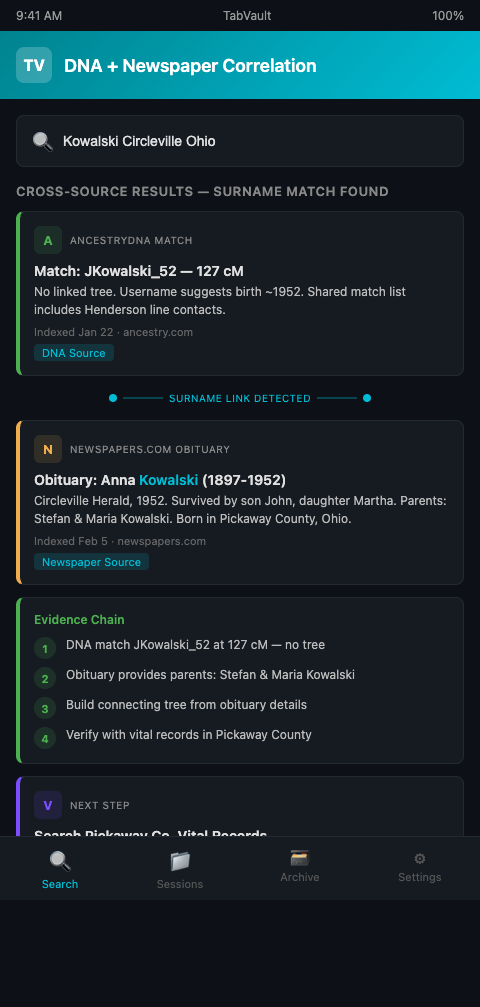
A search angel working an adoption case found an AncestryDNA match at 127 cM with no linked family tree and a username that was just a string of numbers. Dead end -- or so it seemed. Two weeks later, searching Newspapers.com for an unrelated branch of the case, she stumbled across a 1952 obituary in a small-town Ohio newspaper. The obituary listed survivors including a woman with the same distinctive surname as the DNA match's only shared match. That single obituary provided the parents' names, the hometown, and the maiden name that allowed her to build the connecting tree and identify her client's biological grandfather.
The critical detail: she almost missed the connection entirely. The DNA match review happened in one browser session. The newspaper search happened in a different session two weeks later. The link between the two was a surname she half-remembered. If she had closed those tabs and moved on -- as happens in most research sessions -- the AncestryDNA match obituary connection would never have been made.
This is the fundamental challenge of combining newspaper archives AncestryDNA research. The DNA data lives on AncestryDNA's platform. The newspaper records live on Newspapers.com, GenealogyBank (which holds over 316 million obituaries from more than 16,000 newspapers dating back to 1690), or the FamilySearch newspaper collection. These are separate websites, visited in separate sessions, generating separate tabs. The correlation between them depends entirely on the researcher's ability to remember details across sessions and platforms.
Building the Bridge Between DNA and Newsprint
TabVault eliminates the memory dependency by indexing every page from every session into the same searchable archive. When you review an AncestryDNA match profile, the page content -- including the match's username, shared cM, predicted relationship, and any tree information -- gets indexed. When you browse Newspapers.com and view an obituary, that page content gets indexed too. Both entries live in the same searchable private database.
The connection between DNA match and newspaper clipping surfaces through search. Type a surname into your TabVault archive, and the results include both the AncestryDNA match profile that contains that surname and the Newspapers.com obituary that mentions it. The historical newspaper DNA correlation that previously depended on memory now depends on full-text search -- a dramatically more reliable mechanism.
This approach of turning chaotic browser sessions into a searchable private database has particular power for combining DNA matches newspaper clippings because the two source types contain complementary information. DNA platforms tell you how much DNA you share with someone and who else they match. Newspaper archives tell you who that person's family was, where they lived, when they died, and often where they were born. Neither source alone solves the puzzle. The combination frequently does.
Researchers who already cross-reference obituaries and birth records across sessions will recognize this as an extension of that workflow -- adding DNA match data to the cross-referencing mix.
The Newspapers.com AncestryDNA Workflow
Because Newspapers.com and AncestryDNA are both owned by Ancestry, there is already some integration between them. Ancestry has begun indexing obituaries and marriages from Newspapers.com images directly into the Ancestry database, creating a pathway from newspaper record to genealogical research. But this integration only covers indexed records, not the thousands of newspaper mentions that have not been individually indexed.
The most productive Newspapers.com AncestryDNA workflow supplements the platform's built-in integration with systematic manual searching. Here is the process.
Step 1: Extract search terms from DNA matches. Review your AncestryDNA match list and extract every piece of identifying information: usernames, linked tree surnames, shared match names, and any location data visible in profiles. These become your newspaper search terms.
Step 2: Run targeted newspaper sweeps. For each extracted surname and location combination, search Newspapers.com, GenealogyBank, and other newspaper archives. Focus on obituaries first -- they contain the highest density of genealogical information per page. Then search for birth announcements, marriage announcements, and general news mentions. Legacy Tree Genealogists emphasizes that newspapers may contain details not found in more structured records because newspaper articles are not limited to a form.
Step 3: Cross-reference results in your archive. After completing both the DNA review sessions and the newspaper search sessions, search your TabVault archive for overlapping names, locations, and dates. The matches that appear in both DNA and newspaper results are your highest-priority research targets.
Step 4: Build connecting trees from combined evidence. Use the biographical details from obituaries -- parents' names, birthplaces, sibling lists -- to build the family trees that connect your DNA matches to your client. Index the tree-building research sessions so the entire chain of evidence (DNA match to newspaper to vital record to tree) is preserved.
Advanced Tactics for Historical Newspaper DNA Correlation
Search for DNA match usernames in newspaper archives. Some AncestryDNA users set their username to their real name. If a match's username is "JohnKowalski1952," search Newspapers.com for "John Kowalski" near the year 1952. You may find the match's own birth announcement, their parent's obituary, or a family mention that provides the tree-building details you need.
Mine shared match names for newspaper leads. When two DNA matches share DNA with each other and with your client, search for both matches' associated surnames in newspaper archives. An obituary that mentions both surnames may reveal the family connection that explains why both individuals match your client. Researchers combining historical building records with demolition schedules use a similar approach of cross-referencing two different document types to find connections invisible in either source alone.
Use obituary dates to narrow DNA relationship predictions. If you find the obituary of someone you suspect is your DNA match's ancestor, the death date and approximate birth date help you estimate the generational distance between the deceased and your match. Combined with the shared cM value from AncestryDNA, this narrows the range of possible relationships. Researchers tracking centimorgan thresholds across multiple platforms can feed these refined estimates back into their cross-platform analysis.
Index newspaper clippings alongside the Newspapers.com viewer page. When you find a relevant article on Newspapers.com, view the full page context -- not just the clipped article. Neighboring articles, advertisements, and other obituaries on the same page sometimes mention related families. Index the full page view so those contextual details are preserved.
Search for surname clusters in your archive. After several weeks of combined DNA and newspaper research, search your archive for the surnames that appear most frequently. High-frequency surnames are likely to be the ancestral lines closest to your research target. Prioritize further research on those lines.
Leverage social pages and community columns for geographic confirmation. Beyond obituaries, historical newspapers contain social columns, church news, and community event listings that place families in specific locations at specific times. A mention of "Mr. and Mrs. Kowalski attended the St. Stanislaus parish dinner" in a 1948 social column confirms the family's presence in that community and their religious affiliation, both of which narrow the search for vital records. These incidental mentions are rarely indexed by newspaper platforms but appear in full-text search results when you browse and index the surrounding pages during your research sessions.
If your AncestryDNA match reviews and your newspaper archive searches live in separate browser sessions that you close and forget, you are missing the connections that solve cases. TabVault indexes both into the same searchable archive so the surname that links a DNA match to a 1952 obituary surfaces in seconds. Join the waitlist to bridge the gap between your DNA data and your newspaper discoveries.