Creating Your First Evidence Log From Indexed Browser Sessions
The Log Nobody Builds
The Board for Certification of Genealogists publishes a set of standards that define professional-quality genealogical research. Among the most fundamental requirements is thorough documentation: every source consulted, every piece of information extracted, every analytical step taken must be recorded and citable (BCG, Genealogical Standards). In practice, this means maintaining a research log — a chronological record of what you searched, where you searched, what you found, and what you concluded.
Almost nobody does this consistently. The reason is straightforward: manual logging is tedious. Recording the URL, date, platform, search terms, and findings for every page you visit during a research session adds 30 to 60 seconds of overhead per page. In a three-hour evening session involving 40 or 50 pages, that is 20 to 50 minutes of pure documentation work on top of the research itself. Most genealogists, particularly volunteers working adoption cases on personal time, skip the log and rely on memory, screenshots, and the hope that they can retrace their steps later.
The result is a community where the standard exists and is widely respected, but compliance is low outside of professional and certification contexts. Genealogy evidence log creation remains an aspirational practice rather than a routine one.
Why Evidence Logs Matter for Proof Arguments
An evidence log is not bureaucratic busywork. It is the foundation of a proof argument — the structured analysis that demonstrates how available evidence supports a genealogical conclusion.
Proof argument documentation under the Genealogical Proof Standard requires five elements: a reasonably exhaustive search, complete and accurate source citations, analysis and correlation of evidence, resolution of conflicting evidence, and a soundly reasoned written conclusion. The evidence log feeds directly into the first three of these requirements. Without a log, you cannot demonstrate that your search was exhaustive, because you have no record of what you searched. You cannot provide complete citations, because you did not record the details at the time. And you cannot fully analyze and correlate evidence, because you do not have a comprehensive inventory of what evidence you found.
FamilySearch alone contains over 14.3 billion searchable records across collections from more than 200 countries. A serious research session on FamilySearch can touch dozens of record sets, and FamilySearch session tracking — knowing which collections you searched and what you found in each — matters directly for demonstrating exhaustive research. The same applies to every other platform in your workflow.
From Indexed Sessions to a Working Evidence Log
Indexed browser sessions provide the raw material for an evidence log automatically. When every page you visit during a research session is captured, timestamped, and stored in a searchable local archive, you have already completed the most tedious part of logging: recording what you consulted and when.
The shift from indexed sessions to a formal evidence log requires three additional steps.
Step 1: Review your session inventory. After a research session, review the list of indexed pages. TabVault preserves each page with its URL, title, timestamp, and full-text content. This inventory is your genealogy research log template — it tells you exactly which pages you visited, in what order, and what content was on each one.
Step 2: Annotate with analytical notes. The indexed content tells you what was on the page. Your annotations tell you what it means for your case. For each relevant page, add a brief note: "Census shows John Henderson age 42 in Fayette County — consistent with 1858 birth year from DNA match tree." These annotations transform raw data into analyzed evidence.
Step 3: Organize by evidence type. Group your annotated entries by the question they address. All entries related to establishing a birth date go together. All entries related to identifying a birth mother go together. This organization maps directly to the structure of a proof argument, where each section addresses a specific claim supported by cited evidence.
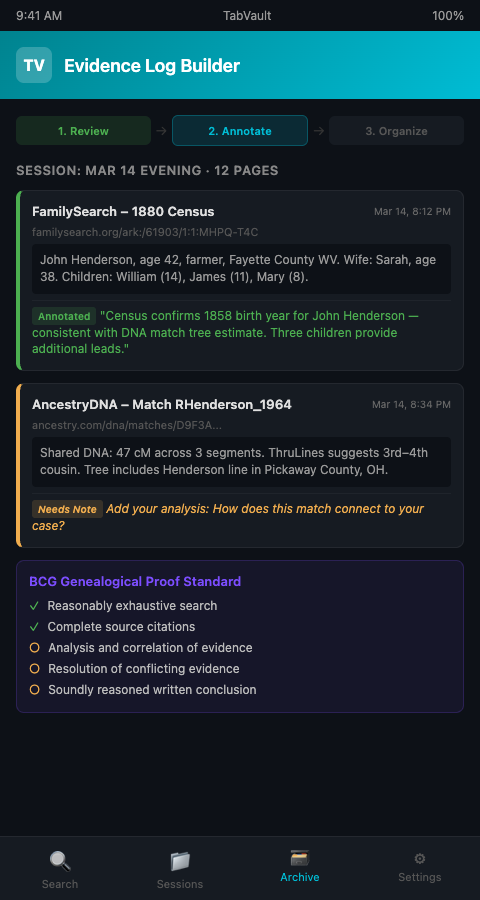
TabVault's indexed session evidence gives you Step 1 for free. The capture and timestamping happen automatically as you browse. Your intellectual work — the analysis, correlation, and argumentation — builds on top of a complete and accurate record of what you consulted. This is the principle of turning chaotic browser sessions into a searchable private database, applied specifically to the problem of genealogical documentation.
FamilySearch Session Tracking in Practice
FamilySearch presents a particular challenge for evidence logging because of the sheer volume of its collections. A researcher looking for a specific individual might search the U.S. Federal Census (1790-1950), state vital records, church records, land and probate records, and military records — each a separate collection with its own search interface. The National Archives notes that census records alone span over 160 years and dozens of enumeration schedules.
Without session tracking, it is common to forget which collections you already searched. A researcher might search Ohio death records on Tuesday and, forgetting by Thursday, search them again — wasting time and introducing confusion about whether a negative result was from the first search or the second.
Indexed sessions eliminate this problem. Every FamilySearch page you visit is in your archive, searchable by collection name, record type, date, or any other term on the page. Before starting a new search, query your archive for the collection name. If it appears, you have already searched it. If it does not, it is a gap in your research that needs filling.
The practice scales beyond genealogy. Architectural salvage dealers turning browser tabs into searchable salvage inventory pipelines face the same fundamental challenge: tracking what you have already reviewed across multiple sources so you do not duplicate effort or miss connections.
Mistakes That Undermine Evidence Logs
Logging only positive results. A complete evidence log records negative results too — searches that returned nothing. The BCG standards require reasonably exhaustive search, and demonstrating exhaustiveness means showing what you searched and did not find, not just what you did find. Index your "no results" pages alongside your hits.
Ignoring derivative sources. A transcribed index on Ancestry is a derivative source. The original record image behind it is the original source. Your log should distinguish between them, because derivative sources carry higher error risk. Note in your annotations whether you viewed the original image or only the index transcription.
Waiting too long to annotate. Indexed content preserves the page, but context fades from memory. The analytical significance of a census entry — why it matters for your case, how it connects to a DNA match — is clearest immediately after you view it. Build a habit of annotating within 24 hours of a session.
Skipping platform-specific metadata. When indexing an Ancestry match page, the page contains metadata beyond the match itself: the date you viewed it, the match's username, the kit number, and the tree privacy status. All of this metadata enters your index and becomes searchable. Do not overlook it. A search for a username can surface every match page associated with that account, which is valuable when a match has multiple kits or has changed their display name.
Not connecting to your vital records research. Evidence logs gain power when they connect DNA evidence to documentary evidence. If your vital records research and your DNA match analysis live in the same indexed archive, your evidence log can draw from both, building proof arguments that integrate genetic and documentary evidence into a single coherent narrative.
A 2024 scoping review on information overload found that structured documentation practices significantly reduced decision fatigue in knowledge-intensive work (ScienceDirect, 2024). Evidence logs are exactly this kind of structure — they externalize your analytical work so your brain can focus on reasoning rather than remembering.
The evidence log also protects against a subtle form of confirmation bias. When your research exists only in memory and scattered notes, you tend to remember the evidence that supports your hypothesis and forget the evidence that contradicts it. A comprehensive, indexed log contains everything — including the match page that did not fit your theory and the census record that contradicted your timeline. Having access to the full evidentiary picture strengthens your analysis and produces more reliable conclusions.
Treating your log as a living document. An evidence log is not a one-time artifact. As your case evolves, new evidence may recontextualize earlier findings. Revisit your log periodically, updating annotations to reflect your current understanding. An entry that seemed irrelevant in February may become a pivotal clue in August. The indexed pages remain unchanged — they are a historical record — but your annotations should evolve as your analysis deepens.
Build the Log Your Research Deserves
Professional genealogists have always known that evidence logs matter. The barrier has never been conviction — it has been effort. Indexed browser sessions remove the largest source of that effort by automatically capturing what you consulted, when you consulted it, and what it contained. TabVault gives you that automatic capture, turning every research session into the foundation of a proper evidence log. Join the waitlist and start building proof arguments on a solid documentary foundation.
One final resource: for researchers ready to share their documented evidence with others, the guide to packaging indexed sessions as shareable evidence covers the next step in the workflow.
Building an evidence log has always been the right practice; the barrier was the manual effort of recording every source. TabVault removes that barrier entirely. Every FamilySearch census page, every Ancestry match profile, and every newspaper archive result you view during a session is automatically captured with its full text, URL, and timestamp. Within your first few sessions, you have the raw material for a research log that meets BCG documentation standards. After several weeks, searching your archive by date range reconstructs an entire month of investigative activity in seconds, giving you a chronological evidence trail that a manually maintained spreadsheet could never match in completeness or accuracy.