Integrating Flow Modeling With Scene Call Sheets
When the Call Sheet Gets the Scene Right and the Audience Wrong
The call sheet for Act 2, Scene 3 specifies the actor enters the study at 9:47 PM with twelve prop items staged on the desk. It does not specify where 200 promenading audience members will be standing at 9:47 PM. That asymmetry is not an oversight — traditional call sheets were never designed for audience-as-participant productions. They were designed for proscenium houses where the audience stays seated and their location requires no planning.
Immersive productions broke that assumption, but most production offices did not update their documentation to match. The result is a call sheet that achieves perfect internal consistency — every actor, every cue, every prop accounted for — while leaving the single most volatile element of the show entirely untracked.
Behind the Scenes: Promenade Theatre (A Younger Theatre) documented this pressure firsthand during the 300-person promenade run of The Drowned Man, where traditional call-sheet documentation proved insufficient for tracking audience movement across dozens of concurrent scenes. When the call sheet cannot anticipate drift, the stage manager discovers the problem live — and by then, the blocking arc is already broken.
Audience Behavior in Immersive Theatre (Tandfonline) confirmed that audience drift in productions like Sleep No More is systematic rather than random. Audiences cluster toward scenes perceived as high-narrative-value and underserve secondary spaces predictably, show after show. That predictability is exactly what flow modeling can capture — but only if the model's outputs feed into the documents the production team actually uses during tech and running.
The call sheet is that document. If flow pressure forecasts live only in a simulator interface that nobody checks after week one of tech, they do not affect staging decisions. The integration work is about making the model's predictions part of the daily production workflow — the same document where the ASM marks scene transitions, where the TD confirms rigging windows, and where the stage manager pacing workflow originates every running call.
Embedding Flow Data Into the Call Sheet Structure
The anatomy of a standard call sheet — scene number, time, location, actors called, cues listed — has one natural insertion point for flow data: the location column. In a multi-room production, "location" already requires disambiguation between scenes running in parallel. That disambiguation column becomes the anchor for audience pressure annotations.
Think of the flow model as a pipe network under pressure. Each scene room is a node, and the audience mass moving between them behaves like pressurized water: it follows the path of least resistance, pools in attractive low-exit scenes, and backs up into adjacent corridors when a popular node exceeds its sightline density ceiling. The call sheet, without flow data, describes the pipe layout but ignores the pressure readings. A flow-integrated call sheet adds the gauge readings next to every node.
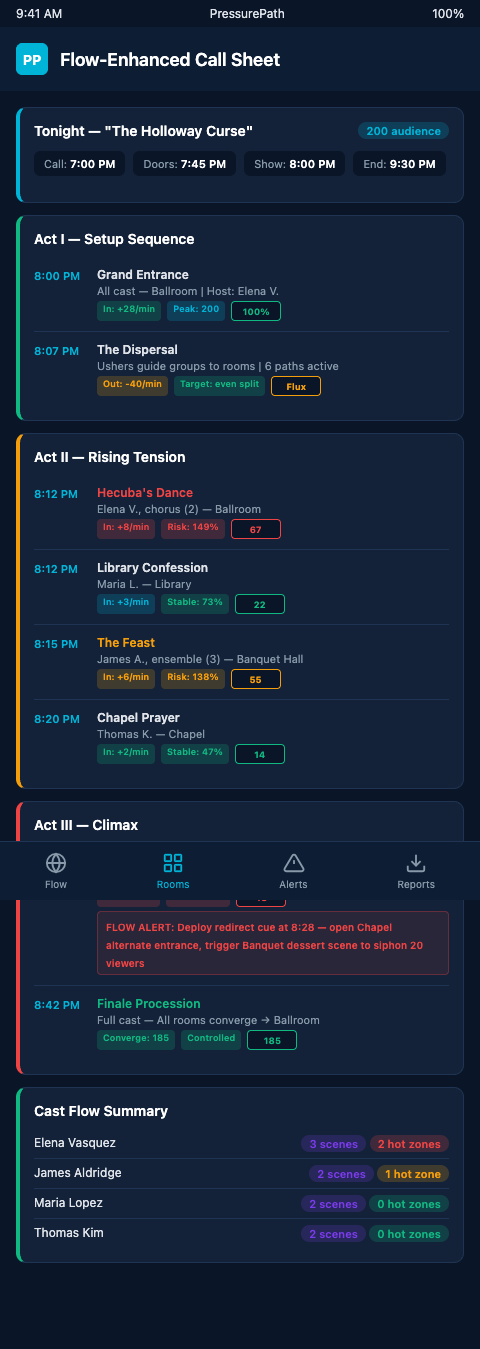
In practice, this means adding two fields per scene block. The first is the expected headcount range — derived from the flow model's simulation output for that scene at that timestamp, expressed as a range rather than a point estimate to acknowledge variability. The second is the pressure alert threshold — the headcount at which sightlines collapse and actors lose sight of the blocking arc they rehearsed. These two numbers together give the stage manager and deck supervisors everything they need to monitor conditions without leaving their positions.
What Is a Cue Sheet? (Stagetimer) describes master cue sheets as documents capturing every technical action with trigger, type, and description. Flow thresholds fit naturally into the trigger field: if Scene 7 headcount exceeds 38 at minute 47, the SM fires the corridor light cue designed to redistribute pressure toward Scene 9. The cue sheet already had a slot for that trigger — the flow model just populates the condition.
Production planning tools like Propared Production Planning and StageWrite Software support field customization in their scheduling and blocking modules. Neither ships with audience-flow fields out of the box, but both allow custom metadata columns that can carry headcount ranges and pressure thresholds from the PressurePath simulation output. The SM team then works from enriched call sheets rather than from a separate system, eliminating the friction of consulting a second tool during a busy running call.
The Ultimate Stage Management Guide (Ticket Fairy) notes that modern stage managers act as the chief operational executive on running nights, translating creative vision to technical reality in real time. When the creative vision includes audience positioning — and in immersive theater it always does — the SM needs operational data, not just artistic intent.
PressurePath generates scene-by-scene headcount forecasts and pressure alerts that export directly as annotations. The first audience pacing model establishes baseline flow behavior in the first week of performances; the call sheet integration then locks that baseline into the production documentation so every subsequent running night benefits from what the model learned.
The AACT Stage Management Handbook explicitly notes that SM reports must cover FOH and audience management but provides no spatial-flow fields for multi-room environments. That gap is the space PressurePath fills.
The mechanics of this integration become clearer when applied to a specific scene type: the pivotal monologue scene. The Poisoning Monologue requires 24 viewers in the library to work as the director blocked it — close enough for intimate sightlines, spread enough that the actor can hold the room's full circumference. The call sheet entry for that scene, once flow-integrated, reads: "Library — Expected headcount: 22-28 — Pressure threshold: 32 — Redirect: Drawing Room corridor light cue 14A." Every person on the running crew who might interact with that scene has the information they need in the one document they already carry.
This granularity scales to all scenes simultaneously. A twelve-scene production running six concurrent scenes at any given time generates twelve annotated blocks per call sheet. The SM's total information load does not increase significantly — the data replaces improvised judgment with pre-documented protocol, reducing rather than adding cognitive load during a running call.
Advanced Tactics for Live Call Sheet Monitoring
Once flow data is embedded in the call sheet, the next step is making those annotations actionable during a running show. Static headcount ranges tell the SM what to expect; real-time deviations tell them when to act.
The most effective implementation pairs call sheet annotations with a density alert threshold per scene. The SM's headset board — whether in QLab, on a running sheet, or in a custom dashboard — flags any scene exceeding its pressure threshold. The call sheet entry for that scene already contains the redirect cue: which adjacent scene has capacity, which corridor light fires, which actor receives a pre-agreed non-verbal signal to extend their current beat. All of that is call-sheet content, written in during tech and rehearsed like any other cue.
Deck supervisors stationed at scene entry points carry a simplified version: scene name, capacity ceiling, current status (green / amber / red), and the redirect instruction for amber and red states. When the library hits 34 viewers against a sightline ceiling of 28, the deck supervisor at the library door holds the next cluster and points them to the drawing room — not on improvised instinct, but on the call sheet instruction written three weeks earlier.
The integration also surfaces a pattern over run time. After ten performances, the call sheet annotations accumulate deviations: nights when Scene 4 ran amber at minute 22 regardless of show conditions, nights when the conservatory consistently underfilled during Act 1. Those annotations feed back into the reservation intake and ticketing-window analysis, allowing the production to adjust arrival staggering before pressure patterns become structural.
Directors reviewing post-show reports benefit from flow-annotated call sheets because the spatial narrative of the night becomes readable without watching footage. They can see that the Poisoning Monologue scene ran 40% over sightline capacity from minute 31 onward, that the corridor light redirect fired twice, and that the blocking arc scored within range despite the overload. That data supports directorial decisions about whether to restructure the Act 2 transition or simply adjust the Scene 11 entry cue timing.
PressurePath's call sheet export is designed for exactly this workflow — annotations formatted for paste-in to existing SM documentation, threshold alerts compatible with standard cue-list structures, and post-show deviation logs that require no additional data entry from the running crew.
Start With One Scene Block
If your production uses any form of call sheet documentation — even a simple running order with cues — the integration path starts with one scene. Pick the scene with the highest historical drift variance: the room that sometimes packs and sometimes empties for reasons nobody on the team has fully explained. Add the PressurePath headcount range and pressure threshold for that scene to your next tech day's call sheet. Run a performance. Review the deviation log.
The reason to start with one scene rather than the full production is calibration cost. Integrating flow data into twelve scenes simultaneously means that if the headcount ranges are miscalibrated — which they will be, on the first pass — the SM receives twelve misleading annotations in a single night and loses confidence in the entire system. Integrating one scene at a time means the SM sees exactly how the model's predictions compare to reality, understands the variance range, and develops the judgment needed to interpret future annotations. After the first scene is well-calibrated across four or five performances, the second scene gets added, then the third. By week three, the full call sheet is flow-annotated and the SM has already built the mental model needed to act on it reliably.
The other benefit of the single-scene starting point is political: production teams that have resisted adding another data system to the SM's workload often accept one annotated scene as a low-cost experiment. When that single scene demonstrably improves the SM's decisions at the tech table, the case for expanding the annotation coverage becomes evidence-based rather than conceptual.
That single annotated scene block will tell you more about your audience flow than three weeks of post-show conversations. Immersive theater companies managing multi-room blocking arcs across forty-plus running nights need that data embedded in the documents the team already trusts. Join the PressurePath waitlist and get call sheet annotation templates built for immersive stage management workflows.