Getting Started With Estate Sale, Auction, and Catalog Indexing
Your First Week of Indexed Sourcing
A salvage dealer in Portland, Oregon, decided to try a structured approach to her online sourcing. For one week, she logged every website she visited during sourcing sessions: 14 estate sale listings on EstateSales.net, 8 auction previews on AuctionZip and LiveAuctioneers, 6 catalog pages on House of Antique Hardware and Olde Good Things, 11 Craigslist posts, 4 demolition permit pages from Multnomah County, and 9 assorted pages -- historical society entries, restoration forum threads, and material identification guides. That totaled 52 pages in five days.
She bookmarked 7 of them. She screenshot 3. The other 42 pages -- containing addresses, prices, lot numbers, dimensions, material descriptions, and sale dates -- existed only as browser tabs that she closed on Friday afternoon.
This is normal. The EstateSales.net 2024 Industry Survey reports over 9,000 estate sale companies listing on the platform, and the auction market adds thousands more listings weekly. No dealer can manually save every page. But with estate sale auction indexing through TabVault -- turning chaotic browser sessions into a searchable private database -- every one of those 52 pages would have been automatically captured, indexed, and made searchable with zero additional effort during the browsing session.
Here is a practical guide for salvage dealer getting started indexing, organized by the three major content types you source from.
Estate Sale Listing Indexing
Estate sale listings are the highest-volume source for most architectural salvage dealers. A single listing page on EstateSales.net typically contains the sale company name, dates, address, description text, and a photo gallery with captions. The description text is where the salvage value hides -- phrases like "original 1920s hardware throughout," "intact butler's pantry with leaded glass," or "collection of antique doorknobs" that signal materials worth sourcing.
TabVault indexes the full text of each listing page as you view it. The critical detail is that the text description, not just the photos, gets captured. When you search your archive weeks later for "leaded glass" or "butler's pantry," the listing surfaces even if you have forgotten which sale it was, which city it was in, or which weekend it was scheduled.
Getting started with estate sale indexing:
Browse EstateSales.net for your region as you normally do. Open listings that look promising. Read the descriptions. View the photos. Then close the tabs. That is it. TabVault handles the indexing in the background. At the end of the week, search your archive for materials you are actively seeking. The results show every estate sale listing you viewed that contained those terms. The BigRentz analysis of construction waste statistics reports that demolition projects generate a significant volume of salvageable building components such as doors, windows, and plumbing fixtures — materials that frequently appear on estate sale and auction platforms before the demolition date arrives.
Over time, your indexed estate sale archive becomes a historical record of what has been available in your market. After six months, you can search for a material and see not just current listings but past listings with pricing, location, and condition data -- a market intelligence resource that builds passively from your normal browsing habits.
Auction Listing Tab Indexing
Auction catalogs are richer in detail than estate sale listings but more ephemeral. A preview catalog for a deconstruction auction might describe 50 lots with detailed specifications: "Lot 12: Approximately 400 board feet reclaimed heart pine tongue-and-groove flooring, mixed widths 3-5 inches, circa 1890, removed from warehouse in Savannah, GA." After the auction closes, the catalog page often disappears or is archived behind a login wall.
Auction listing tab indexing preserves this data permanently. When TabVault indexes an auction preview page, the lot descriptions, estimated prices, and auction details become searchable in your private archive. Three months later, when you are pricing a similar batch of heart pine for a client, you search your archive for "heart pine" and retrieve the auction listing with its estimated value -- historical pricing data that would otherwise be lost.
Getting started with auction indexing:
Browse auction preview catalogs on AuctionZip, LiveAuctioneers, and regional auction house websites. View each lot page that contains salvage-relevant materials. After the auction, visit the results page if available to index sold prices. Your archive accumulates both asking and realized prices over time, creating a private pricing database that grows with each auction season.
The difference between a dealer who indexes auction catalogs and one who does not becomes apparent after six months. The indexing dealer can search "reclaimed heart pine" and retrieve 30 auction lots with estimated and realized prices, board footage, and geographic sources. That data informs bidding strategy in a way that memory and experience alone cannot match.
Period Hardware Catalog Search and Reference Indexing
Period hardware identification is a specialized skill, and online catalogs are essential references. Companies like Olde Good Things maintain inventories with over 4,500 pieces of vintage hardware categorized by style and era. House of Antique Hardware catalogs period-inspired pieces spanning colonial to mid-century modern. Restoration forums contain discussion threads where experienced dealers identify obscure hardware by photo.
Catalog indexing architectural salvage reference material creates a searchable knowledge base from these sources. When a client brings in a brass hinge and asks you to source five matching pieces, you search your archive for the descriptive terms -- "brass butt hinge," "Eastlake pattern," "3.5 inch" -- and retrieve catalog pages, forum discussions, and dealer inventory listings that match.
Getting started with catalog and reference indexing:
Spend one session per month browsing reference sources: period hardware catalogs, architectural style guides, restoration forum threads, and historical society pages. These pages index alongside your sourcing leads, creating a reference library that grows alongside your lead pipeline. Veterinary toxicology clinicians use first-week MSDS, PubMed, and Merck Manual indexing to build the same kind of reference library for emergency protocols.
The period hardware catalog search capability becomes particularly valuable when clients request specific styles. A restoration contractor working on a Craftsman bungalow needs hardware that matches the original period. Your indexed catalog pages from Olde Good Things, House of Antique Hardware, and Historic Houseparts give you instant access to matching options -- complete with descriptions, prices, and availability -- without re-browsing each catalog from scratch. You respond to the client within minutes rather than days.
Your First-Week Indexing Checklist
Here is a concrete plan for your first week of indexed sourcing.
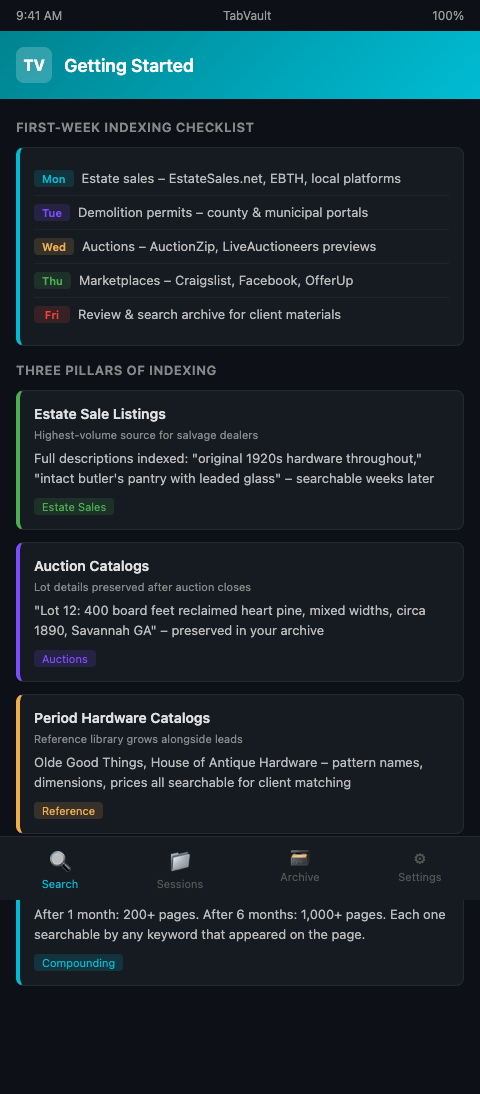
Monday: Estate sales. Browse EstateSales.net, EBTH, and local sale platforms for your region. View every listing within your sourcing radius. TabVault indexes each one.
Tuesday: Demolition permits. Check your county and municipal permit portals. View new filings. The addresses, dates, and property details enter your index.
Wednesday: Auctions. Browse upcoming auction previews on AuctionZip and LiveAuctioneers. View lot pages with salvage-relevant materials.
Thursday: Marketplaces. Scan Craigslist, Facebook Marketplace, and OfferUp for salvage and reclaimed material listings in your area.
Friday: Review and search. Search your archive for materials your current clients need. Review the week's indexed pages by date range. Flag leads that require follow-up. Note which sources produced the most useful results.
After one week, your archive contains roughly 40 to 60 indexed pages. After one month, 160 to 240. After six months, over 1,000. Each page is a searchable entry in your private sourcing database.
The key insight is that you are not adding any new steps to your workflow. You are browsing the same sites you already browse. The only difference is that TabVault runs in the background, indexing every page as you view it. The effort is zero. The return -- a searchable archive of your entire sourcing history -- compounds with every session.
Advanced Indexing Habits
Re-index favorite sources. Revisit estate sale company pages and auction house sites weekly. Each visit updates your index with their latest listings, keeping your archive current alongside historical data.
Index sold listings. When an item sells at auction or an estate sale listing is marked "sold," the final price often appears on the page. Indexing sold listings builds a pricing reference that improves your buying decisions.
Cross-reference sources. When the same item appears on multiple platforms -- an estate sale listing on EstateSales.net and an auction lot on LiveAuctioneers -- searching your archive by item description reveals both. This helps you compare pricing across channels and choose the better deal.
Layer catalog reference with sourcing leads. When you identify a piece of hardware at an estate sale but cannot name its style, search your archive for descriptive terms. If you previously indexed a catalog page from Olde Good Things or House of Antique Hardware describing that style, the reference page surfaces alongside the estate sale listing. Your permit matching and material identification improve as your reference library and sourcing archive grow together in the same searchable index.
The EPA's reporting on construction and demolition materials documents the scale of the material reuse opportunity. The fraction that passes through online listings represents a searchable, indexable flow of sourcing intelligence -- if you have the right tool to capture it.
Start Indexing This Week
You do not need to change how you browse. You need to change what happens to the pages after you browse them. TabVault indexes every estate sale listing, auction catalog, and reference page you visit, building a private archive that makes your sourcing sessions permanently searchable. Join the waitlist and start your first week of indexed sourcing.
Start with estate sales on Monday, auctions on Wednesday, and catalogs on Friday. By the end of your first week, TabVault has indexed fifty or more pages without a single extra click. After one month, that archive holds hundreds of listings with pricing data, lot descriptions, and hardware specifications you can search by any term. The dealer who has been indexing for six months owns a private reference library spanning thousands of sourcing pages -- the kind of accumulated market knowledge that turns a request for matching Eastlake rosettes from a research project into a ten-second search.