Monitoring Demolition Notices Across Multiple City Portals
Three Cities, Three Portals, Zero Overlap
A dealer outside Philadelphia recounted losing a major haul of 1920s radiators and cast-iron balustrades because the demolition permit was posted on Cook County's Electronic Permit Processing Portal while he was checking Philadelphia's Department of Licenses and Inspections site. By the time he found the listing, a competitor had already negotiated salvage rights. The gap was seventy-two hours. That is the difference between a profitable pull and an empty truck.
Municipal demolition permits are public records, but the systems that publish them are fragmented by design. Chicago posts demolition wrecking permits through its Department of Buildings portal, while Washington, D.C., routes applications through a separate Citizen Access Portal at the Department of Buildings. Cook County's demolition permitting process alone can take three to seven business days for approval, and the notice window before work begins varies by jurisdiction. Dealers sourcing across state lines face the same fragmentation that genealogists encounter when searching multi-state vital records — each jurisdiction maintains its own database, its own update cadence, and its own interface.
The result is a sourcing workflow that demands checking five, ten, or fifteen separate city portals every morning. Each portal loads differently, uses different search parameters, and displays results in different formats. A dealer who covers the Baltimore-Washington-Philadelphia corridor might open a dozen tabs before breakfast — and if the browser crashes or restarts, every tab resets to the portal homepage, not the filtered results page.
The volume of material at stake makes this fragmentation costly. The EPA reports 600 million tons of C&D debris, and a significant portion of that debris contains salvageable architectural elements — millwork, hardware, masonry, decorative metalwork — that will be crushed and landfilled if no dealer reaches the site in time. The window between a demolition permit posting and the start of wrecking work is often measured in weeks, not months. Miss the posting on one portal, and the material is gone before you knew it existed.
Compounding the problem, most city portals do not send proactive notifications. A few municipalities offer email alerts for specific permit types, but the majority require manual searches. That means the dealer's competitive position depends entirely on how thoroughly and how frequently they check each portal — a task that scales poorly as sourcing territory expands beyond two or three jurisdictions.
Turning Portal Chaos Into a Searchable Private Database
Consider the sheer number of jurisdictions a regional dealer must cover. The Philadelphia-Baltimore-Washington corridor alone includes the City of Philadelphia, Delaware County, Montgomery County, Baltimore City, Baltimore County, Washington D.C., Arlington County, and Fairfax County — each maintaining its own building department and demolition permit system. Expanding further into New Jersey adds municipalities like Camden, Trenton, and Newark, each with separate portals. A dealer who sources across even half of these jurisdictions faces a daily monitoring burden that no amount of bookmarking can sustainably support.
The structural fix is to stop treating each city portal as a separate task and start treating every page you visit across all of them as a single, searchable collection. This is the principle behind turning chaotic browser sessions into a searchable private database — every demolition notice, every permit detail page, every filtered results list gets indexed locally the moment you view it.
TabVault does exactly this for multi-city demolition tracking. When you open a permit detail page on San Diego's Development Services portal or Raleigh's residential demolition page, the full text of that page is captured and indexed on your machine. Close the tab. Move to the next city. Every page persists in your local archive.
Applied Sourcing Strategies
The practical change is immediate. Instead of re-checking each portal from scratch, you search your index. Type an address, a neighborhood name, or a building type, and every matching demolition notice across every city you have browsed appears in one results list. A permit you saw on the D.C. portal two weeks ago shows up alongside one you checked on the Philadelphia site yesterday. The multi-city demolition tracking problem collapses into a single search bar.
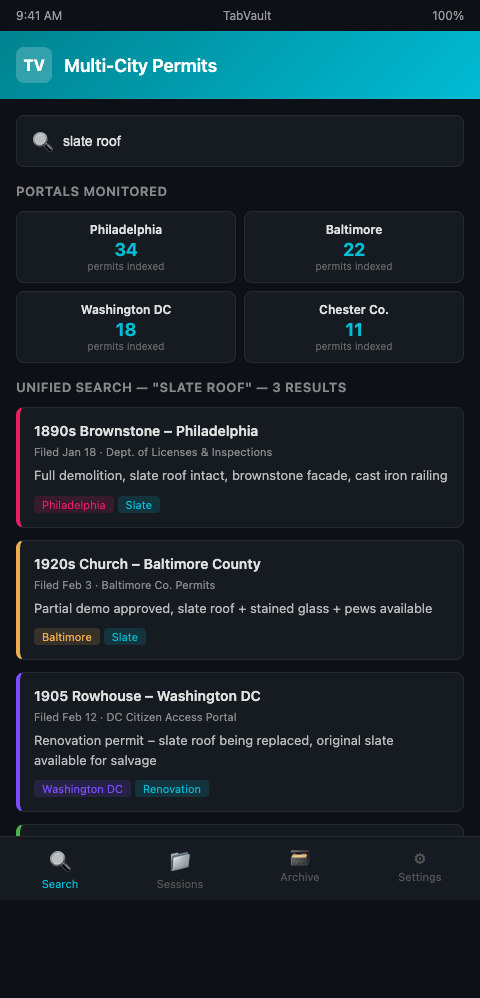
This approach pairs naturally with the demolition monitoring workflow you may already have for a single jurisdiction. The difference is scale: instead of bookmarking filtered views on one portal, you are building a cumulative archive across every portal you touch.
TabVault's local indexing also captures details that portal search filters miss. Many city portals let you filter by permit type or date range, but they do not support full-text search across permit descriptions. Your indexed archive does. If a demolition notice mentions "1890s brownstone" in a free-text field, a search for "brownstone" will surface it — even if the portal's own search only supports address or permit number lookups.
The demolition schedule tracking tool aspect of this workflow addresses a second problem: sequence. Demolition permits do not always move in a predictable order. A permit filed in January might not proceed to actual demolition until June, while another filed in March could start wrecking within two weeks. By indexing every permit page with its filing date, status updates, and any noted timeline, you build a demolition schedule that you can query by date, status, or keyword. When you need to know which permitted demolitions are likely to begin in the next thirty days, a date-range search across your indexed archive provides that view — something no single city portal offers across jurisdictions.
Privacy and Competitive Advantage
The privacy dimension matters too. Your indexed archive lives locally on your machine. No competitor can see which permits you have been tracking, which cities you prioritize, or how you allocate your sourcing time. The intelligence you build from city portal salvage sourcing is yours alone, stored in a format that only you can search.
The indexed record also carries a timestamp, so you know exactly when you first encountered each notice. That timestamp matters when you are negotiating salvage access and need to document how early you identified the opportunity. It also matters for combining demolition schedules with historical building records — you can reconstruct a timeline of when each demolition entered your awareness and cross-reference it with the building's history.
Advanced Tactics for Multi-City Monitoring
Create a morning rotation and stick to it. Open each city portal in sequence, scan new permits, and let every page index. Even if you do not act on a notice immediately, it is captured. When a client calls next month asking about Art Deco fixtures, you can search your archive for demolition notices mentioning that era across every city you have monitored.
Track portal update schedules. Not every city updates its demolition permit database daily. Some post weekly batches. Note the cadence for each portal and adjust your rotation accordingly. Checking a weekly-update portal every morning wastes time; checking it once a week and relying on your index for the rest is more efficient.
Use building permit demolition alerts where available. Some municipalities offer email or RSS notifications for new demolition permits. Subscribe to those, then click through to the full permit page so it gets indexed. The alert gets you there faster; the index makes the content permanently searchable.
Layer permit data with estate sale timing. A demolition notice on a residential property often coincides with a probate process. The Homelight probate timeline guide notes that probate sales can take six to twelve months, which means estate sale listings may appear weeks before the demolition permit is filed. Cross-referencing both data streams catches opportunities that monitoring demolition notices alone would miss.
Flag commercial properties separately. Commercial demolitions often yield larger quantities of uniform materials — think office building door hardware, institutional light fixtures, or warehouse steel. When you spot a commercial demolition notice, tag it in your notes so you can prioritize site visits.
Search by building type to identify patterns. After several months of indexing demolition notices across cities, search your archive for building types — "school," "church," "hospital," "warehouse." This aggregated view reveals which building types are being demolished in your territory and at what frequency. Churches, for instance, yield stained glass, pews, and decorative woodwork. Schools produce institutional hardware, gymnasium flooring, and large-format doors. Knowing which building types are trending toward demolition in your market helps you plan inventory and storage.
Compare jurisdictional timelines. Different cities process demolition permits at different speeds. Your indexed archive, with timestamps on every page, lets you compare how long each jurisdiction takes from permit filing to probable start of demolition. A city that processes permits in seven days gives you a shorter window than one that takes thirty. Adjust your response time for each jurisdiction based on the patterns your archive reveals.
Stop Losing Leads to Fragmented Portals
Every day you spend manually toggling between city portals is a day a faster competitor could beat you to the next demolition site. A searchable, indexed archive of every demolition notice you have ever viewed — across every jurisdiction — eliminates the information gap. TabVault builds that archive automatically from your normal browsing. Join the waitlist and turn your multi-city demolition tracking into a permanent sourcing advantage.
Every city portal you check this morning adds indexed pages to a unified demolition archive. After eight weeks of multi-city monitoring, a single search for "pre-war commercial" returns matching permits from Philadelphia, Baltimore, and D.C. in one results list. After six months, your archive maps demolition activity across your entire sourcing territory -- a private intelligence layer that collapses a dozen fragmented portals into one search bar and ensures you never lose another lead to a missed portal check.