Protecting Sensitive Sources With Local-Only Research Indexing
The Subpoena That Exposes Your Research
A podcast producer investigating a pharmaceutical company received a subpoena demanding all records related to her research, including browser history, bookmarks, and any cloud-stored notes. Her browser history was synced to her Google account. Her bookmarks included pages related to confidential sources. Her research notes lived in Google Docs. The subpoena potentially reached all of it — everything stored on a third-party server was discoverable. The sources she had promised confidentiality were now at risk because her research workflow had silently uploaded evidence of their identities to the cloud.
This is not a hypothetical edge case. The Freedom of the Press Foundation publishes a digital security checklist for journalists that warns explicitly against storing sensitive source information in cloud services vulnerable to legal process or data breaches. The Committee to Protect Journalists advises that journalists should avoid using personal or work devices linked to identifiable accounts when contacting sensitive sources, and that metadata in documents and messaging apps can identify sources even when the content is encrypted.
The problem runs deeper than deliberate note-taking. Chrome syncs browser history, bookmarks, and open tabs to Google's servers by default when a user is signed into their Google account. Firefox offers similar sync features. Every page you visit during source protection browser research — a whistleblower's LinkedIn profile, a confidential tipster's public social media, a document portal you accessed with credentials a source provided — enters a cloud-synced record that you do not fully control.
Shield laws provide some protection: 49 states and the District of Columbia have enacted some form of shield law protecting journalists from being compelled to reveal sources. But shield law protections vary dramatically by state, and the federal PRESS Act, which would have provided uniform federal protection, failed to pass the Senate after being blocked. For podcast producers operating without a newsroom's legal infrastructure, relying on shield laws alone is insufficient when your research data sits on servers accessible to legal process.
Local-Only Indexing as a Source Protection Strategy
Private local indexing means your research archive never leaves your machine. No cloud sync. No third-party server. No database accessible to anyone but you. The index lives on your local drive, encrypted if you choose, and searchable only from your computer.
TabVault operates as a local-only research database. When you browse a source's public records, review confidential documents, or research background on a sensitive subject, the full text is indexed on your machine. It is not uploaded to any server. It is not synced to any account. It is not accessible to any subpoena directed at a cloud provider. Your research stays in your physical possession — turning chaotic browser sessions into a searchable private database that is private in the most literal sense.
This matters for sensitive investigation data storage because the threat model for investigative podcast producers includes not just hackers but legal process. A civil litigant, a government agency, or a subject of investigation can issue subpoenas to cloud providers without your knowledge. Google, Microsoft, and other providers may comply and hand over your synced browsing data, bookmarks, and stored documents before you even know the request was made. Local storage eliminates the cloud provider as an attack surface.
The practical workflow for source protection browser research with TabVault involves three steps. First, disable browser sync on your research profile so that history, bookmarks, and open tabs are not uploaded to any account. Second, use TabVault to index every page you visit during research — the full-text index replaces the need for cloud-synced bookmarks or history as a retrieval tool. Third, apply full-disk encryption to the drive where your TabVault index resides, adding a layer of physical security.
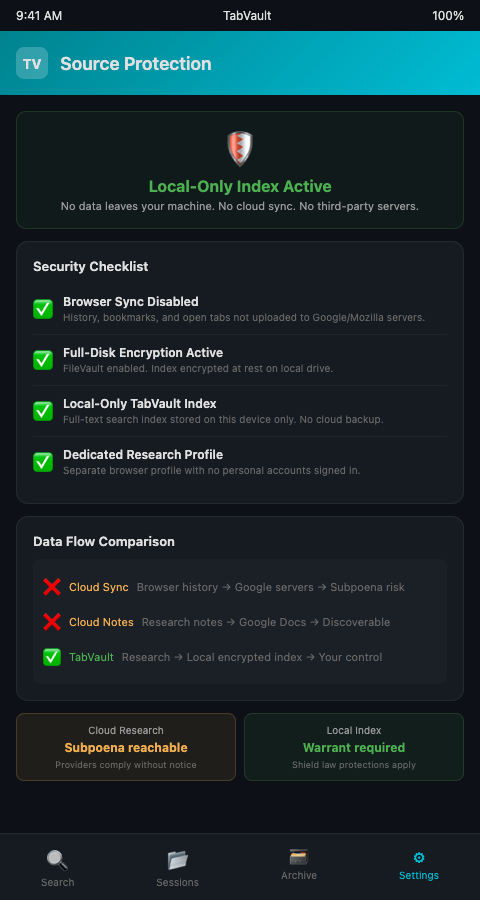
This approach parallels how other sensitive-data professionals handle confidential material. The ICIJ's Datashare platform processes documents locally precisely because the investigations it supports — Panama Papers, Pandora Papers, FinCEN Files — involve material that cannot be stored on external servers. The principle is the same: keep the index local, keep the data under your control.
TabVault's local indexing also supports how you manage portal indexing for FOIA and court systems. Indexing government portal pages locally means that even the record of which portals you visited stays on your machine. And when your investigation involves shared research with co-producers, you control exactly which portions of your archive to share and which to keep private.
Architectural salvage dealers working in competitive markets face an analogous confidentiality challenge and have adopted private indexing for competitive intelligence to prevent sourcing strategies from being exposed. The underlying need — keeping research data out of systems you do not control — transcends industry.
The distinction between local and cloud storage is not academic. The Nieman Foundation at Harvard maintains a digital security resource library for journalists that emphasizes the legal and operational advantages of minimizing cloud exposure for sensitive material. When the Department of Justice seeks records from a cloud provider, the provider may comply without notifying the account holder, depending on the type of legal process used. A local index stored on an encrypted device requires physical access and, in most cases, a warrant directed at the journalist — a higher legal bar and one where the journalist has the opportunity to assert shield law protections before any data is disclosed.
Eliminating Cloud Exposure and Enabling Thorough Research
Private local indexing also eliminates the risk of data breaches at third-party providers. Cloud services experience security incidents regularly. If your research notes, browsing patterns, or indexed page content are stored on a provider's servers, they are exposed to any breach that provider suffers. A local-only database reduces your attack surface to your own physical and network security — a scope you control and can harden to the level your investigation requires.
The practical benefits extend to everyday research discipline. When a producer knows that their research index is private and local, they browse more freely — visiting source profiles, reviewing sensitive documents, and exploring confidential leads without worrying that each page visit is creating a cloud-synced record that could later be compelled. This freedom to research thoroughly, without self-censoring browsing behavior, produces deeper investigations and more complete evidence gathering. SecureDrop, the whistleblower platform maintained by the Freedom of the Press Foundation and now deployed at over 65 news organizations, demonstrates that security-first design enables rather than constrains journalism. The same principle applies to research indexing.
Advanced Tactics for Secure Research Indexing
Maintain separate indexes for sensitive and non-sensitive research. If your investigation involves both public-record research and source-related research, consider maintaining separate TabVault indexes on different encrypted volumes. If a legal challenge targets your research, you can disclose the public-record index without exposing the source-related one.
Audit your browser's sync settings regularly. Browser updates sometimes re-enable sync features or change default settings. Check monthly that your research browser profile has sync disabled for history, bookmarks, and open tabs. The Freedom of the Press Foundation's digital security checklist recommends regular security audits of all tools used in newsgathering.
Use a dedicated device for sensitive research. Architectural salvage dealers have adopted private indexing for competitive intelligence using the same local-only principle to protect sourcing strategies. The journalist source confidentiality tools recommended by CPJ include using devices purchased specifically for contacting sources, kept separate from personal and general work devices. Apply the same principle to research browsing: a dedicated device with TabVault indexing locally and no cloud accounts signed in.
Encrypt your index at rest and in transit. Full-disk encryption (FileVault on macOS, BitLocker on Windows) protects your index if the device is lost or seized. If you need to transfer index data between devices, use encrypted USB drives rather than cloud transfers.
Delete what you no longer need. A local index is only as secure as its management. When an investigation concludes and the episode airs, review your index for material that should be permanently deleted. Source-identifying information that served its purpose during production may not need to persist in your archive indefinitely.
Conduct a pre-publication security review. Before any episode airs, search your archive for source-identifying details — names, email addresses, phone numbers, locations — and verify that none of this information will be inadvertently disclosed through shared research files, show notes, or supplementary materials. A single accidental disclosure can compromise a source permanently.
Document your security practices. If your investigation faces legal challenge, being able to demonstrate that you took reasonable precautions to protect source confidentiality strengthens your legal position. Maintain a written record of the security measures you applied — local indexing, encryption, sync disabled, dedicated devices — as part of your project documentation.
Your Sources Trusted You — Keep Their Trust Local
Source protection is not just about encrypted messaging. It extends to every aspect of how you store, organize, and search your research. Cloud-synced browsing data is a liability. TabVault keeps your full-text research index entirely local — on your machine, under your control, and off anyone else's servers. If source confidentiality matters to your investigations, join the waitlist and build a research archive that stays where it belongs.
When a producer investigating a pharmaceutical company received a subpoena demanding all research records, every cloud-synced bookmark and Google Doc was potentially discoverable. A local-only TabVault archive would have kept that research trail on her encrypted laptop -- off third-party servers, beyond the reach of cloud-provider subpoenas, and under her physical control. Source protection starts with architecture, not intention. Install TabVault on an encrypted device, disable browser sync, and build a research archive that exists nowhere except your machine. Every whistleblower who trusted you with information deserves infrastructure that matches that trust.