How Tab Indexing Preserves Connections Browser History Erases
The Connection That Vanished Between Sessions
A true crime podcast producer spent an afternoon cross-referencing property records on a county assessor's website with corporate filings on a secretary of state portal. Midway through, she noticed that the same LLC appeared on both a property deed and a campaign finance disclosure she had opened three tabs earlier. That connection — the thread tying a real estate transaction to a political donation — existed only in the spatial arrangement of her browser tabs and her short-term memory. She closed the laptop for the evening. The next morning, Chrome's session restore failed. Browser history showed a list of URLs. It did not show which pages she had open simultaneously, what text she had been reading, or why those particular tabs sat next to each other.
Browser history was never designed to preserve research connections. Chrome stores history for 90 days by default, recording only the URL, the page title, and a timestamp. Firefox behaves similarly. Neither captures the full rendered text of the page, the content of dynamically loaded elements, or any contextual relationship between tabs open in the same session. A Carnegie Mellon study on tab behavior found that users treat open tabs as external memory — spatial cues that encode relationships between pieces of information — and that losing those cues forces costly re-finding and re-reading (Carnegie Mellon University, 2021).
For investigative podcast producers working multi-month cases, browser history limitations compound over time. The Reporters Committee for Freedom of the Press documents how FOIA-driven investigations routinely span dozens of agency portals and hundreds of individual document pages. Browser history reduces all of that to a flat list of links — no full text, no relationships, no content.
Full-Text Tab Search vs. Browser History: What Changes
The difference between tab indexing and browser history is the difference between a filing cabinet of photocopied documents and a list of addresses where documents once existed. Tab indexing captures the full rendered text of every page you visit, stores it locally, and makes it searchable by any word or phrase that appeared on the page. Browser history stores a URL that may or may not still point to the same content. The gap between these two approaches determines whether an investigative team can retrace their research path or is forced to start over.
Chrome's default behavior compounds the limitation. History is retained for 90 days, and dynamically loaded content — the kind found on many government portals and court record systems — often does not register in history at all. A PACER docket page loaded through a session-authenticated link may appear in history as a generic URL that reveals nothing about the case it referenced.
TabVault applies this distinction to the investigative podcast workflow. When you browse a court record on PACER, a FOIA response on an agency portal, or a news article on a local newspaper's website, TabVault indexes the entire visible text of that page on your machine. The page enters your private searchable database — turning chaotic browser sessions into a searchable private database that persists long after the browser session ends.
Research Continuity in Practice
Consider what full-text tab search means in practice. You remember that a witness mentioned "Greenfield Holdings" in a deposition excerpt you read two months ago, but you cannot recall whether it was in a court filing, a news report, or a FOIA document. With browser history, you would scroll through hundreds of URLs hoping to recognize the right one, then click through each to see if the page still loads and contains the phrase. With TabVault, you search "Greenfield Holdings" and every indexed page containing those words appears instantly — the deposition excerpt, a corporate filing that also mentions the name, and a city council meeting minutes page you had forgotten you ever visited.
This is why tab indexing preserves connections that browser history erases. The connection between the deposition and the corporate filing was not encoded in any URL. It was encoded in the content of the pages themselves. Only a full-text index captures that.
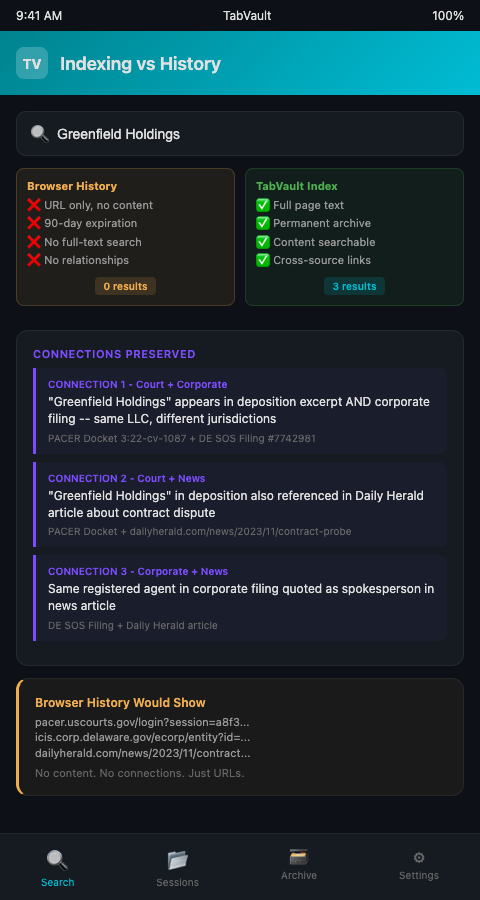
The practical impact on an investigative podcast workflow is measurable. Instead of spending hours re-finding and re-reading pages to reconstruct a line of reasoning, a producer searches once and retrieves every relevant page from months of research sessions. The Investigative Reporters and Editors (IRE) resource center emphasizes that organizational systems determine whether an investigation stalls or advances — a full-text index is that organizational system applied to browser-based research.
TabVault also solves the volatility problem that browser history cannot. A URL in your history points to a page that may have changed, moved, or disappeared. A PACER docket page might be updated with new filings. A news article might be edited or taken behind a paywall. The full text indexed at the time of your visit remains in your archive regardless of what happens to the source page. Other research-intensive fields face the same challenge — architectural salvage dealers have documented how forgotten browser tabs cost them estate sale leads when listings disappear from volatile auction sites.
The temporal dimension of full-text tab search adds another layer that browser history fundamentally lacks. When you index a FOIA response page on March 3 and a court filing on April 17, both entries carry those dates. Six months later, you can reconstruct not just what you read but when you read it and in what sequence. For investigations that may face legal scrutiny, this timestamped research log demonstrates the provenance of your reporting — showing that you found a specific document before a particular claim aired, not after. Browser history timestamps exist but are useless without the full text to contextualize them.
The gap between tab indexing and browser history widens further when you consider how investigative podcasters work across devices. A producer might research on a desktop at the office and a laptop at home. Browser history stays siloed per device unless cloud sync is enabled — and enabling sync creates the privacy risks that source-sensitive work should avoid. A local TabVault index on each machine, with controlled sharing between them, preserves the research connections without exposing browsing patterns to a cloud provider.
Advanced Tactics for Preserving Research Connections
Tag sessions by investigation phase. Label your research sessions by phase — background research, document collection, source verification, fact-checking. When you search later, filter by phase to see only the pages relevant to your current task. This prevents early-stage background reading from cluttering results when you are doing final fact-checks.
Search for co-occurring names to surface hidden connections. The most valuable connections in investigative work are often indirect. Search your index for two names simultaneously — a person and a company, a location and a date — to find pages where both appear. These co-occurrences are invisible in browser history but immediately surfaced by full-text search.
Use your archive to retrieve records from past research sessions. When a follow-up episode requires revisiting material from an earlier investigation, your indexed archive lets you search across all prior sessions without relying on memory or bookmarks. Every page you indexed during previous projects remains searchable.
Keep research organization tight from the start. The more consistently you index, the more complete your searchable archive becomes. Gaps in indexing create gaps in your ability to search. Make indexing a reflex, not an afterthought.
Compare indexed snapshots to current pages. When you revisit a source months later, compare what your index preserved with what the page currently shows. Edits, retractions, and updates become visible. For investigative work, documenting that a page changed between your first visit and your second can be as important as the content itself.
Build a connection map from search results. After searching your archive for a key entity, map out every page where that entity appears and note the other entities co-occurring on each page. This manual step, powered by the full-text search results, produces a visual connection map that browser history could never generate. Use it to brief your team or plan the narrative arc of an episode.
Index opposing viewpoints alongside evidence. When your investigation involves a dispute — a company's public statements versus whistleblower claims, an agency's official report versus FOIA documents — index both sides. Searching for a specific claim then surfaces both the assertion and the counter-evidence, giving you the full picture from your own archive.
Your Research Connections Deserve Better Than a URL List
Browser history gives you a list of places you visited. Tab indexing gives you a searchable record of everything you read, every connection you drew, and every detail you might need months later. TabVault builds that full-text index automatically as you browse, preserving the investigative podcast workflow that browser history was never built to support. Join the waitlist and stop losing the connections that matter most to your investigations.
A corporate fraud investigation generates an average of 60 to 80 unique research pages per week across PACER, state registries, and news databases. After three months, that is over 900 pages -- and the connection between a shell company filing from week two and a property transfer from week eleven exists only if both pages are indexed and searchable. TabVault captures the full text of every page at the moment you visit it, so the cross-reference that would take two hours of manual re-searching surfaces in a single query. Install it before your next research session and let three months of browsing become three months of searchable evidence.