What to Index and What to Skip in Public Records Research
The Indexing Overload Problem
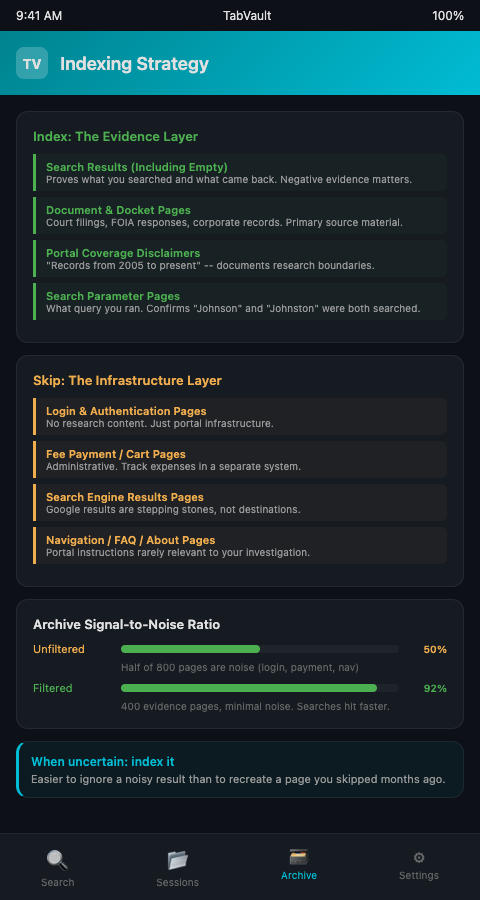
A producer researching a municipal corruption story described indexing every page she visited over a two-week period. The result: over 800 indexed pages, roughly half of which were login screens, search engine results pages, fee payment confirmations, and navigation menus. When she later searched her archive for a specific city council vote, the relevant court docket page was buried under dozens of irrelevant hits. The index had become so noisy that searching it was nearly as slow as re-doing the original research.
The opposite extreme is equally damaging. Another producer indexed only the pages where she found substantive results -- court filings, government reports, documents with names and dates. She skipped the pages that returned no results. Six months later, when her co-producer asked whether they had checked the county assessor's records for a particular property, she had no way to confirm. The search had been done, but because it returned nothing, it was never indexed. She ran it again, wasting an afternoon on work already completed.
The Department of Justice's Office of Information Policy notes that federal agencies processed over 928,000 FOIA requests in fiscal year 2022 alone. The National Center for State Courts aggregates annual caseload data from all fifty states, the District of Columbia, and Puerto Rico, documenting the volume of civil, criminal, domestic, juvenile, and traffic cases flowing through state systems each year. Investigative producers regularly interact with both federal and state systems, and each interaction generates multiple browser pages -- portal homepages, search forms, result lists, individual document views, fee pages. A public records indexing strategy needs to distinguish between pages that carry evidentiary value and pages that are pure infrastructure.
What to Index: The Evidence Layer
The principle is straightforward: index any page whose content might answer a question someone asks later. This includes pages with results and pages without them.
Search result pages, including empty ones. When you search a court records portal for a name and get zero results, that empty result page is evidence. It proves you searched that system for that name and nothing came back. TabVault indexes these pages alongside the ones with fifty hits, turning your chaotic browser sessions into a searchable private database that captures both positive and negative evidence.
Document and docket pages. Every court filing, government report, FOIA response document, corporate filing, or property record you view in the browser should be indexed. These are the primary sources your investigation relies on. Skip them and you lose the ability to search your own research.
Portal coverage disclaimers. Many public records systems display notes about what their database covers -- "records from 2005 to present" or "civil cases only." Index these pages. They document the boundaries of what you searched, which matters when someone asks whether your research was thorough.
Search parameter pages. The page showing your search form with the terms you entered is sometimes the only record of what query you ran. Index it. When you need to verify that you searched for both "Johnson" and "Johnston" in the same portal, the indexed search form confirms it.
Producers working with FOIA portal systems already know that the search parameters matter as much as the results. The same principle applies across all public records research.
What to Skip: The Infrastructure Layer
Not every page you visit during research carries evidentiary value. Filtering research tabs for your podcast means identifying the infrastructure pages that add bulk without substance.
Login and authentication pages. The page where you enter your username and password for PACER or a state court portal contains no research content. It is infrastructure. Skip it.
Fee payment and shopping cart pages. Pages displaying payment amounts, credit card forms, or transaction confirmations are administrative. They document spending, not evidence. If you need to track expenses, use a separate system.
Search engine results pages. The Google results page that led you to a court portal is a stepping stone, not a destination. The court portal itself is what you index. The search engine page just adds noise to your archive.
Navigation and menu pages. The homepage of a state court system, the "about this database" page, the FAQ -- these rarely contain information relevant to your investigation. Index the search results, not the instructions for how to search.
Duplicate result views. If you reload the same docket page three times during a session, you only need one indexed copy. Some indexing tools handle deduplication automatically. If yours does not, be deliberate about which view you keep.
Building Your Selective Tab Indexing Strategy
The goal of selective tab indexing research is a clean, searchable archive where every entry either contains evidence or documents the absence of evidence. Knowing what to index public records sessions for — and what to skip — separates a usable archive from a cluttered one.
Use session boundaries to your advantage. Start a focused research session with only the relevant portal open. Close unrelated tabs before you begin. This naturally reduces the number of infrastructure pages that get indexed alongside your research. Producers who structure their pre-production workflows around dedicated session blocks find that this single change cuts indexing noise by half or more.
Establish a team-wide indexing convention. If multiple producers contribute to the same investigation, agree on what gets indexed and what gets skipped. The convention does not need to be complex -- "index every page that shows search results or document content; skip login, payment, and navigation pages" covers most situations. Dealers who filter period hardware catalogs use similar filtering conventions to keep their archives manageable.
Review your indexed sessions periodically. Once a month, search your archive for common noise terms -- "login," "password," "payment," "FAQ" -- and note how many results appear. If noise pages are creeping in, tighten your filtering. If your searches are returning too few results, you may be skipping pages that should be indexed.
Err on the side of indexing when uncertain. If you are unsure whether a page carries evidentiary value, index it. It is far easier to ignore a noisy result in a search than to recreate a page you skipped indexing months ago. The public records search filtering process should be conservative -- keep anything that might matter, skip only what clearly does not.
Applying Selective Indexing to Specific Record Types
Different public record categories demand different filtering approaches for your podcast. Court records from PACER and state systems generate the highest volume of infrastructure pages -- login screens, fee calculators, account management interfaces -- but the docket pages and filing summaries themselves are high-value evidence. NIST's guidelines on digital evidence preservation recommend that evidence handlers establish standardized systems for classifying and managing evidentiary items, and the same principle applies to filtering research tabs for your podcast investigation workflow. Create a mental classification: if the page would be meaningful in a deposition or fact-check, index it; if it exists only to facilitate access to another page, skip it.
Corporate filings from secretary of state websites present a different filtering challenge. The search form page may seem like infrastructure, but it often displays the exact query you submitted -- making it a record of what you searched. The results page lists entity names, filing dates, and status indicators. The individual entity detail page shows registered agents, formation dates, and annual report history. All three carry evidentiary value for public records search filtering purposes. The only pages worth skipping are the portal's FAQ, terms of service, and account creation interfaces.
Property records from county assessor and recorder websites follow the same pattern. The assessed value page, the deed history page, and the parcel map page all contain substantive data worth indexing. The GIS viewer login page and the "how to use this system" tutorial do not. When your investigation involves dozens of properties across multiple counties, this distinction between what to index in public records and what to skip keeps your archive focused enough to be useful during script drafting. The discipline of filtering research tabs podcast producers develop pays off most when you are searching six months of accumulated sessions and every result is substantive.
If your investigative podcast research generates hundreds of indexed pages and you cannot find the one that matters, your indexing strategy needs refinement. TabVault gives you the search layer, but the signal-to-noise ratio depends on what you feed it. Index the evidence, skip the infrastructure, and your archive becomes the research tool your investigation deserves. Join the waitlist to build a cleaner, faster research archive.