Indexing Veterinary CE Sessions Without Missing Key Resources
The Disappearing Lecture Reference
During a continuing education webinar on xylitol toxicosis in dogs, the presenter shares a link to a 2020 case series published in the Journal of Veterinary Internal Medicine. You click through, scan the abstract, note the dosing thresholds, then return to the webinar. Two more links follow — an updated ASPCA exposure guideline and a veterinary pharmacology calculator. You open all of them. The webinar ends 90 minutes later, and you close your browser to move on with your day.
Three weeks later, a Miniature Schnauzer arrives after ingesting sugar-free gum containing xylitol. You remember the case series from the webinar — it had specific guidance on blood glucose monitoring intervals — but you cannot find it. It is not in your bookmarks. Your browser history shows 200 pages visited that day, and you cannot recall enough of the title to pick it out.
This pattern repeats across every veterinary CE session. The American Veterinary Medical Association requires varying amounts of continuing education for licensure renewal depending on state, with many states mandating 15 to 40 hours annually (AVMA CE Requirements). Each hour of toxicology CE can generate a dozen supplementary browser tabs. The American Board of Veterinary Toxicology certifies specialists who participate in even more intensive educational activities. Over the course of a year, a veterinarian who takes CE seriously opens hundreds of reference pages during lectures and webinars. Without a systematic capture method, the vast majority of those references are lost.
A 2022 review of veterinary continuing education effectiveness noted that knowledge retention drops significantly within weeks of a lecture unless the learner has access to reference materials for reinforcement (Dale et al., 2022). The references exist. The webinar presenters shared them. The attendee opened them. The failure is in the retrieval, not the initial access.
Turning CE Browsing Into a Searchable Archive
The shift is from passive viewing to active indexing. Instead of opening CE reference links, reading them, and hoping to find them later, you treat every CE session as a collection point — turning chaotic browser sessions into a searchable private database. When the webinar is over, the tabs can close, but the content persists in a searchable archive. This is veterinary CE session indexing in practice.
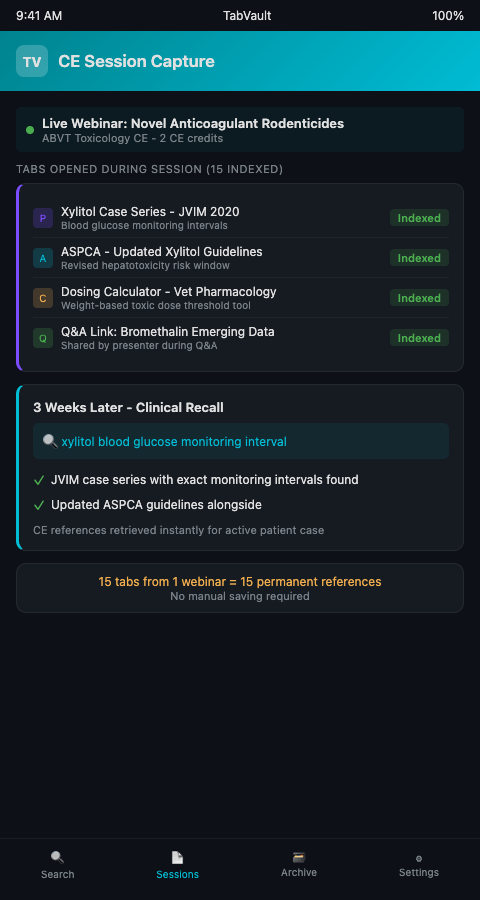
TabVault handles this automatically. During a webinar, every link you click — the PubMed abstract, the dosing calculator, the ASPCA guideline update, the presenter's institutional protocol page — gets indexed in real time. The full text of each page is captured locally. After the session, your archive contains a complete record of every continuing education toxicology resource you accessed, searchable by any term that appeared on those pages.
The vet CE webinar tab capture problem is solved by changing nothing about how you attend the webinar. You still click the links. You still read the content. You still close the tabs when the session ends. The difference is that TabVault has silently built a veterinary CE credit research archive in the background, and three weeks later when that xylitol case arrives, you type "xylitol blood glucose monitoring interval" and the case series appears.
This approach connects naturally to how veterinary residents learn to index their research. Residents in toxicology training attend more CE sessions and review more literature than any other group in a veterinary hospital. If they index their CE browsing from the start of residency, they graduate with a searchable archive spanning three or four years of lectures, webinars, and literature reviews — a personal toxicology lecture reference library that no textbook can replicate.
TabVault's toxicology lecture reference saving also captures the context surrounding each reference. If the webinar presenter discussed a dosing chart in the context of a specific clinical scenario, and you followed a link to that chart during the lecture, your indexed archive preserves not just the chart but also the surrounding pages you viewed — the case that prompted the discussion, the comparative data from a different study, the formulary page you checked for confirmation. Searching for the toxin name retrieves the entire constellation of resources, not just the single page you are trying to find.
The parallel to research organization in other fields is exact. Genealogy researchers who organize their DNA cluster analysis research face the same problem of scattered session references that need to be retrieved weeks or months after the initial research. The CE webinar context is different, but the retrieval challenge is identical: you opened the page, you read it, you need it again, and it has vanished.
Maximizing CE Indexing Value
Index pre-session reading too. Many CE webinars distribute pre-reading materials — journal articles, case summaries, background references. Open and read these before the session so they are indexed alongside the in-session materials. When you search later, the pre-reading and the in-session references appear together, giving you the complete learning context.
Tag sessions by CE event. Before a webinar starts, note the CE event name or topic in a quick text file. After the session, your indexed pages carry timestamps that correspond to the event window. Searching your archive by date range retrieves every page indexed during that specific CE session, letting you reconstruct the entire reference set from a single lecture.
Index the Q&A links. The most valuable CE content often emerges in the question-and-answer segment, when presenters share additional references in response to audience questions. These links are typically displayed briefly in chat and then scroll out of view. Click them as they appear — TabVault indexes each one, and they become permanent additions to your archive.
Build a post-CE review habit. After a CE session, spend five minutes searching your newly indexed pages to verify they were captured correctly. Search for the key toxin discussed in the lecture and confirm that the relevant pages appear. This quick review also reinforces your memory of the material, addressing the retention problem identified in CE effectiveness research. The National Library of Medicine recommends spaced retrieval practice for medical knowledge retention, and searching your CE archive is a form of exactly that.
Cross-reference CE content with clinical cases. When a toxin you learned about in a CE session appears in a clinical case weeks later, your indexed CE references and your indexed clinical browsing both appear in the same search results. The CE lecture on grape and raisin nephrotoxicosis from January meets the grape ingestion case you treated in March, and the combined search results give you both the didactic knowledge and the clinical experience in a single view. This cross-referencing is especially powerful when you are combining PubMed case reports with AnTox database results — the CE lecture references add a third evidence layer to the clinical and population data.
Every CE Session Is an Investment — Make It Searchable
Veterinary CE sessions generate reference material that has direct clinical value. Losing those references to closed tabs and forgotten browser history wastes both the educational investment and the clinical utility. TabVault makes veterinary CE session indexing automatic and retrieval instant. If you want your continuing education toxicology resources to be available when you need them, not just when you happen to remember them, join the waitlist and start building a CE archive that lasts.
That CE webinar on novel anticoagulant rodenticides just generated fifteen supplementary reference tabs. With TabVault active during the session, every one of those references — the presenter's cited PubMed case series, the updated ASPCA dosing guideline, the pharmacology calculator linked in the chat — is already indexed before the webinar ends. Three weeks later, when a patient presents with the exact toxin the lecture discussed, you type the compound name into your archive and retrieve the CE materials alongside your clinical case references, merging your continuing education investment with your hands-on clinical research in a single search.