LARP Runtime Basics: What to Log, When, and Why
What Most LARP Logs Actually Look Like
Post-event, the typical LARP organizer has three things: a notebook with partial scene notes written by a runner who was also dispatching NPCs, a radio log that was abandoned after Saturday noon because nobody had time to maintain it, and memory.
Memory is the least reliable record of a live event. By Sunday evening, the organizer's recollection of what happened has already compressed into a highlights reel, skipping the moments that didn't fit the narrative they're already building about how the event went. The missed story beat on Saturday afternoon isn't in the memory—only the successful Sunday climax is.
Research on why event staff skip the logbook from Event Manager Blog puts a number on the problem: 60%+ of event runtime logs are never reviewed post-event, wasting capture effort across complex productions. The failure isn't always in the logging—it's in logging things that don't get used, which makes the next organizer skip logging too.
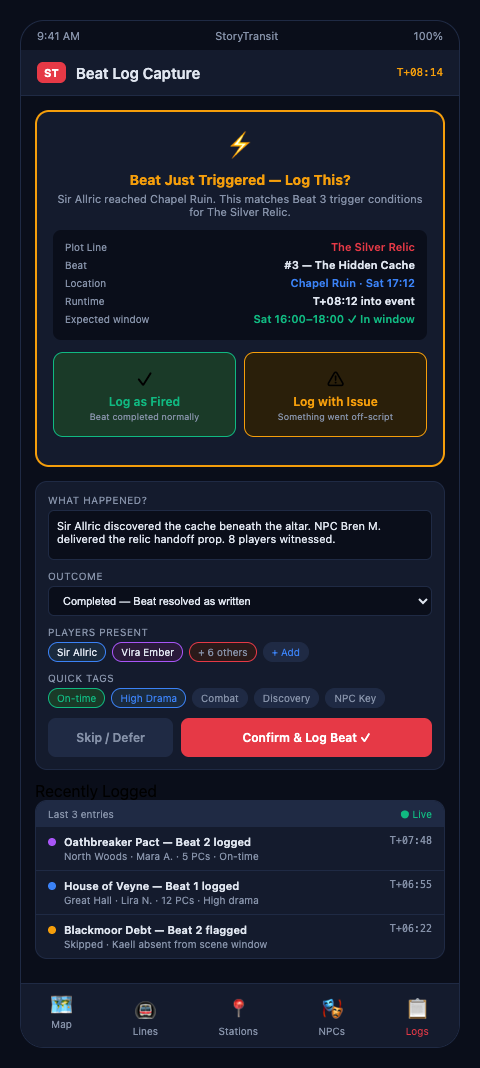
The solution is not more logging. It's logging the right things at the right intervals with a structure that connects directly to how you'll use the record. What to log at LARP, when to log it, and what counts as a live event record worth keeping—these are the event documentation basics that experienced organizers develop through hard-won trial and error, but that can be built in from the start. Good organizer logging habits are structural, not personal: they depend on having a format that makes logging faster than not logging, even under peak-hour conditions. StoryTransit's runtime log is designed around exactly that constraint—entries that take fifteen seconds to complete rather than interrupting the dispatch flow.
What to Log: The Four Core Categories
NIMS documentation standards from FEMA define what operational data to capture for complex multi-team events: activity by unit, time stamps, communication content, and decision points. Applied to a LARP event, that translates into four categories:
Plot station status changes. Every time a station activates, completes, or gets skipped, that's a log entry. Format: [TIME] [STATION NAME] [LINE COLOR] STATUS: active/complete/skipped. This is your ground truth for which story beats happened.
NPC deployments and returns. Every time a costumed volunteer is dispatched to a plot station and every time they return, log it. Format: [TIME] [NPC NAME] dispatched to [STATION] / returned from [STATION]. This creates the timeline that shows you whether an NPC was double-booked in practice, not just in theory.
Player group movements. When a runner observes a player group reaching a significant location or completing a meaningful scene, log it. This is the most operationally difficult category—it requires runners to report back, not just dispatch outward. But it's what makes the player beat tracking system work. These are the live event records that turn a weekend's radio traffic into an actual account of what happened and when.
Decision points. Any time an organizer makes a significant call—extending a scene, reassigning an NPC, activating a dormant stop, skipping a beat—log the decision and the reason. [TIME] Decision: advanced Station 4 on red line; players completed Station 3 early. These entries are what you'll need when you're doing the post-event review and can't remember why the Sunday timeline shifted.
The Incident Command System mandates exactly this structure for complex real-time operations: timestamped activity by unit, communication records, and decision documentation. An ICS log for a wildfire incident and a runtime log for a weekend LARP have the same informational architecture.
When to Log: Interval vs. Trigger Logging
There are two logging modes, and the best runtime system uses both.
Trigger logging captures events as they happen: a station changes status, an NPC gets dispatched, a decision is made. This is the high-fidelity layer. It's also the one most likely to lapse during peak event activity because the dispatcher is busy routing NPCs and can't also maintain the log.
Interval logging captures a snapshot of the full event state at regular intervals: every thirty minutes, the dispatcher notes the status of each active plotline and the current location of each NPC. This is the backup layer. Even if trigger logging goes dark during Saturday's chaotic afternoon, the interval snapshot at 4 PM tells you what the state was at that moment.
The interval snapshot format: for each plotline, one line showing the last completed station and the next pending one. For each NPC, one line showing current deployment status. That's the entire snapshot—two fields per plotline and two fields per NPC. It takes less than five minutes to complete and gives you a recoverable record of event state even when the trigger log has gaps.
Plot and character design research from Nordic Larp establishes plot line status, NPC availability, and scheduling deviations as the core elements that must be tracked during runtime. The interval snapshot is the live version of that structure, updated throughout the event rather than only at planning time.
Why: The Three Uses of the Runtime Log
The runtime log has three distinct uses, and designing your logging structure with all three in mind is what makes the record worth maintaining.
Use 1: Real-time dispatch decisions. The log tells the dispatcher what's already happened, which prevents redundant NPC deployments and surfaces when a station is overdue. The dispatcher should be reading the log forward, not just writing to it.
Use 2: Mid-event adjustments. When the Saturday 3 PM review shows that plot B has three consecutive stations still pending, the log is the evidence for the adjustment decision. You're not acting on intuition—you're acting on a two-hour record of what hasn't happened.
Use 3: Post-event improvement. After-action review methodology requires comparing intended outcomes to actual outcomes. The runtime log is your record of actual outcomes. Without it, the AAR is a conversation about impressions. With it, it's an analysis of what the event data shows.
For real-time beat tracking to connect to player experience improvement, the runtime log has to include player beat data—not just NPC and station data. That's the layer that tells you which player groups missed critical story beats and why.
Session recap logs in long-running tabletop campaigns serve a parallel purpose: they're the record that keeps the story coherent across sessions. The weekend LARP runtime log is the live-event equivalent, capturing state in real time rather than reconstructing it afterward.
The Radio Communication Log
Two-way radio communication logs at large events provide a recoverable record of runtime decisions and escalations across large event staff. Most LARP events rely on radios, but few maintain a structured log of radio traffic.
For events with multiple radio channels—one per plotline, or one for each runner team—the communication log captures which channel, who spoke, and what was communicated. When the Saturday afternoon cascade of radio traffic results in a missed NPC deployment, the communication log tells you exactly where the instruction was lost.
For LARP documentation failures that show up at debrief, the communication log is often the evidence that clarifies whether the failure was in the instruction (never sent), the receipt (sent but not confirmed), or the execution (confirmed but not acted on).
What Not to Log
Runtime logging fails as often from over-logging as from under-logging. When organizers try to capture everything—every NPC interaction, every player conversation, every costume note—the log becomes too dense to be useful at a glance, and the logging effort becomes unsustainable during peak event hours.
The question for each potential log entry is whether it will change a decision. Station completions change dispatch decisions. NPC deployments and returns change assignment tracking. Player group movements change beat tracking. Decisions and their rationale change the post-event review.
Narrative content—what an NPC said, how a player responded emotionally, which improvised moments were memorable—does not belong in the runtime log. That content belongs in the post-event debrief document, written after the event from memory and runner notes. The runtime log is an operational record, not a narrative record.
The Log Format That Gets Used Versus the One That Doesn't
Logging systems fail not because organizers forget to log but because the format takes longer to fill than the pace of the event allows. A log entry that requires fifteen fields and a narrative summary will be abandoned by Saturday afternoon. A log entry that requires four fields and takes fifteen seconds will survive the entire event.
The minimum viable runtime log entry: timestamp, category (station/NPC/player/decision), entry in one sentence or less, status flag. That's it. Everything else belongs in the post-event debrief document, not the runtime log.
The live event management software market surpassed $10B in 2024 specifically because organizers across industries need tools that match the pace of live operations—not tools that require stopping the operation to document it. Your runtime log format should pass the same test: can a dispatcher maintain it while simultaneously routing NPC calls?
Reviewing the Log During the Event
The runtime log is not just a write-only document. Review it at two scheduled points each day: mid-afternoon and late evening. The mid-afternoon review catches Saturday drift before it becomes a Sunday problem. The evening review gives you the actual state of the event going into the night, which is the state you need to brief your Sunday morning crew correctly.
Each review produces exactly three outputs: what's on track (no action needed), what's behind schedule (requires a routing decision), and what's been skipped entirely (requires a decision about whether to recover or write off). That fifteen-minute review at 4 PM is the highest-value operational meeting of the event.
StoryTransit is built for LARP event organizers who want runtime logging that works in the conditions of an actual live event—not a system that requires a dedicated logging clerk sitting still at a desk. LARP event organizers running weekend events can join the waitlist to get early access to the runtime documentation features.